Atomos Ninja V

Yeah, Blackmagic has an input range setting in their 5" View Assist.

Atomos products have lots of issues in general, recent ones include audio distortion on the Ninja V (apparently due to improper internal shielding).

If so many customers have complained for years about lack of an input range setting, wonder if technicians at Atomos even understand the issue?
 
Im a new Ninja V user along with a Fuji X-T3 and only shooting in F-Log I have FW 10.1 installed on my Ninja. Am I still going to have an issue?
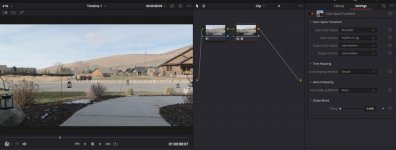
I Color Grade in Resolve 16.1 and after importing all my media I do a "Clip Attributes" and change "Data Levels" to Full. Then I do a "Color Space Transform" see attached.
Doing this am I still going to have an issue?

conversion.jpg
 
Im a new Ninja V user along with a Fuji X-T3 and only shooting in F-Log I have FW 10.1 installed on my Ninja. Am I still going to have an issue?
I Color Grade in Resolve 16.1 and after importing all my media I do a "Clip Attributes" and change "Data Levels" to Full. Then I do a "Color Space Transform" see attached.
Doing this am I still going to have an issue?

View attachment 137609

Yes, I believe you are. The Ninja V misinterprets the X-T3 footage and applies an incorrect range. It effectively destroys your dynamic range. To my knowledge there is currently not a fix for this. It burns the video range into the footage.
 
Yes, I believe you are. The Ninja V misinterprets the X-T3 footage and applies an incorrect range. It effectively destroys your dynamic range. To my knowledge there is currently not a fix for this. It burns the video range into the footage.

This is not correct.

Shifting the levels to “Data Levels” in Resolve will solve the issue. Nothing is lost recording to the Ninja, only misinterpreted.

What is an issue is that the exposure monitoring on the Ninja, is reading values from the misinterpreted signal, so the top and bottom of your exposure range won’t be completely accurate.
 
Thanks for the clarification there seems to be zero consensus on this issue / non issue.
So basically trying to set the exposure using the tools of the Ninja could be problematic?
Since there are no waveforms on the X-T3 and only Zebra what would you recommend to set zebra on the X-T3
 
This is not correct.

Shifting the levels to “Data Levels” in Resolve will solve the issue. Nothing is lost recording to the Ninja, only misinterpreted.

What is an issue is that the exposure monitoring on the Ninja, is reading values from the misinterpreted signal, so the top and bottom of your exposure range won’t be completely accurate.

Interesting. I thought that only applied to the internal H265 footage. I thought the Ninja V actually burns the misinterpretation in. I really do hope I am wrong and you are right on this. Do you own a Ninja V and have this confirmed?
 
I have read on other forums that the issue with the internal codec is it tags the file incorrectly i.e . Not rec709 it using the older standard which i forgot what its called. Since I have a X-T3 with the Ninja V how would i do a test?
 
Thanks for the clarification there seems to be zero consensus on this issue / non issue.
So basically trying to set the exposure using the tools of the Ninja could be problematic?
Since there are no waveforms on the X-T3 and only Zebra what would you recommend to set zebra on the X-T3

There’s no consensus because there are hyperbolic people on social media who don’t understand the simplest elements of testing these things.

It’s a non-issue as far as final image quality and total latitude are concerned, but it is a genuine irritation, and requires an extra step in post (albeit a very quick one).

As far as exposure monitoring goes, it’s simply going to crush the darkest shadows and clip the brightest highlights (for the monitoring tools on the Ninja itself).

I don’t like, and never use zebras personally, so I can’t really speak to that. I just use my meter, for which ISO 640 on the X-T3 (the base for FLOG) is actually 400 ISO.
 
There’s no consensus because there are hyperbolic people on social media who don’t understand the simplest elements of testing these things.

It’s a non-issue as far as final image quality and total latitude are concerned, but it is a genuine irritation, and requires an extra step in post (albeit a very quick one).

As far as exposure monitoring goes, it’s simply going to crush the darkest shadows and clip the brightest highlights (for the monitoring tools on the Ninja itself).

I don’t like, and never use zebras personally, so I can’t really speak to that. I just use my meter, for which ISO 640 on the X-T3 (the base for FLOG) is actually 400 ISO.

Gotta love social media. Oh well I’m just going to keep doing what I am doing.
I have noticed on the Ninja when using the waveform vs the rgb parade the highlights do peak out at a different level values, not sure why that is.
Would it be correct to assume when using the RGB parade that when any of the colors reach 100 that it’s really more like 90 because of the “bug” in the HDMI output?
 
Another annoying thing about the Ninja V with the X-T3 is that while it can record 4K DCI in 17:9 in 24fps, it cannot do this in 25fps. Why PAL territory users are deprived of this format is beyond me.
 
Gotta love social media. Oh well I’m just going to keep doing what I am doing.
I have noticed on the Ninja when using the waveform vs the rgb parade the highlights do peak out at a different level values, not sure why that is.
Would it be correct to assume when using the RGB parade that when any of the colors reach 100 that it’s really more like 90 because of the “bug” in the HDMI output?

Interesting, I'll have to take a look at RGB Parade vs Waveform, I hadn't noticed that.

I couldn't speak for the exact values it begins to compressed the knee and toe at. But if it really bothered you, you could put a LUT on to the Ninja that "decompresses" the top and bottom of the curve (to restore "full levels" for the sake of monitoring). I believe someone on youtube has put one together and made it available for download.

I only shoot FLOG with the camera so having to switch from a monitoring LUT to an exposure-measuring LUT would be more hassle than I could bare. But it's doable.

Another annoying thing about the Ninja V with the X-T3 is that while it can record 4K DCI in 17:9 in 24fps, it cannot do this in 25fps. Why PAL territory users are deprived of this format is beyond me.

Really? I'm sure I've done 4k 17:9 to the Ninja. Maybe I've only done UHD @25fps (because of the stupid pan-and-scan way the Ninja handles 17:9). I'll have to check that when I get home.

REC601, which was the NTSC 480 color standard, really old these days.

Bizarre choice.
 
When recording F-log and film simulations externally, X-T3 outputs BT.709 matrix. Internally it uses BT.601 matrix for both H.264/H.265 codec, the files must be decoded using BT.601 matrix for correct colours (there's a simple LUT fix for NLEs that don't).

When recording HLG externally and internally, X-T3 outputs BT.2020 matrix, again it must be decoded using BT.2020 matrix for correct colours (there's also a LUT fix for it).

As to why using BT.601, Fujifilm Tokyo replied:

Matrix coefficient is BT.601 for compatibility with existing third party decoders.
 
When recording F-log and film simulations externally, X-T3 outputs BT.709 matrix. Internally it uses BT.601 matrix for both H.264/H.265 codec, the files must be decoded using BT.601 matrix for correct colours (there's a simple LUT fix for NLEs that don't).

When recording HLG externally and internally, X-T3 outputs BT.2020 matrix, again it must be decoded using BT.2020 matrix for correct colours (there's also a LUT fix for it).

As to why using BT.601, Fujifilm Tokyo replied:

Since I am a FLOG shooter and sometimes will be shooting internally where can I find the LUT that would correct the BT.601 matrix?

Thanks
 
Interesting, I'll have to take a look at RGB Parade vs Waveform, I hadn't noticed that.

I couldn't speak for the exact values it begins to compressed the knee and toe at. But if it really bothered you, you could put a LUT on to the Ninja that "decompresses" the top and bottom of the curve (to restore "full levels" for the sake of monitoring). I believe someone on youtube has put one together and made it available for download.

I only shoot FLOG with the camera so having to switch from a monitoring LUT to an exposure-measuring LUT would be more hassle than I could bare. But it's doable.


Really? I'm sure I've done 4k 17:9 to the Ninja. Maybe I've only done UHD @25fps (because of the stupid pan-and-scan way the Ninja handles 17:9). I'll have to check that when I get home.


Bizarre choice.

I do load the supplied LUT from Fujifilm as a monitor LUT on the Ninja yet I assume this does not change how waveforms or rgb parades are displayed ?
 
I do load the supplied LUT from Fujifilm as a monitor LUT on the Ninja yet I assume this does not change how waveforms or rgb parades are displayed ?

Well it will change the exposure metering - the Ninja's exposure tools can't show you the underlying log exposure when there's a LUT on top. They only read off the image the Ninja is displaying (also a very irritating feature in 2019).

And no, the Fuji LUTs won't help. They're designed for footage with Full Levels, so will makes things crunchier than intended if applied as-in onto the Ninja footage.
 
Well it will change the exposure metering - the Ninja's exposure tools can't show you the underlying log exposure when there's a LUT on top. They only read off the image the Ninja is displaying (also a very irritating feature in 2019).

And no, the Fuji LUTs won't help. They're designed for footage with Full Levels, so will makes things crunchier than intended if applied as-in onto the Ninja footage.

So is it best to leave the monitor profile set to native then? I realize the Ninja exposure tools will still be incorrect though.
By adding a LUT in the “monitor” section will not affect the final footage correct?
 
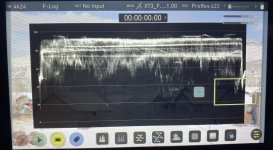
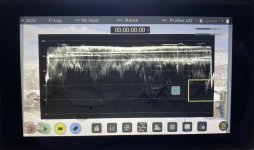
Here is a quick test I did loading the fuji LUT in the "Monitor" and just using Native looking at the waveforms they look the same to my untrained eyes.
Yet to verify this waveform I am looking at is not really correct? It's being mapped to 16-235 RGB and not 0-255

fuji lut.jpg

native.jpg
 
Back
Top