Atomos Ninja V

That would have probably added $300 to the cost if you're going by the difference with their N/I and S/I (even though I think they could do it for less).

I haven't done any research about the Ninja V or ProRes RAW as I'm not interested in either right now, but if this product and format exist, isn't it obvious changes will be made and RAW will be possible via HDMI in the future?
 
That would have probably added $300 to the cost if you're going by the difference with their N/I and S/I (even though I think they could do it for less).

I haven't done any research about the Ninja V or ProRes RAW as I'm not interested in either right now, but if this product and format exist, isn't it obvious changes will be made and RAW will be possible via HDMI in the future?

I don't have a dog in the fight, but from what I've read and how I understand it, HDMI specs do not support the transfer of RAW and there are no plans to update the specs from the group that controls the HDMI specs, protocols, etc.(this from a representative of one of the companies that is part of the group that sets and controls those specs). And one would presume that you cannot do anything outside of the specs and protocols and still carry the HDMI logo/endorsement/connector on your equipment. So probably no "trickery" to send a RAW or RAW like stream over it.
 
I see...thank you.

It's so difficult for me to understand anything that's called RAW if it's not going to allow access to that data we want to see (I really sound like a broken record with this).

Cinema RAW Light, ProRes RAW, other RAW (C300 Mark II, Sony's non-CinemaDNG?, etc)...all of these non-traditional RAW formats.

RED has been doing this for over a decade and it's better than ever...

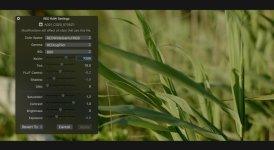
So if you're making a device that is supposed to capture ProRes RAW from a camera that outputs RAW, but it doesn't work via HDMI and the device only has a HDMI I/O, what is the point of using ProRes RAW...especially if you're not able to view these kind of settings like below?

I am honestly confused (it doesn't happen often, lol).

RED.jpg
 
Well then, I pray to see a $1000 Ninja V Inferno w/SDI soon! ;)

You need to ask Atomos to make a 5" SDI monitor. I'm sure if enough people ask for it they will make it. They tend to create products where there is a need.

I see nothing wrong with a HDMI only Ninja V. The market size of those using raw is such a tiny niche of an already niche market. A majority of users using a DSLR or similar HDMI only camera likely would never make use of external raw in much the same way they never bought into the external recorder thing for ProRes. If these users don't see the benefit of ProRes over internal h.264 they are less likely to see an advantage of raw. That isn't to say a few people wouldn't love it but honestly I just don't see a market there.

It also isn't as if you don't have other options. Granted a 7" but I really do think if enough people ask for it you will get a 5" SDI Atomos long before you actually see raw over HDMI implemented. I think the Ninja V is testing the waters to see if a 5" is profitable for them. I know a lot of people that no longer like 5" monitors and prefer 7" for ease of view reasons. 5" is a bit niche and while it does have clear advantages that doesn't apply to every user.
 
No doubt, tbh, i'm sure they're already working on it. They mentioned as much in a video interview and that their new focus was shrinking everything in size. Which is great. I've got the 7" SI and it's just unwieldly with the EVA1.
 
The way I understood the battery port on the back of the Ninja V was it was intended for things like continuous power attachment and SDI ports etc. Isn't this a better way for people who really want RAW input. They buy the SDI attachment. We will have to wait to see what attachments are made of course but the design intent is there.
 
Was anyone able to find confirmation regarding the new atom x miniSSD drives designed for the ninja V — these will also work with standard atomos recorders like the shogun inferno? With the addition of a “clever extension Handle”? That’s what the website says but the meaning isn’t entirely clear.

Little torn on investing in this. On one hand I’d rather invest in drives made for the smaller system because everything will shrink and that’s the future - no good having a stack of standard size SSDs that are obsolete if I want to move smaller ASAP.

On the other hand, now these are proprietary to atomos only...

Hhrrmmm... what would you do?

anyone on this?
 
So any standard sata ssd is compatible altough it will stick out a little bit, the new small factor ssd are compatible with the whole atomos lineup.
I would just get the standard ssd and live with it :-)
 
hi
i post here because i'm lost and can't find any forum to help me
i just bought this monitor and i have a mark III from canon
the problem is that when i connect my canon to this baby , then nothing appears on the screen , it says no input
i connect it through a hdmi cable from atomos ; out from canon to in in the monitor
i did everything ok , i set on video mode on my canon etc.. nothing from nothing, although when i'm not connected the image is on the screen with my dslr

if anybody has the mark III pleaaaaaase help me i'm a little desperate here


thanks guys
 
Looks like you got one of the very first shipping units. Cool!

Only thing I can think of offhand is to make sure you have a media card in your camera. At one point, at least, the camera needed to have media in the camera in order to output (or trigger?) external recorders. At least, that's how I remember it with the 5D MkIII. Perhaps someone else here can correct me.

Other than that, file a support ticket/email with Atomos. Since the Ninja V is so new, I'll assume the tech support staff is primed to respond to people having issues.
https://support.atomos.com/hc/en-us

Sorry I'm not more help... Someone else?
 
thanks for the reply
i checked and i have a media card in my camera , sd card actually
i think like you said that i'm gonna write to the atomos support ,
thank you , i didn't think i'll be replied so quickly
 
Try a different cable and also try 24p/25p (not 60p/50p) if you haven't. Also try different HDMI settings in the camera (if available).
 
So the Ninja V shipped with a supplied HDMI cable? I'd try a different cable, and the usual things to try in addition to the above recommendations to jog the settings are to try adjusting the order of powering on the units and also powering the units on with the HDMI cables inserted vs out.

Did you get one of the new mini SSDs as well, or are you using a standard size SSD? (Is there a caddy for the standard size included?)
 
i have the hdmi cable from atomos , if the atomos cable doesn't work ;, then no other cable won'"t work i guess..
i'(ll try your method
powering on the units and also powering the units on with the HDMI cables inserted vs out.
and i'll tell you

thanks
 
i have the hdmi cable from atomos , if the atomos cable doesn't work ;, then no other cable won'"t work i guess..
i'(ll try your method and i'll tell you

thanks

Yeah just helps to rule out that the cable itself is the issue, so swapping to a different cable and/or checking the atomos cable in another device would narrow that down.
 
i tried the method: 1st start is canon then atomos and vice versa , no way
i tried with another cable (i have 2 : one of 30 cms and the other 50 ) it's again no way.
this f.. atomos is a f. riddle

i'll try to write the support , but i can't find the serial number on the back , do you know where is it? (they ask for that in order to write them)
thanks
 
i tried the method: 1st start is canon then atomos and vice versa , no way
i tried with another cable (i have 2 : one of 30 cms and the other 50 ) it's again no way.
this f.. atomos is a f. riddle

What a bummer.

i'll try to write the support , but i can't find the serial number on the back , do you know where is it? (they ask for that in order to write them)
thanks[/QUOTE]

It's on a sticker behind the SSD caddy on the Ninja Flame, maybe same place on the Ninja V?
 
Back
Top