Ask A Zoom Rep

@ZoomOfficial: I love my F8. It is a great unit at a nice price point...

My only issue is the clicking noise when making trim adjustments. IMO it's a significant issue on this recorder. Others have noted it as well. I know analog pots were not a possibility at this price, but some technically knowledgeable people (including on this forum) have suggested that it can be fixed in a firmware update.

Is this something Zoom is working on?

Thanks

My understanding is that was fixed with firmware 2.0. Maybe the Zoom Official can verify that.
 
Mic Level signal should go in XLR. Line Level should go in TRS. This is true for both the F8 and H6.

You can record a backup track at -12dB on the capsule track of the H6, but not the 4 XLR/TRS inputs. You can stereo link, just press 1 and 2, or 3 and 4 at the same time

Hello, I am curious about the XLR/TRS option, coming from a Sennheiser wireless lav, is it better to go to the XLR or connect to the TRS? Or are they the same either way? This would be on a F8 and H6 both. Also on the H6 is there any way to 1)record one input to 2 tracks at different volumes and 2) any way to get the wav files to be linked like I can on the F8?

Thanks for any help.
 
The H4 uses a barrel connector for AC power, while the H6 uses a USB port, so the power adapter cannot be used for both.

We do have some videos about certain H6 functions. Check out youtube.com/zoomsoundlab

Hi, and thanks for doing this! I have both an h6 and an h4n - is it possible to use the A/C power source for the h4 with the h6? They have the same electric rating. Also, do you have any videos to recommend for setting up/maximizing usage and workflow with the h6? Thanks!
 
It can be improved with firmware, but not eliminated. It is also more prevalent when using phantom power then without.

Our engineers are definitely looking to improve this on current units as well as future products

@ZoomOfficial: I love my F8. It is a great unit at a nice price point...

My only issue is the clicking noise when making trim adjustments. IMO it's a significant issue on this recorder. Others have noted it as well. I know analog pots were not a possibility at this price, but some technically knowledgeable people (including on this forum) have suggested that it can be fixed in a firmware update.

Is this something Zoom is working on?

Thanks
 
It can be improved with firmware, but not eliminated. It is also more prevalent when using phantom power then without.

Our engineers are definitely looking to improve this on current units as well as future products

Glad to hear you're working on it. I'm 99% working in phantom. I run with a very tight bag, so no room for an external phantom box...
 
Could Zoom please bring out a firmware update for the F4 / F8, so that you can plug a USB keyboard directly into the Zoom recorder for entering metadata without needing to use a big bulky F-control unit! (or even just a tiny tiny USB to USB adapter to enable this keyboard functionality, which is much much smaller than an F-control)

Is especially bad with the F4 which lacks bluetooth so can't use the app to enter in metadata :-/ :(
 
Interesting flame war on the F8 & F4 digital limiter question going on on the F8/F4 FaceBook page. The consensus seems to be the limiters are fine if used correctly.
https://www.facebook.com/groups/zoomf8/?multi_permalinks=1730129497298875¬if_t=group_highlights¬if_id=1486935797439973

I'll look it up to post here, as they're worth keeping around for posterity! Plus with direct links to what Greg Simmons wrote, rather than just a link to the group itself:

https://www.facebook.com/groups/zoo...1730356340609524&comment_tracking={"tn":"R1"}
Gabriel and Jacob:

There is nothing wrong with the limiters. This notion that they are not good because they are after the AD conversion does not apply in a closed and fully integrated system where the preamp, converter and limiter are, essentially, all the same thing.

Nagra have been doing it on their digital machines for some time, it's not an issue when the whole lot is integrated into one closed system.

As I wrote in another thread here, and pasted in another one:

"The F8's mic preamp, AD converter and limiter are part and parcel of the same circuit. The level is sensed at the output of the AD converter, and gain reduction is applied directly at the input of the preamp via it's digitally controlled gain.

The mic preamp and AD converter are optimised to work as one unit, so there is no difference in sensing the level at the output of the mic preamp or at the output of the converter. If you know the level coming out the AD converter, you will also know the level coming out of the mic preamp.

The benefit of sensing post-conversion (in a closed system such as this) and applying the gain reduction to the preamp itself are numerous:

Firstly, the limiter can be very versatile because it is digitally controlled and is sensing a digital signal; you can apply all kinds of attack and release times and transfer curves to the gain reduction - which is why the Zoom's limiters are so full-featured and versatile. It's far easier to do than in the analogue domain.

Secondly, you are not passing the signal through another layer of analogue circuitry (e.g. a variable gain cell) as required for an analogue limiter. This results in a cleaner overall signal path.

Thirdly, because the limiter applies gain reduction to the gain control of the preamp, it not only prevents overloading the AD converter, it also prevents overloading the mic preamp itself. A separate system that goes from mic preamp into limiter cannot do that because the limiter can only protect what comes after it, not what went before. If your mic preamp is cllpping, there's nothing the limiter can do about it.

Fourthly, unlike an analogue system made of separate components (mixer, recorder) the limiter knows *exactly* where the maximum input level of the AD converter occurs and reponds to it appropriately; it's not up to the engineeer to adjust levels between all these different devices and hope it's all aligned correctly. If the threshold is set to, say, -6dBFS, then it *is* -6dBFS and nothing is going to change that - there are no level controls in between the components and therefore no possibility for human error in alignments, as there would be with separate components.

Nagra have been using this same approach on their digital machines for some time now. It works very well, has no disadvantages compared to the analogue method but has many advantages over it - but only in a closed system."

https://www.facebook.com/groups/zoo...1730333830611775&comment_tracking={"tn":"R2"}
As I wrote in a reply to a recent comment, the digital limiters are superior to analogue in a closed system such as this. We have to ditch this old analogue notion that they can't be as good because they come after the AD converter, because in a fully integrated digital system such as this, the preamp, AD converter and limiter are essentially the same component. The old analogue thinking does not apply...

https://www.facebook.com/groups/zoo...1730364833942008&comment_tracking={"tn":"R2"}
I doubt that the people warning about it have tested it themselves... They're saying what makes sense from a system made of separate analogue components that are strung together to make a signal path. And it does make sense from that point of view.

I've reviewed both the F8 and the F4, and the digital limiters were the first things I went for with the F8 (didn't bother with the F4, same circuits).

I was quite concerned when Nagra built a digital limiter into the Nagra 7, but after testing it and reading about how it worked, I realised it was superior to the analogue method. I believe Zoom is using the same approach...

https://www.facebook.com/groups/zoo...1730738223904669&comment_tracking={"tn":"R1"}
IIRC, the limters are set to 20:1 ratio, so they're going to come in hard - however, you can adjust threshold, knee, attack and release times. I think in some ways they might be too flexible, and that in turn might cause confusion and problems for some people.

I set them at -6dBFS, with a fast attack and fast release but a soft knee. I try to never let my peak levels go over -12dBFS during recording, so they really are a last minute safety measure.

Apart from field work, I've used the F8 to record dozens of live acoustic jazz gigs, typically drums, bass, piano as a backline with horns and/or voice as features.

That stuff is incredibly dynamic, and I only get one chance to get it right, so I'm quite conservative with my levels. If I get the chance during soundcheck, I'll make sure nothing goes over -12dBFS, preferring if possible to keep the average around -20dBFS. Of course, on a good gig the band often goes louder than the soundcheck levels.

Sax and trumpet can be a real problem when the player spends most of the night a comfortable 30cm or so away from the mic, then decides to swallow it into the horn for a solo! The limiters have saved my butt on those occasions, although even then the peak level rarely gets to -6dBFS so I'm really just catching the big problems.


Greg Simmons also made another interesting comment about the F8 HP output:
https://www.facebook.com/groups/zoo...1731308363847655&comment_tracking={"tn":"R7"}
Sorry, yet another long-winded post from me...

The headphone amplifier is definitely one of the weaknesses of the F8. Seems like headphone amplifier chips have not made the same progress as preamp and converter chips in recent years. Or perhaps Zoom had a bunch of headphone chips left over from earlier products and needed to use them up! I'm quite sure contemporary headphone amplifier chips are better than those in the F8.

For those who aren't aware of how headphone specs and amps interact, read on...

The volume you get from any given headphone amplifier is dependent on the sensitivity and impedance of the heaphones.

Sensitivity is essentially a measure of the headphone's efficiency: how well they convert the electrical power from the headphone amplifier into acoustic power into your ears. For any given amplifier and any given headphone impedance, higher sensitivity headphones will produce a louder output signal than lower sensitivity headphones - assuming you do not adjust the volume between comparisons.

Then there's impedance. In accordance with Ohm's Law and the power formula, for any given amplifier settings and any given headphone sensitivity, lower impedance headphones will produce a higher volume than higher impedance headphones because they draw more current and therefore consume more electrical power from the headphone amplifier to convert in to acoustic power for your ears.

When using battery powered equipment, where voltage rails are often low, it's helpful to use headphones with high sensitivity and low impedance.

Anecdotal example... When I got my Nagra V in 2003 I started out using BeyerDynamic DT250s. The V's headphone amp sounded good but I had a really hard time getting the level up in situations where I needed to monitor the captured sound over what was bleeding in acoustically past the headphones. I'd have to crank the amp all the way, sometimes it was distorting. Those headphones were 250 ohms impedance with a sensitivity of 100dB/mW. I'd been using them with my mains powered rig for quite a while and really liked them, was comfortable working around their flaws, etc., but the Nagra was having trouble getting them to the levels I needed.

Then I learnt that Beyerdynamic made an 80 ohm version, specifically for this reason. Same sensitivity. I took the Nagra and my 250 ohm versions to a store and compared. With the 80 ohm version I could set the volume control to around 2 o'clock and get the same playback volume (or more) as the 250 ohm versions at maximum volume.

These days I use AudioTechnica M50s, M50Xs and MSR7s, and Etymotic's ER4 PTs. I have no problem getting high levels through those. I used to have some of Sennheiser's venerable HD600s for the audiophile work but with an impedance of 300 ohms and a sensitivity of 97dB they are pretty much useless without a separate and dedicated headphone amplifier.

Comparing the specs on the four cans I have settled with is interesting:

M50s: 38 ohms, 99dB/mW
M50X: 38 ohms, 99dB/mW
MSR7: 35 ohms, 100dB/mW
ER4 PT: 27 ohms, 102dB/mW

You can see from my shortlist above, they are all low impedance and around the same sensitivity. They're all easy to drive to high volumes. The ER4s are ridiculous in that they go deep into the ear canal and provide considerable attenuation from external sounds, great when you're working in the same space as the sound source. That means I don't have to drive them so hard to hear what's being captured over what is spilling in, which is good for my hearing preservation!

I can happily switch between any of those four and not have to make any major changes to my monitoring volume. I can also split any two of them (through a normal headphone splitter jack thing) so that someone else can monitor at the same time and know that they'll be hearing about the same volume as me, so there's none of that "It's too loud for me, it's not loud enough for you" problems.

As with most heapdhone amps, I find the F8's amp sounds better when not driven too hard. It's still not great, but it gets pretty nasty when pushed hard, such as driving high impedance low sensitivity headphones.
 
Last edited:
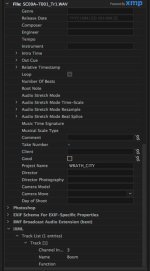
2 new questions for Samuel. I am having trouble getting my scene increment to advance during my shoot. I press the stop & FF buttons simultaneously and hold sometimes 5-10 times before I get the "advance scene increment" dialogue. Am I doing this wrong? It seems to just change the "playback" file until I finally hit the timing right. Can be very nerve wracking when shoot is moving quickly scene to scene.

Also, I have changed my track names, but my file names still are written as Trk1, Trk2 etc. I tried looking at "properties" in Premeire but see no mention of my descriptive Track names (boom, lav 1 etc). How do I access & use this meta-data? Is there some way to get these track names written to the file name? That would be very handy!
 
Last edited:
About those f-series limiters. There are two opinions out there about them. 1-they are junk. 2-they work fine.

Generally, opinion 1 comes from people who have never seen or used an F4 or F8.

Opinion 2 comes from people who own one.

Only on the internet would the two opinions be given equal weight.
 
Another question. I have just finished a 2 day shoot using a host of the meta-data fields in the F4. Now how to use it? In Premiere I have found the extensive meta data tab in the media browser and there are literally hundreds of fields available in check boxes there. Has anyone figured out where the "Track Names" lie in the meta data world of a Zoom flavored BWF file? It would be very useful to be able to see my track names (Boom, Lav 1, Lav 2 etc) entered in the F4 in a field in the Project tab of Premiere.
 
Premier is notorious for being unfriendly to all audio data. I don't know about Zoom's BWF, but I use SD's Wave Agent to look for any abnormalities or 'hidden' metadata. You can also change it w/o affections sound or other metadata (for instance, TC)
 
Premier is notorious for being unfriendly to all audio data. I don't know about Zoom's BWF, but I use SD's Wave Agent to look for any abnormalities or 'hidden' metadata. You can also change it w/o affections sound or other metadata (for instance, TC)

Rick,

I have emailed Zoom tech support to see if they can shed light on which fields the "Track" metadata is written to. I don't know why they just don't write it to the file name instead of the generic "Trk1" "Trk2" etc.
I did not have any luck with getting the latest version of Wave Agent to launch on my Mac running 10.11.6. The installer opens and just disappears without doing anything.
 
I have found the track name field in the iXML data MetaData.jpg

Now I can't seem to figure out how to get that field to display in the Project panel metadata area...Anyone got ideas?
 
Last edited:
Question about the F4: A review I watched said that the XLR output was "consumer line level" rather than broadcast line level. If so, I'm concerned the output would be too low for my FS7 inputs. Comments from Zoom?
 
I have seen this discussion before. The answer is to adjust the output level in the settings. The output can range from a mic level to a +10 level. For some reason the default is -10 so you need to set it to a different level manually and not use the defaults.

This may have been, or may be, fixed in a firmware update.
 
Question about the F4: A review I watched said that the XLR output was "consumer line level" rather than broadcast line level. If so, I'm concerned the output would be too low for my FS7 inputs. Comments from Zoom?


Default input line level is -10db, default output line level is +4db. They can be changed in the menu system.

I think that is because a lot of wireless lav's are -10db output (at least mine is), so the default input is set to that since the F4 is intended for filmmakers.

ADDED: Your, mentioned, review is incorrect by the way.
 
Last edited:
The F4 manual states "Maximum output level = +10 dBV" for both the main and sub outputs" . That's 10dB lower than the typical maximum output level of +20 dBu. And most pro gear even goes higher than that. Along with that, dBV has a little less voltage than dBu or dBm measurement. So the signal could be somewhat anemic for feeding a typical nominal +4dB input. In addition, raising the downstream devices input gain to compensate could induce more noise.
 
The F4 manual states "Maximum output level = +10 dBV" for both the main and sub outputs" . That's 10dB lower than the typical maximum output level of +20 dBu. And most pro gear even goes higher than that. Along with that, dBV has a little less voltage than dBu or dBm measurement. So the signal could be somewhat anemic for feeding a typical nominal +4dB input. In addition, raising the downstream devices input gain to compensate could induce more noise.

dbV, dbv and dbu are entirely different critters, as are dbVU, dbFS, and so on. db is merely a logarithmic scale, where it references to can be anything, there are a lot of standards. You need a nomograph to convert from one standard to another, just adding and subtracting numbers is meaningless. For instance the difference between that -10db and +4db we are talking about is slighty less than 12db, so much for simple arithmetic.

db's are something like degrees, if you say 20 degrees it is meaningless. Do you mean degrees K, degrees C, degrees F, or maybe degrees Left Accension? They all use the same term, but are all different values. Confusing, and db's more so.

So the nomograph (for audio measurements, in this case) that you can lay a straight edge across and read the various equivalents. In fact it is so confusing that I can not locate the specific nomograph I was thinking of in a google search (too many different ones).

To keep things sort of simplified, I tend to think in dbVU which my old analog gear is calibrated in, and dbFS which my newer digital gear is calibrated in. The crossover points of the three systems are 0, -12, and -20. At other values the differences vary, but those numbers give you a place to zero them together at.

Even I get confused about all this and my Resume says I have a BSEE.

All of which does not help the OP. He just needed to know that you can change the settings in the menus on the Zoom F4.

ADDED: Here is a nomograph that gives you and idea what the heck I was talking about

zb-reflevel-analogdigital.png
 
Last edited:
Back
Top