Ask A Zoom Rep

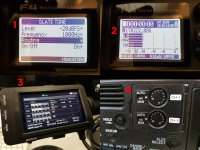
I'm struggling with the output of the F4 into a Sony FS7 camera. Below is a comp of 4 pics, showing:

1) my ref tone at at -20dBFS

2) the main outs showing a -20dBFS signal

3) FS7 showing a line level of -20dBFS (please ignore the Audio Input Level notice at bottom of screen - this is the default max input of 99 and is greyed out in the audio menu, so cannot be changed.)

4) The input pots on the FS7 - just a smidge below 10 to achieve this.
Lineout comp.jpg


Cabling - XLR outputs from Zoom 4 Main Outs to XLR inputs on FS7, preamps set to line level input.

My question: In my old fart analogue world, this suggests a mismatch, as I shouldn't need to be adding that much gain at the camera end. I've played around with increasing the F4 Fader Main Out 1/2 level to +12dB, as talked about above, but it has no effect on the slate tone output.

I'm hoping I'm just being a numpty and missing something completely obvious. I too saw a YouTube review speaking of "consumer line level" output, which may have given me a bum steer.

If so, any ideas as to why I should need to crank the line level input gain so high?

Thanks,

Ben.
 
I'm struggling with the output of the F4 into a Sony FS7 camera.

A chat over on the FB page and some subsequent tinkering suggests the following:

I can boost the Main Outs by 12dB, bringing it in to the ballpark of proper line out level - certainly the pots on the FS7 now line up physically at exactly half way on the dials.

The slate tone/oscillator is post-fader and post-Main Out - so I had to record tone and play that back from SD card to calibrate the F4 to my camera, with the new hotter output.

Boosting the Main Outs by 12dB means the Main Out meters now look very hot.

So my solution is to disable them from the meter views and just use the L/R meters as my reference for what's going to camera.

It also means that headphone routing also needs Main Out disabling - or that hot output ends up making everything sound clipped in the headphones.

Not an awful workaround - but I think the line level outputs on the F4 need to be increased to regular professional line level standards and this should be a priority on the next firmware upgrade.

Ben.
 
I am going to have to play with my F4 a bit to see what I get.

But for reference, using the tone on my analog mixer adjusted to zero dBVU, I get exactly -12dBFS in my 16 bit camcorder. Which is what it should be.

Using the F4 as a mixer seems rather confusing. I would think that you need to set the tone for prefader, adjust the outputs to the appropriate value, then the camera to match. But the manual is rather about a lot of things.
 
Well, that was interesting!

Looks like you are correct, Ben. I do not know why I thought the main output was +4db, spec's say -10.

While I can set pre-fader in the main menu, I can only set post fader in the Tone menu.

I can set Tone level to different values, but if set at the standard -20db that is what I get out to the camcorder. If I set it to -12db that is what I get to the camcorder. To get those readings the camcorders gain needs to be almost all the way up (maybe 4db down?). But here is the really strange thing, when I swith the camcorder from the set audio levels mode to the record mode the tone level drops to mid-scale.

I can guarantee that is not how things work with my FP42 mixer's tone. (could it be because the mixer is +4 output?)
 
I have emailed Zoom tech support to see if they can shed light on which fields the "Track" metadata is written to. I don't know why they just don't write it to the file name instead of the generic "Trk1" "Trk2" etc.


After discussion with Adobe PrPro Tech Support, it appears that the iXML data is not viewable anywhere but in the metadata panel itself by design. Of course it would be easy for Adobe to add this feature, and it would also seem to be easy for Zoom to write the custom track names to the file name string instead of the generic "Trk1" "Trk2" they now use. It would be a great addition to the F4, and F8. From a product stand point, the F series is changing the way sound is recorded for indie micro budget films. There seems to be little advantage to trying to do a field mix of any great consequence when you have 6 to 8 iso tracks available on set for less than $1000. Just mic the crap out of a scene and sort it out later. I saw another post on this forum about increasing requests for boom & lav on actors. This has to be at least partially driven by this proliferation of inexpensive iso tracks. Being able to identify the origin of all these tracks in post would be a big advantage.
 
Last edited:
After thinking about it, they call it a "Slate Tone" not a "Calibration Tone". What the seems to mean is that it is not intended to calibrate anything. It is just to put a tone on the recording, or to indecate that everything is passing the signal. There seems to be no way to use it to set levels in the recording chain. It seems to only put a tone on the output jacks. Nothing else.

Now after resetting everything and going back to my norms, with the main outputs set to L & R respectively, I get a fat signal to the camcorder showing -12db peak at a conversational level into my condenser omnidirectional interview mic with the camcorder gain barely turned up, and the trim on the F4 at about 1/3 (showing about -20db peaks).

So there does not seem to be any problem using the F4 as a mixer. We were just trying to over think the whole thing, I guess.
 
Sorry, Tom, but I think you have misunderstood.

Samuel, can the F4 be configured in firmware to operate at a +4dBu line level output, or is it restricted by hardware spec to its current domestic -10 dBV output spec?

Thanks.
 
Last edited:
A chat over on the FB page and some subsequent tinkering suggests the following:

I can boost the Main Outs by 12dB, bringing it in to the ballpark of proper line out level - certainly the pots on the FS7 now line up physically at exactly half way on the dials.

The slate tone/oscillator is post-fader and post-Main Out - so I had to record tone and play that back from SD card to calibrate the F4 to my camera, with the new hotter output.

Boosting the Main Outs by 12dB means the Main Out meters now look very hot.

So my solution is to disable them from the meter views and just use the L/R meters as my reference for what's going to camera.

It also means that headphone routing also needs Main Out disabling - or that hot output ends up making everything sound clipped in the headphones.

Not an awful workaround - but I think the line level outputs on the F4 need to be increased to regular professional line level standards and this should be a priority on the next firmware upgrade.

Ben.

Scratch all of that - it just compresses the clipping to occur at -12, because the DAC is natively a -10 level analogue stage. The main out adjustment is all in the digital stage.

Conclusion - F4 doesn't work as a regular "ENG style" field mixer - ie it won't interface with the analogue inputs of a professional +4 line level camera.

As a separate time-coded 6 track ISO recorder, it's still very powerful - so that's how we'll use it and re-synch to the MXFs using Tentacle Studio.

I just can't fathom why Zoom gave the F4 balanced XLR outputs at consumer levels - ie, what would normally come out of a pair of RCA phono sockets.

So it's time to ditch the umbilical and free the soundie!
 
Just mic the crap out of a scene and sort it out later.

DO NOT do this. Ever. You are just creating way more work for your post people, and that's even if post people get hired. I've seen more and more "we're low budget so we can't afford a sound editor" stuff lately. If you just put a mic on anything and record a bunch of iso tracks without a mix track, you are going to confuse your editor and the potential for screw ups down the line is massive. I've seen it happen first hand. Do the job right the first time on production, and you save time and money in the long run. I always do a mix track. It doesn't have to be a solid mix if I also have iso tracks AND I know that there will be a dialogue editor taking a pass at the audio. The mix track is for picture editorial and everything is for dialogue editorial. I also take copious notes to cover my @$$ in case anyone down the line has a question about anything I did. Plus, doing it right the first time is just the professional and courteous thing to do.
 
I have to agree with Dave.

As someone who is mostly doing post I see WAY TOO MUCH of the mic it all garbage. And that is usually what it is. It has been a very rare day that I get a project with a ton of tracks where it seemed like anyone was listening to any of them. Even if they are all OK it means listening to all of them so that just added a ton of time.
I personally don't care about the mix track. It is sometimes a bad thing since some editors will toss the other tracks and just use the mix tracks. If it's a big film then you just send an order down to transfer and they pull the tracks you need (and charge the client) but on a no budget show it's the poor editor who has to slog through takes trying to find a match. And really, that only happens if the mix track really sucks because you just don't have the time to find and re-sync the whole show by ear.
 
DO NOT do this. Ever.

I was being a bit flip with my language there, but what I was reflecting on is that the availability of inexpensive iso tracks is changing the way sound is done, especially in lower budget, indie type films. The other thread about requests for boom and lavs was part of that observation. It appears to me there is a definite shift away from location mixing to location recording, and in fact I don't call myself a mixer, I call myself a recordist (recorder?). Yes I see the value to recording a mixed track, and do it, but I don't bust myself on trying to make that mix track final quality. It's a guide for the editor and whoever will be mixing the iso tracks later. And yes, having a bunch of iso tracks can be confusing, but that's why I have been trying to find a way to use the great metadata capabilities of the Zoom F series, to label tracks with descriptive names like "Boom" and "Boom -12" for a scream track, "Lav 1" "Lav2" etc. Being able to display these names in PrPro and Audition would make the post mix process a lot easier. Writing them into the file names would be even better.
 
Questions for Zoom:

Is it possible, via firmware update, to make the outputs true professional line level?

Is it possible via firmware update to make it so I can route any input to any record track?


Suggestion:
Move the media slot from the back to either the side or the front of the machine in the F4 mkII.
 
By my inspection, Samuel, the official Zoom rep, hasn't checked in for a month (2/8). Does any one know if he's OK? Have we scared him away?
 
Question about the F4: A review I watched said that the XLR output was "consumer line level" rather than broadcast line level. If so, I'm concerned the output would be too low for my FS7 inputs. Comments from Zoom?

There is a output volume control. You can set the gain staging to have good signal. Should not be a problem
 
Questions for Zoom:

Is it possible, via firmware update, to make the outputs true professional line level?

Is it possible via firmware update to make it so I can route any input to any record track?


Suggestion:
Move the media slot from the back to either the side or the front of the machine in the F4 mkII.

Line level is a no. Hardware limitation.

I've discuss the routing options with our engineers. Not sure if we will see it on the current unit but maybe future ones.

Media slot is a common concern I've discussed with our engineers. Perhaps we shall see a change
 
Scared.... never

Well I was beginning to worry about you...

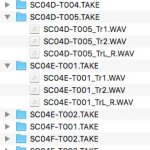
Anyway, I did go around the loop with Adobe PrPro engineering, and it is possible to see the custom track names ("Boom" "Lav1" etc.) recorded to the Zoom Wav file metadata, but only in the PrPro metadata panel under the iXML category at the very bottom of the metadata panel in PrPro, and nowhere else. What are the chances we could get the custom track names written to the file name in a future firmware version? I currently use the user file name to get files named for scene, shot and take. Replacing the Tr1 Tr2 with the custom metadata would make things much easier in the edit...

ScreenGrab.jpg
 
Hi Samuel,
In Zoom F4, when the 'Pre Rec' option is set to 'On' (page 35 in the Operation Manual), does the recorder record continues (all the time) to the SD card, or is the audio data kept in a buffer without actually recording it, as long as the 'Record' button isn't pressed?
 
Back
Top