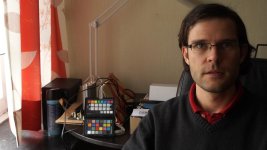
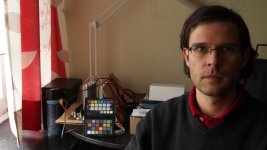
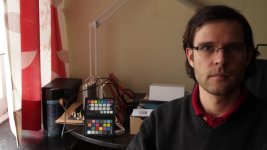
are natural skin tones achievable with the A7s without using LUTs?

Having worked with the C300 / 1DC it was never a problem for me to obtain natural looking skin tones with very little effort shooting in C-Log.

But for documentary film work involving interviews, I've been assigned the A7s and I'm having a lot more trouble obtaining natural looking skin tones shooting S-Log 2 and with other PP profiles as well.

I've been researching this quite a lot in different forums, and conducting numerous tests myself. But so far in my experience, A7s skin tones always seem to skew unnaturally towards yellow-green. Even though I made sure to be properly color balanced. For example if I set my LEDs to 5600K or 3200K then I adjust accordingly on the A7s. But I've tried nearly every Picture Profile, not just S-Log 2, and I'm just not obtaining natural looking skin tones. The skin always seems slightly jaundiced colored.

I've even tried tweaking the additional A7s color filter setting in the white balance menu which does help a little. But I'm still not getting good results. Not casting any blame here. I'm sure it's something I haven't mastered yet. But if any of you are getting natural looking skin tones with the A7s, I would love to know what settings give you the best skin tone results. I'll keep reading here in this forum and testing.

But just to clarify, I'm not actually seeking a color grading "look" like Impulz LUTS offer, just trying to obtain natural color in the skin tones.
 
Why not use a LUT? Sony released a few which I have adjusted to work well with the A7s to give a very standard rec709 when shooting SLOG2 (so you get all that great latitude).
Rough_cut.00_00_15_01.jpg
Rough_cut.00_00_17_15.jpg


If you NEED it to be in camera, and you're using LEDs, my experience is that unless it's a top-notch brand (like the arri L7c) it's going to skew a bit green in your skin tones because LEDs don't actually cover the entire color spectrum, so maybe adjust your profile to skew a little magenta?

Would you mind posting a tiff screen grab of a shot you have in mind?
 
Last edited:
Hi Casey,

Thanks very much for your help. I'll be sure to try these out. And the skintone on that actress looks great, perfectly natural. No sign of skewing towards yellowish-green. Yes, I'll be sure to post some pics so that you can see the issue I'm facing.

When you say that I should skew a little towards magenta, are you referring to moving the color filter knob to the lower right area of the color grid in the white balance menu? Or to dialing the RGB settings towards magenta in the Color Depth menu of picture profile section?

Thanks again for your feedback and help.
 
the white balance menu grid. That of course will skew it all that much more magenta... so i'd only really push that if the vast majority of your scene is lit by your LEDs
 
I thought so. Yes, that grid is quite useful. I've read a lot about the L7C. amazing light!
I only have access to the Zylight Z90 when it comes to multi-colored lights. Much smaller than the L7C but I'll see if I can get better results with the zylight. So far I've only shot with LED litpanels 1x1, sola 4, ikan ifb576.
 
I've found NO picture profile with camera set to standard color works great!
Turn the saturation down to -3, and the sharpness to -3 then set the DRO to 4 and you've got as much latitude as a C300/100MK I, if not more.
A side note- with no Pic Profiles, I can preview composition/control exposure on my iPad or iPhone using the Sony PlayMemories app.
win/win
 
Thanks very much PTRush. I just used your approach. No picture Profile looks great actually. I also lowered Contrast to -3 and that seems to give me more latitude as well.

I'm very thankful for all the feedback and help you guys are giving me. And I'm sure this will help others as well.
 
Last edited:
If you look at the Picture Profile thread here, check out the spreenu profile, which is a slight mod of Kholi's cine profile. I really loved the skin tones from that under tungsten...still need to do more tests though.
 
Samuel, Michael, and pianoboy, thank you all very much as well. Will be sure to check out Kholi's cine profile. I haven't I tried that one yet. I just finished watching Philip Bloom's A7s seminar (42 min) on youtube:https://youtu.be/zeX-eZXaRtw

After 13:00, he discusses picture profiles, saying that for the CNN series "The Wonder List" he shot mostly in Cine 4 with S-Gamut (in daytime) and Cine 2 (at night), but avoiding S-Log2 in daylight (due to the 3200 ISO constraint). Will be posting my results shortly. Thanks again, everybody.
 
Last edited:
sgamut is highly non-linear (skin changes color depending on exposure, goes from green to magenta) and horrible according to almost everybody who has ran a controlled test
it must be used with the correct LUT-based workflow, or avoided
 
Why not use a LUT? Sony released a few which I have adjusted to work well with the A7s to give a very standard rec709 when shooting SLOG2 (so you get all that great latitude).
View attachment 101218
View attachment 101219


If you NEED it to be in camera, and you're using LEDs, my experience is that unless it's a top-notch brand (like the arri L7c) it's going to skew a bit green in your skin tones because LEDs don't actually cover the entire color spectrum, so maybe adjust your profile to skew a little magenta?

Would you mind posting a tiff screen grab of a shot you have in mind?

Very nice natural color. Where to get the Lut from sony?
 
Very nice natural color. Where to get the Lut from sony?

it's an adjustment of the official sony one they released (the f55/65 have much different sensors and record different than our camera)
you can get it from my website:
http://caseywilsondp.com/2015/03/25/a7s-slog2-rec709-lut/

the original sony files can be found here (but you'll need to do a bit of adjusting to get them to play nice with a7s footage):
http://community.sony.com/t5/F5-F55/NEW-3D-LUT-s-for-F55-and-F65/td-p/135617
 
Personally, I find that the Sony delivers pleasing skin tones even without using PPs and LUTs.
I tend to use the flat profile with saturation set to -2, contrast to -1, and detail to -2, then use RGB curves to grade.
 
Hi Kostas,

Since reading all the great tips in this thread I have to agree with you. After turning off Picture Profile altogether, and using Creative Style-Standard mode with contrast and saturation both dialed to -3, I find that I'm getting much better results skin tone wise. For me, its almost like shooting Cinelog V on my GH4, where everything is a little desaturated and flat, but much easier to get natural looking skin tones. Shooting in that mode, I can easily add a little color and contrast back into the image without too much fuss. That may be a lazy approach but I just find it safer for the time being. I feel I just don't know enough about S-Log2 to risk shooting with it on a professional assignment.

While we're on the subject of S-Log, I read somewhere (perhaps on redsharknews or newsshooter) that the color science of Sony's new "S-Log3" format is supposed to make it easier to achieve natural looking skin tones than S-Log2. I just don't recall whether the article mentioned that S-Log3 might be made available for the A7s.
 
Would someone mind posting great skin tones achieved in 2 min or less? Thanks!

Honestly using a lut takes mere seconds to achieve great results IMHO.

Hi Kostas,
While we're on the subject of S-Log, I read somewhere (perhaps on redsharknews or newsshooter) that the color science of Sony's new "S-Log3" format is supposed to make it easier to achieve natural looking skin tones than S-Log2. I just don't recall whether the article mentioned that S-Log3 might be made available for the A7s.
Doubtful we will see slog3 on the a7s, or any significant update I think.
 
Okay below are once again matches of S-Log2 with STD (PP off). Unfortunately you have to do with me, as I don't have models for such tests ;)

If you properly bring S-Gamut into the Rec709 color space, you will get great results IMHO. To do this I brought the S-Log2 signal to linear, applied the proper matrix and adjusted the Hues and Saturation to match the targets on the Color Checker, which you can see in the pictures and brought it back from linear to a nice gamma curve.
If you want to know in detail how I do this, let me know. I already prepared an article, but it needs some final touches...

A quick work about acquisition: I like to shoot S-Gamut at +24 saturation to reduce noise even further (besides shooting 3200 as 800 like Casey also seems to do). For the "Movie" matrix I like to use the specific color depths so that the luma values of the colors fall closer to the 709 targets.

Casey, your screenshots also look like you add a bit saturation in camera to your S-Gamut footage. Is that right?

STD (PP off)
STD.jpg

S-Log2, Movie, Color Depths 313140
SL Movie 313140.jpg

SLog2, S-Gamut, Sat +24
SL SG+24.jpg
 
Back
Top