Are GH2 RAW stills files editable today on Mac?

Question for anyone who has a GH2: Are GH2 RAW still files open-able & editable in Preview & iPhoto on the Mac already (like GH1 RAW files are now), or do we have to wait for Apple to release an update for its RAW compatibility?

Thanks.
 
Apple released a Camera RAW Compatibility update today that contained support for the GH2. Run Software Update and you'll see it there.
 
(I don't own Aperture. I only have iPhoto 8.1.2 & Preview 5.0.3 installed under Mac OSX 10.6.5).

http://www.macworld.com/article/156466/2010/12/digital_raw_update_35.html

Apple on Thursday released an update for Aperture 3 and iPhoto ’11 to add raw image support for certain Canon, Leica, Nikon, and Panasonic cameras.
The list of lucky cameras supported in the Digital Camera Raw Compatibility Update 3.5 includes the Canon PowerShot G12, Leica D-Lux 5, Leica V-Lux 2, Nikon D7000, Nikon COOLPIX P7000, Panasonic Lumix DMC-GF2, and Panasonic Lumix DMC-GH2.

The full list of cameras that Apple supports can be found on the company’s Website.
The patch is 6.3MB in size, requires a Mac running OS X 10.5.8 or OS X 10.6.5 or later, and can be downloaded via Apple’s Website or Software Update. The company notes in a separate Knowledge Base article that computers running OS X 10.6.2 through 10.6.4 may not display this update via Software Update initially; as a solution, users are advised to run Software Update and update their Mac to OS X 10.6.5. At that point, the update should successfully display.
 
Thanks for all the info, but ...

Unfortunately, as of this morning this new Apple RAW update only seems to be available to people who have paid extra to buy the latest version of Aperture or iLife. The RAW update Apple released yesterday won't install if these apps aren't installed first.

Unless I'm mistaken, that means unless Apple releases a separate installer for all Mac OSX 10.6.5 users (and users of the previous OSX version), these users can't preview GH2 RAW still images in the desktop Finder, or in Preview, or in QuickLook (such as in Mail).

Hopefully Apple releases ASAP a RAW update for those of us who have no need for Aperture or iLife.
 
Last edited:
http://www.macworld.com/article/156466/2010/12/digital_raw_update_35.html

Apple on Thursday released an update for Aperture 3 and iPhoto ’11 to add raw image support for certain Canon, Leica, Nikon, and Panasonic cameras.
The list of lucky cameras supported in the Digital Camera Raw Compatibility Update 3.5 includes the Canon PowerShot G12, Leica D-Lux 5, Leica V-Lux 2, Nikon D7000, Nikon COOLPIX P7000, Panasonic Lumix DMC-GF2, and Panasonic Lumix DMC-GH2.

The full list of cameras that Apple supports can be found on the company’s Website.
The patch is 6.3MB in size, requires a Mac running OS X 10.5.8 or OS X 10.6.5 or later, and can be downloaded via Apple’s Website or Software Update. The company notes in a separate Knowledge Base article that computers running OS X 10.6.2 through 10.6.4 may not display this update via Software Update initially; as a solution, users are advised to run Software Update and update their Mac to OS X 10.6.5. At that point, the update should successfully display.

Yes, read my first reply to the OP.
 
Thanks for all the info, but ...

Unfortunately, as of this morning this new Apple RAW update only seems to be available to people who have paid extra to buy the latest version of Aperture or iLife. The RAW update Apple released yesterday won't install if these apps aren't installed first.

Unless I'm mistaken, that means unless Apple releases a separate installer for all Mac OSX 10.6.5 users (and users of the previous OSX version), these users can't preview GH2 RAW still images in the desktop Finder, or in Preview, or in QuickLook (such as in Mail).

Hopefully Apple releases ASAP a RAW update for those of us who have no need for Aperture or iLife.

Did you try the direct download link I gave you above? How about installing the Aperture trial and then the update?
 
Did you try the direct download link I gave you above? How about installing the Aperture trial and then the update?

The standalone installer for Apple's RAW update won't install unless Aperture or iLife is installed first.

Your suggestion to install the trial version of Aperture as a way of getting desktop RAW support for the GH2 is a good idea. I'll give it a shot. Thanks.

(Yikes, it's a 684 MB download ...)
 
Thanks again, Mike. That trick seems to have worked.

I'll know for sure once my GH2 arrives and I test if I can view its RAW files on my Mac in the Finder, Preview & Mail, etc.

Cheers!
 
You're welcome. It works for me with the GH1 with Finder, Preview, and Mail, so I think you should be good to go. :thumbsup:
 
I have the latest Aperture and downloaded the GH2 RAW update yesterday. All my RAW files from the GH2 go deep dark green in Aperture, iPhoto or Preview. I have posted a note on the Apple forum to see if this is a common problem. Silkypix is fine with the same files - thumbnails look OK in each program, it is just when you select it and it opens up.
 
Last edited:
I have the latest Aperture and downloaded the GH2 RAW update yesterday. All my RAW files from the GH2 go deep dark green in Aperture, iPhoto or Preview. I have posted a note on the Apple forum to see if this is a common problem. Silkypix is fine with the same files - thumbnails look OK in each program, it is just when you select it and it opens up.

Just an FYI: Now that I have my GH2 I can confirm this. I get the same results, even though I installed the latest free trial version of Aperture & Apple's new RAW software update.

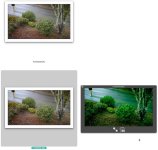
GH2 JPEG photos look fine in every app I've opened them in, but the RAW images are extremely green-ish everywhere except for the Finder's miniature file icon thumbnail & in the SilkyPix app included with the GH2.

In the attached screen grab, these are the large-size Finder file icons (set to their maximum size just to show here). The JPEG file icon looks OK, and the RAW file icon thumbnail looks OK too, but the QuickLook version (lower right) is how the RAW image appears everywhere except in SilkyPix.

Certainly looks to be an Apple (not Panasonic) problem. The thread on Apple's tech support page is here:
http://discussions.apple.com/thread.jspa?threadID=2687279&tstart=0

GH2 green RAW issue.jpg


If you're having this issue, too, let Apple know via their Feedback form:
http://www.apple.com/feedback/aperture.html
 
Last edited:
A few days ago Apple _finally_ posted a new version of their RAW compatibility updater v.3.6 which kinda, sorta, fixes the "way too green RAW" GH2 digital stills problem.

The new "Digital Camera RAW Compatibility Update 3.6" is available here (or via Software Update in your Mac's Apple menu):
http://support.apple.com/kb/DL1357


I say "kinda, sorta" because while Apple's latest RAW compat. update fixes the problem for users of the latest versions of Aperture & iPhoto, it won't even install if you don't have the latest versions.

As suggested by a post in Apple's support forums, the following workaround was successful for me:


As I posted earlier, I've owned a GH2 since mid-Dec. 2010, and haven't been able to properly display or edit its RAW files in the Finder, Preview or iPhoto 8.x, and as we all know, Apple's RAW compatibility update 3.5 -- which was supposed to support the GH2 -- didn't work.


Today I tried installing the new RAW compatibility update 3.6, but it wouldn't install because I don't have Aperture or iPhoto v.9 or higher installed.


I then installed Apple's free Aperture trial version. I don't actually want to use the app, I only installed it so I could get the RAW compat. updater 3.6 to install.
The free trial version of Aperture is available here:
http://www.apple.com/aperture/

I then ran Software Update, and it noticed I had the Aperture trial installed, so it asked to download & install the latest Aperture update and the latest RAW compat. update. I opted to download & install only the RAW compat. update 3.6.


Having done all that, my GH2 RAW files now seem to be correctly displayed in the Finder, Preview, & iPhoto v.8.x, and I can edit them in Preview & iPhoto.
I've since deleted the free trial version of Aperture, and everything continues to work properly.

Dear Apple: While I'm glad this is finally working, it's been a real drag having to wait more than 2 months to get to this point. :badputer:

Cheers.

P.S.: The GH2's RAW files can be displayed properly & edited in the SilkyPix app that Panasonic bundles with the GH2, even without Apple's RAW compat. update installed. However, I find SilkPix to be utterly inscrutable and avoid using it. SilkyPix appears to have been designed by space aliens -- or perhaps Blackout's Free Mason friends -- the SilkyPix UI makes absolutely no sense to me at all. :-)
 
Last edited:
Back
Top