F55: Applying 2.LC_709TypeA curve too aggressive

Omar N

Active member
Hi guys,


I have a test clip I shot in S-Log2. When I apply a 2.LC_709TypeA look profile in Catalyst Prepare, the saturation and contrast becomes way too aggressive. I have seen online all sorts of examples where people are applying such look profiles and getting beautiful results. I cannot understand why anytime I apply the same look profile, I get just blocky and aggressive results.


Note I do not believe the fact that I am applying the look in Catalyst Prepare has anything to do with it. I believe I would get results had I applied it in camera as well. I attached two screenshots that show the differences between S-Log2 and S-Log2 with the 2.LC_709TypeA curve applied. Any tips or hints on why I am getting such skewed results is much appreciated!


Thank you!
OmarS-Log2.jpg2LC_709TypeA.jpg

 
I think the contrast looks ok, but the color towards cyan is more the issue. To me it just looks like white/color balance issue, and something that can be corrected in post.

If I had to guess, I'd say the camera was set to 3200k color temp but the lighting was 5500k skewing everything more towards blue/cyan.

In CB take the color temperature slider and nudge it to the right a bit.. see if that balances it out.
 
If you do it in Camera (Baked In), you have to expose it correctly and set the right white balance.

If you do it in post, it's still best to expose and WB correctly, but you can fix it a lot easier as well. Just bring it into Catalyst Prepare and tweak the contrast, exposure, brightness and whatever else. I find that most of the time, just tweaking the exposure and contrast makes it look great. If you messed up the WB, you can somewhat change it, but this is not RAW so changing the WB in post is way more limited.

If you are in in Premiere, After Effects or a similar program. Just apply the LC709a LUT. If you exposed incorrectly, the simplest thing to do is apply a Brightness / Contrast filter and adjust those and it will look good in seconds.

But yeah, it's best to set a correct WB. Even with the limited 3 presets you can generally get pretty close to where it's not much of a problem. From shooting manual WB tests, I find that indoor daytime tends to be around the 4300K Preset, unless the subject is right in front of window, then it skews more towards 5500K. I find that Sonys tend to get a little too yellow / golden for me, which is why I wish we had custom WB. On my FS700, for daytime I tended to shoot around 5200K because it cool it a slight bit. I wish we had that option on the FS7 in CineEI.
 
Last edited:
Unless I'm mistaken, I think the LC_709TypeA LUT was developed for use with SLog3. Most of the examples I've seen were applied to SLog3. While you can apply it to SLog2 footage, you're going to need to adjust it to make it look good.
 
Thanks for the replies guys. Even when I adjust the white balance and exposure all in camera, I can never get anything to look good, which is causing me to believe there is some other underlying problem that is more fundamental. I've tried with both S-Log3 and S-Log2, and both give an image that is totally unusable when applying a look profile.
 
Make sure the following is properly setup:

You should be in Sgamut3.cine/SLog3 mode (CineEI not Custom)

All MLUTs should be turned off

It looks like you shot that in an office (likely with fluorescent lights). Are you properly white balanced for your light? I would recommend getting some exterior daylight shots, for testing.


Are you recording internally or with an external system?
 
Yup, LC709A is designed, specifically, to work with sgamut3.cine/slog3. If you shot in Sgamut3/Slog3, Sony has a LUT to convert it to Sgamut3.cine first. One needs to understand what each color gamut has as a definition to technically understand why you're looking too saturated. Sgamut and Sgamut3 are just way too big, especially with a skew in the green coordinates, unlike sgamut3.cine. Applying LC709A to an sgamut is making a difficult job bordering on impossibly difficult. Sure, you can correct out practically anything, but, why carry 50lbs when you can do the job with 5 lbs? If you read Art Adams' article on Sgamut3.cine, you can manually apply the similar LC709A CC via Resolve without using the LC709A LUT.
 
There are actually two sets of 3D LUTs released by Sony officially that include LC709, LC709A, slog709, and Cine709. One was for slog2-sgamut while the other was slog3-sgamut3.cine. As Cuervo points out if you use regular slog3/sgamut3 you need to covert it to slog3/sgamut3.cine before applying the LUT. Who knows if Catalyst Browse does this for you or not, I suspect not.

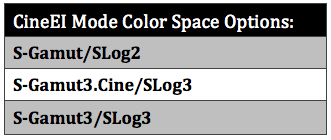
Perhaps the others are right and this is more a color space issue. In CineEI mode you have three color spaces to chose from, so maybe your skew lies with the color space you had selected in the camera. Catalyst Browse will actually tell you what you had selected if you look at the metadata on the right side of the window.

Table-CineEI-Mode-Color-Space-Options.png


I shot an X-Rite color chart in every possible combination of color space and gamma mode settings and made them available for download if you're interested to take them through post and see how the LUTs react with the different combinations,

http://www.dvinfo.net/article/acqui...ng-cineei-mode-in-custom-mode-on-the-f55.html
 
Last edited:
Thanks Dennis. I tried to download the charts, though it looks like the file is no longer available?
 
Btw, I am shooting in XAVC. I assume these look profiles should work for XAVC, and not just raw, correct?
 
Link is at bottom of that page I posted, under the DVinfo link...

Correct. I shot all of these in XAVC on the F55.

One real thing I found interesting about this test is that the slog2/sgamut in custom mode and cineEI mode when selected do not match. So then what color space exactly is it in custom mode? :huh:
 
ah, ok. my bad. fixed now on my page, but yes run some tests on your end and pay attention to the three color space presets available in cineEI mode.
 
There are actually two sets of 3D LUTs released by Sony officially that include LC709, LC709A, slog709, and Cine709. One was for slog2-sgamut while the other was slog3-sgamut3.cine. As Cuervo points out if you use regular slog3/sgamut3 you need to covert it to slog3/sgamut3.cine before applying the LUT. Who knows if Catalyst Browse does this for you or not, I suspect not.

Perhaps the others are right and this is more a color space issue. In CineEI mode you have three color spaces to chose from, so maybe your skew lies with the color space you had selected in the camera. Catalyst Browse will actually tell you what you had selected if you look at the metadata on the right side of the window.

Table-CineEI-Mode-Color-Space-Options.png


I shot an X-Rite color chart in every possible combination of color space and gamma mode settings and made them available for download if you're interested to take them through post and see how the LUTs react with the different combinations,

http://www.dvinfo.net/article/acqui...ng-cineei-mode-in-custom-mode-on-the-f55.html

I'm not sure if it's related to this or not, but I dont think Catalyst Browse is always reporting the color space correctly. You may have had it set to S-Gaumut3.cine but CB will show slog2 in the metadata.
 
Back
Top