Apple dumps Intel and shows Final Cut Pro on new Mac with Apple CPU !

Maybe someone here would like to contribute data to a Resolve benchmark?

The link takes you to a post with more information about the benchmark and a link to download it. If you want to try it, but don't know how to set it up (you just need to import the project and relink media) I can explain in more detail. The linked post also has some more info on how to run it. The benchmark can be run on macOS, Windows or Linux.

Regardless of that, here is some initial data for different systems. A MacBook Air M1 down below.


MacBook Air M1 2020:

09 Blur: 07-10 fps

Looking for more complete data set here.

Is the M1 running Resolve via Rosetta?
 

Thank you! I'll download these today and probably check it out sometime after Christmas. One question I already have is if the Canon 10-bit 422 files are not GPU accelerated, that would mean its a good test for the CPU (and Rob!) - but I'll also be curious regarding gpu acclerated) 10bit 422 files (ie h265 hevc)
 
I see, these are in fact HEVC files then? I had time now so put them into the system and played already. Still no issues!!

They are more taxing, though. I can feel it slightly but not much. I added filmconvert onto the files, plus lumetri color, (both with adjustments), and played them back at Full quality for everything...

Realtime playback, no issue. 2x Playback, no issue. Two clips at once scalded down (multicam), no issue. Scrubbing and jumping around, no issue.

Unlike my 420 files from S1H, here the fans kick in and CPU utilization jumps to 50% for 1x forward playback and 100% for 2x forward playback with high activity on all 16 cores, vs much lower use on 420 footage. GPU is only being used 10%, though.

Also unlike my 420 files, here are the challenges: 4x playback falls apart, getting stuttery and then fizzing out. Reverse playback at 1x works, but stutters at what feels about 50% frame rate, 2x reverse playback, don't try it.

All in all I think I could edit this just fine without transcoding, I can add filters on and maintain realtime playback at Full Quality at 2x speed and jump all around without issue. It's just 4x speed and reverse playback that slows things down. I am not sure how Resolve would fair but it may utilize the GPU better?

On a larger and more complicated project I could see the benefit of transcoding to keep things silky smooth but I wouldn't complain about editing a whole project like this, its still much faster and snappier than my old workstation editing lesser codecs. Whereas the S1H 420 footage feels like it's even bothering this system, this 422 footage feels like it's fully utilizing the rig and reaching its limits under more stressful scenarios.
 
CRL isn't that demanding.

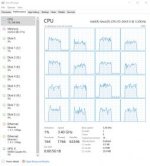
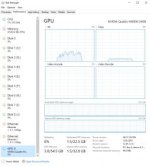
Here are graphs of CPU and GPU utilization using Canon's Cinema RAW Development 2.6 with full quality full screen settings on on-set dailies playback station:

cpu.jpg

gpu.jpg

It's bumping CPUs to 3.4 GHz and using ~50% of processing power evenly distributed across all logical cores.

GPU is utilized up to ~30%.

GPU with min. 4GB of VRAM is required for 5.5/5.9k and 8GB for 8k.

When using SDI, either on AJA or BMD, there is limit to 24/25/29.97 fps when using 4:4:4.

So, there is no real reason why CRL wouldn't be smooth in either Premiere or Resolve running on modern system configurations.
 
Is the M1 running Resolve via Rosetta?

Resolve performance is ok on M1 but yes there are better machines out there for Resolve. Resolve can make use of a lot of processing power which is why it scales so well to multiple cores and multiple GPUs.

While insanely impressive for a low power integrated GPU the M1 graphics processing is far from the best out there. So far 4k 24p Braw seems to work really well on my new base model M1 MBA I picked up. I didn't expect miracles on a $899 entry level machine of course but I am very happy 4k Braw actually does work well enough. More than enough for light work in the field to check footage or organize a project.

Could do a full edit if I really wanted to. I just know not to expect miracles from it for what this computer is. It will not be processing 4k Braw, NR and a pile of luts and CC nodes and play in RT with this GPU. Not without reducing playback quality or using a proxy format.

If one uses HD Braw I'm sure it will kick butt. 4k is on the edge of RT performance with some effects. 6k Braw seems to be too much except for simple playback with no CC or luts.

I often wondered about shooting 2.6k with the P4k to get 120fps but still have more detail than HD would have. This might also help M1 users get a lot more performance out of the machines. Not 120 fps but if one stayed at 2.6k for 24p then that would performa that much better on the M1. Budget users could have a pretty solid filmmaking setup with the P4k and a $899 MBA by using 2.6k Braw. Especially if all their delivery is still HD. Thats more than enough to make up for bayer detail loss.
 
I got my second notification from B&H that the mac mini I ordered I think almost 2 months ago is still back ordered. Anyone ever start to lose interest in something if you have to wait a really long time?

Btw, I saw this video that gave me second thoughts. I've seen so many videos claiming great speed increase while this one doesn't. I wonder if it's because of the slower external drive or are the other ones testing in a way that makes it look faster?

https://www.youtube.com/watch?v=3Uwg4uf0Rcc
 
I got my second notification from B&H that the mac mini I ordered I think almost 2 months ago is still back ordered. Anyone ever start to lose interest in something if you have to wait a really long time?

I was willing to wait a week when I originally preordered, but then canceled after I found out the non-base models will take another 1-2 months.

I would have owned more cameras if I didn't have to wait 30-60 days for them.

My max is about a week for almost everything or I lose interest. (I check back months later for some things if personal status for item or a similar hasn't changed.)
 
I confess I did not watch the video. I don't have patience for the average Youtube video. They take 10 or 20 minutes to convey what could have been a 2-minute one or, even better, a 3-paragraph article, which would have taken 30 seconds to skim.

Minor rant aside, I don't think anyone should buy one of the new Macs unless your current computer is:

  • so old you can't install needed software
  • choking on current workloads
  • mechanically failing

If you just happen to be in that situation at this time, what serendipity! There has never been more bang for your buck.

However, if your current computer is a few years old but, objectively speaking, working just fine, then take some Gas-X and don't buy yet.
 
I confess I did not watch the video. I don't have patience for the average Youtube video. They take 10 or 20 minutes to convey what could have been a 2-minute one or, even better, a 3-paragraph article, which would have taken 30 seconds to skim.

Minor rant aside, I don't think anyone should buy one of the new Macs unless your current computer is:

  • so old you can't install needed software
  • choking on current workloads
  • mechanically failing

If you just happen to be in that situation at this time, what serendipity! There has never been more bang for your buck.

However, if your current computer is a few years old but, objectively speaking, working just fine, then take some Gas-X and don't buy yet.
You could skip to near the end basically he says editing for him is about the same as his 2017 imac using fcpx and export was a little quicker with the imac but he used the same external drive to store the source video to keep the test even. Don't know what to make of it.

As far as the waiting game. I'm upgrading from an 2009 PowerMac so I've been playing the waiting game a very long time. The biggest problem I have with it is when I do multi clip even at 1080, when I add transitions, it drops frames, so the edit takes longer because I need to render and rerender at the finishing stages to judge the timing. Which takes more time than you would think to complete edits with lots of cuts.

So while I have gotten by for a long time and could continue to get by getting real time playback with effects, transitions, would be nice.
 
lol, it was fun, you learn a lot.

Last purchase I've made was a R5 in July (canceled the M1), but sold that after a few week as you probably know.

2019 was my last year of crazy buying. From about 2015.

Had to have every meaningful mirrorless camera and most cinema cameras below $10K in those 4 years. Plus lots of other gadgets.
 
Peter, it sounds like you will see a massive speed increase on an M1 mac mini. I think it's probably worth the wait
 
I'm upgrading from an 2009 PowerMac [...] even at 1080, when I add transitions, it drops frames

Ah, then you have waited longer than many people, and I think the $600 Mini will be worth your while.

still back ordered [...] Anyone ever start to lose interest in something if you have to wait a really long time?

You have waited 11 years. What is a few more months? Besides, what is your alternative? Cancel the order? Then it would be even longer before you get it --- like, never.

I saw this video that gave me second thoughts [...] about the same as his 2017 imac

Yeah, but his 2017 iMac is faster than your 2009 PowerMac. One thing is for sure, your editing experience will improve, for $600.
 
Back
Top