Anyone Think the GH2 Will Have the Pulsing Problem?

Filmkid2003

Well-known member
Does anyone think the GH2 native 1080 24p footage will suffer from the same "pulsing" problem as the GH1 1080 24p/60i footage or the GH13 native 1080 24p footage? If so, that's a deal breaker for me.
 
i really don't understand these questions when no one has got their hands on one to answer. making up ones mind long before its even released. it should more be along the lines of wait till the camera is out for proper review and then ask "does the gh2 have pulsing" not "do you think".

my rational thinking, unlike the gh13 which was hacked to have native, the gh2 was "designed" to have it. so you can draw your own conclusion, i myself think that it won't but that means nothing until its out on the shelf.
 
Last edited:
The pulsing is not an "autofocus glitch". I shoot all my footage with the camera set to manual focus. The pulsing has to do with the codec. You can clearly see it on a large HD TV like my 47" LCD HD flat screen TV. Maybe that's why some people see it and others don't. Hopefully, the GH2 will have a better codec and no pulsing.
 
It could be that the implementation of the player in the TV is causing the pulsing. I had similar pulsing on VLC player at one time. Newest version of VLC cures this with better player implementation. Do not automatically blame the camera. It is more likely the TV, especially given the evidence that most people do not have this problem.
 
Oh, forgot to mention. The pulsing on VLC was due to poor handling of the GOP. It would pulse every half second when it got a new I frame. So look for pulsing every half second and that is probably a codec decoding issue.
 
thanks kaine. here is a good clip courtesy of Nitsuj from that thread that shows pulsing. damn that's really obvious once you train your eyes to see it. like staring at a pimple.

http://exposureroom.com/members/Nitsuj/60839febfaa540f8964174db9c269468/


Ok, so that's pulsing. It is quite obvious on the foliage scene. I don't think I could have missed it if my shots had it. Need to make sure though.

So does this happen on all 25p/24p shots? Or only on certain shots?
 
There is no 'pulsing'. I played out of a 10,000 lemuns projector to a movie theater screen and there was no pulsing nor was there on a 60 samsung led lcd.

Sounds like an individual issue with your camera... bad hack settings, or an issue with your TV.

Just looked at your clip... that looks like the old prehack GH1 footage. You need to raise our bitrate up more. What is happening in that clip, is the moving waves are taking most of the data space, and the cam is deciding to give less detail to the trees on some frames... hence the 'pulsing' or mud.

Raise your data rate up to 50mbits and shoot the same scene, you wont see any of that, and you'lll see far more detail.
 
Last edited:
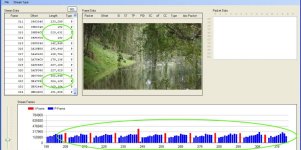
I am going through my footage and I have finally seen one video where I suspect it is pulsing. Having gone through the thread that kaine linked above, it seemed that there were P frames that were bigger than I frame which was responsible for the pulsing. I don't know if the the rogue frames they discussed in that thread now can be attributed to Stream Eye.

Checking the clip in question using GH13 StreamParser, I see that some of the P frames are bigger than I frame (slightly) and curiously two P frames on either side of the I frame is unusually small.

I am trying to post the video, but not working out with Vimeo today. Otherwise I will check how to upload to a file share site.

Here is the StreamParser snapshot. This was shot with 25p enabled, 140 mm, 5.8 aperture, on AFC, about 42 Mbits clip.

From what has been said earlier, this may likely to be present only on static highly detailed scenes with high DOF, especially when there are dark or under exposed areas in the footage. However I have searched many of my clips and I cannot see the pulsing any of them, even high detailed one.

Do not know if there are camera to camera variation on what would trigger this, but mine seem relatively free of it. I suspect that a scene that is capable of getting pulsing is also the kind of scene that would freeze the camera on 25p native mode 40 mbps footage and thus may not be a major concern as I rarely get the card error.
 

Attachments

  • Pulsing.jpg
    Pulsing.jpg
    81.3 KB · Views: 0
Last edited:
That "pulsing" thing is an autofocus glitch that happens occasionally only. Nothing major at all.

That is the only time I see it. Autofocus starts dancing. The fix is simple. Then again, I don't have the 24p option checked since I am no longer interested in pretending to shoot film.
 
Last edited:
I notice the pulsing more when I am shooting with the ultra sharp pancake lens in areas that aren't lit up well. Also, I have one of the "Made in China" cameras. I don't know if that's a factor but, I believe Blackout has a "Made in Japan" camera. Am I correct in saying so, Blackout?
 
Back
Top