Anyone Running nVidia 480GTX Fermi With FCPX?

Faymus Media

Well-known member
I know it will run like a champ with PPCS6 however I decided to make the switch to FCPX for most projects for many reasons I discussed in my other post.

Right now I am using a 8800GT it has open CL support and CUDA support. I was looking for a 285GTX becuase apple list's it on the website as a supported card. I found a 480GTX fermi for the same price brand new as a 285GTX used!

So my question is to find out if anyone is using a 480 GTX fermi card and how its working out with FCPX?

Thanks


EDIT: Would i be better of grabbing a ATI 4870 or a 5870 1GB or 2GB card? They render open GL and CL @ like 2 teraflops!
 
Last edited:
i tried the gtx570 in FCPX Trial, didn't work well as it wasn't on apples GFX card list... rendering was creepingly slow, unfortunately slower than on a colleagues 2010 macbook pro...
 
i tried the gtx570 in FCPX Trial, didn't work well as it wasn't on apples GFX card list... rendering was creepingly slow, unfortunately slower than on a colleagues 2010 macbook pro...


So if its not on the final cut website then its going to be bad? Right now my 8800GT can render and export h.264 to prores 422 decently. 15 seconds of footage takes about 20 seconds. If there is heavy effects maybe about 30 seconds.


EDIT: I found a ATI 4870 1 GB for 50 bucks locally. I also found a ATI 5870 1 GT and 2 GB card as well. I wonder how they perform. They are on the FCPX site. I read that the 5870 from ATI has 2 teraflops bandwidth. My 8800GT has like 160 gigaflops, so it would be like 12 times faster LOL
 
Not sure this can be of much help... maybe you can search more on the site for specific cards. But its always good to see what these guys test and how it stacks against other cards:
Faster gaming GPUs for Mac Pro
OS X Lion vs Mountain Lion doing Graphics
Radeon 7970 in a Mac Pro vs other GPUs
Final Cut Pro X on three different Macs
Apple Motion 5 - various GPUs

Preparing for Final Cut Pro X :: Silverado Systems, Inc.

Just FYI, Adobe preforms much better with Nivida cards... Maybe you should consider that as well, if you may use some Adobe products in the future along side FCP X.
 
Not sure this can be of much help... maybe you can search more on the site for specific cards. But its always good to see what these guys test and how it stacks against other cards:
Faster gaming GPUs for Mac Pro
OS X Lion vs Mountain Lion doing Graphics
Radeon 7970 in a Mac Pro vs other GPUs
Final Cut Pro X on three different Macs
Apple Motion 5 - various GPUs

Preparing for Final Cut Pro X :: Silverado Systems, Inc.

Just FYI, Adobe preforms much better with Nivida cards... Maybe you should consider that as well, if you may use some Adobe products in the future along side FCP X.


This is helpful. Yes nvidia definitely runs better on PPcs6 and most adobe products. However, from the MAC gaming tests and how i translate that to FCPX the ATI 5870 is faster than a 285GTX by about 10% maybe 15%. BUT the 285GTX is also compatible with PPcs6.

What to do, what to do! LOL


EDIT: just realized AMD has NO drivers for mac whatsoever. nVidia has all their cards now supported with mountain lion. Looks like i am gonna have to think hard on this....
 
Picked up a 480GTX for 160 new in open box!

I picked up a evga 480gtx 1.5GB DDR5 video card open box for 160. Couldnt pass it up. I installed newest cuda driver, then i installed the quadro 4000 mac mountain lion driver ODE i believe.

Then i deleted smbfs.kext from the library. I heard it messes things up?

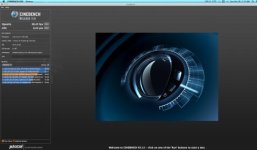
Here is my cinebech results, is my graphics card working at the acceleration it should be?


The reason i ask is the my "Xbench" results were the same as my 8800GT results??? I also enabled CUDA and OPENCL via the text files in premiere pro cs6, and i can select which ever i want CUDA or OPENCL in the project settings but it doesnt encode video any faster whatsoever than my 8800GT

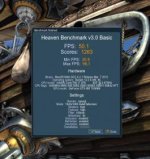
11 seconds of video, with heavy effects takes 30 seconds. Anyway is this normal? Here is my benchmark results from 2 different programs on mac with open CL support.


EDIT: on the "Galaxies" benchmark my 8800GT got 160 gigaflops and the 480GTX got 588 gigaflops.


Attachments

  • Screen Shot 2012-10-28 at 3.12.07 AM.jpg
    Screen Shot 2012-10-28 at 3.12.07 AM.jpg
    14.9 KB · Views: 0
  • Screen Shot 2012-10-28 at 3.43.29 AM.jpg
    Screen Shot 2012-10-28 at 3.43.29 AM.jpg
    16.5 KB · Views: 0
11 seconds of video, with heavy effects takes 30 seconds. Anyway is this normal? Here is my benchmark results from 2 different programs on mac with open CL support.

So are you running FCPX or PPCS6 now?

FCPX: http://support.apple.com/kb/HT4664

maybe thats why FC is so slow, i had the same issue...

Does PP say the Mercury Playback Engine is on? Another hint... just move the Cudasupportedcards.txt file into the trash and you won't have to mess around with editing those files (This is just for Premiere Pro on Mac, as far as i know).

You can easily test if MPE is on, slow down your footage, then look at the color indicator above your timeline, if it is yellow, MPE is working fine, no rendering needed.

What "heavy effects" did you apply? I guess that are 3rd party ones, since the common adobe effects don't require rendering while using MPE...

cheers
 
So are you running FCPX or PPCS6 now?

FCPX: http://support.apple.com/kb/HT4664

maybe thats why FC is so slow, i had the same issue...

Does PP say the Mercury Playback Engine is on? Another hint... just move the Cudasupportedcards.txt file into the trash and you won't have to mess around with editing those files (This is just for Premiere Pro on Mac, as far as i know).

You can easily test if MPE is on, slow down your footage, then look at the color indicator above your timeline, if it is yellow, MPE is working fine, no rendering needed.

What "heavy effects" did you apply? I guess that are 3rd party ones, since the common adobe effects don't require rendering while using MPE...

cheers


I just rendered the same clip in ppcs6 and fcpx, with magic bullet looks and mojo effect on at the same time. PPcs6 exported to prores in 1:17, and it took fcpx 3:55!

WOW
 
I just did a test. This test was with a "12 second" AVCHD .MTS file. magic bullet MOJO was added and nothing else!


PPCS6: encode times

8800 GT software render - 45 seconds
480GTX GPU Cuda Mercry engine - 45 seconds

FCPX: encode times

8800 GT: 2 minutes 0 seconds
480GTX: 3 minutes 50 seconds


From these results i gathered the GPU cuda support in premiere pro isnt much faster with a top of the line card, its more casual speed increase.

For FCPX since the 8800 GT is on the compatibility list it achieved a 2 minute encode time, the ATI 5870 is also on the compatibility list and its like 4 times faster than a 8800GT in every way. I bet the 5870 is a monster for encoding with FCPX!
 
as far as i know, none of the magic bullet effects are affected by the MPE and its CUDA capabilities, thats why the render times are the same... try encoding the same sequence with just adobe effects like contrast and brightness or three way color correction applied and render out a file via media encoder... you'll see a huge difference :) Magic bullet render times are mainly affected by your CPU not GPU if i'm not totally mistaken. It's so ridiculous that the 8800GT is twice as fast in FCPX!
 
as far as i know, none of the magic bullet effects are affected by the MPE and its CUDA capabilities, thats why the render times are the same... try encoding the same sequence with just adobe effects like contrast and brightness or three way color correction applied and render out a file via media encoder... you'll see a huge difference :) Magic bullet render times are mainly affected by your CPU not GPU if i'm not totally mistaken. It's so ridiculous that the 8800GT is twice as fast in FCPX!

I dont know what happened. However i rendered the same MTS clip with MOJO in FCPX and i did it this time with the 480GTX and it finished in 54 seconds?? LOL

The only thing i did different was on import option i selected "use optimized media"


EDIT: I took your thoughts from the post above and did the following test.

Same clip 11 seconds in lenth:

PPcs6
brightness contrast
3-way color corrector
noise

55 seconds to encode

FCPX:
color 2 levels of edit
noise
apple film look

15 seconds WOA! It was mojo killing it! Looks like my card and final cut worked that one out haha
 
Last edited:
The 480 should work fine as it does support open cl.


Good to hear, I was really contemplating a ATI 5870!

Might I ask what your entire system has inside it? CPU/RAM, MacPro year? Just curious...


core i7 920 @ 3.6 ghz
15 GB DDR3 @ 1.7 ghz
Gigabyte UD5 6.4 ghz QPI
nVidia GTX 480
650 watt power supply
noctua cpu cooler

cpu stays around 34-36 C at idle or light work, and full throttle no more than 60C. Graphics card about 10-15 C hotter.
 
Back
Top