GH3 Anyone noticing AGC happening in the GH3?

tommyp

Well-known member
We received a GH3 a few weeks ago I am messing around with it now. I am feeling that I am hearing some AGC when testing mics. Seems like the nosie floor goes up a lot when I am not talking. I am going to pull a file and see what it looks like.
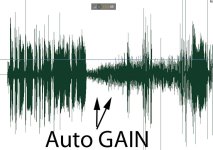
gain.jpg


Yup looks looks like AGC to me. Is there any way to control this?
 
Last edited:
The native GH3 RMS noise floor is -66 dB, and the GH3 AGC circuit boosts the noise floor by 3 dB at the audio level 1 setting. As you raise the audio level setting the AGC boost will go up to 20+ dB when you are at the audio level 19 setting.

To record good audio with the GH3, try and keep your audio level setting to 1 and feed your GH3 a -15 dB audio signal. ( this will require the use of a good pre-amp for most mics )

Also always use the 50 Mbits MOV recording format which will record audio in the uncompressed LPCM format.
 
Cool, I was shooting in AVCHD I switched over to mov and used the 50mbit. I dropped the input to 1 was using a pre but had the gh3 in the middle.

Thanks your setup should help.
 
TheDingo,

I know little about audio ("ignorance is bliss") & work with dedicated Sound Person(s). I use the GH3 audio as scratch for syncing via PluralEyes, & your settings for the Rode VMP have been great, so much so that the editors have occasionally pulled tracks directly from the cam. Thanks for that!

In some circumstances I go with no external mic, & wonder what your recommendation would be for scratch sound? Outdoors I've been cranking the GH3 audio to 13+ & so far haven't received complaints from the editors.

Lastly do you know what the GH3 levels indicators correspond to? Wish it was industry standards.

Thanks again,
Bern
 
In some circumstances I go with no external mic, & wonder what your recommendation would be for scratch sound?

For scratch tracks I have been using the audio level 19 setting to ensure that everything in the room will get picked up. The GH3 has a pretty good limiter built-in to the audio circuitry, so it's difficult to make it clip. I imagine if you are filming in a loud environment ( i.e. dance-club/rock concert, racetrack, airport runways, etc... ) you might want to set this lower.

Based upon my own tests the GH3 audio level setting is really an AGC-Boost control. ( +3 dB at level 1, that goes up to +20 dB at level 19 )

If you don't want AGC-Boost then use level 1, and if you do then go with as much as you like.


Lastly do you know what the GH3 levels indicators correspond to?

These numbers are for the initial audio level BEFORE the AGC-Boost kicks in, which it will always do.

Audio Level Display Units

0 = -66 dB
1 = -27 dB
2 = -24 dB
3 = -20 dB
4 = -17 dB
5 = -12.5 dB
6 = -9 dB
7 = Limiter circuit prevents this from being measured
8 = Limiter circuit prevents this from being measured

So if you are using a mixer with a 1 kHz test tone, I would aim to have the test tone showing 5 audio display units lit up.

If you have no test tone, then I would adjust your pre-amp until regular spoken dialog is showing 5 audio display units lit up.

...I agree it would be nice if Panasonic used industry standards, but hey this is damn good sound for a low cost DSLR. Last time I checked the Canon/Nikon DSLR audio was nowhere near as good.
 
TheDingo,

I know little about audio ("ignorance is bliss") & work with dedicated Sound Person(s). I use the GH3 audio as scratch for syncing via PluralEyes, & your settings for the Rode VMP have been great, so much so that the editors have occasionally pulled tracks directly from the cam. Thanks for that!

In some circumstances I go with no external mic, & wonder what your recommendation would be for scratch sound? Outdoors I've been cranking the GH3 audio to 13+ & so far haven't received complaints from the editors.

Lastly do you know what the GH3 levels indicators correspond to? Wish it was industry standards.

Thanks again,
Bern

I am also using the Rode VMP with the GH3. Can you repost those recommended settings here?

Also, any recommended settings for the GH3 with the Senheisser wireless lav ew g3 set? I need help setting the transmitter, receiver, and gh3 levels. I know they can vary shoot to shoot, but I'm looking for a general starting point or rule of thumb for weddings where the groom will be wearing the mic:
http://www.sennheiserusa.com/professional_wireless-microphone-systems_lavalier-mics_ew-100-g3_503107
 
Last edited:
I am also using the Rode VMP with the GH3. Can you repost those recommended settings here?

- Set your GH3 to audio level 1
- Set your Rode Video Mic Pro to the +20 dB setting


Also, any recommended settings for the GH3 with the Senheisser wireless lav we g3 set?

The transmitter setting will vary a little depending on the lav mic you are using.

So far with my G2 Sennheiser kit I use...

-18 dB on the transmitter when using a TRAM TR50 lav mic

0 dB on the receiver going directly into the GH3 mic input

GH3 audio level set to 1
 
- Set your GH3 to audio level 1
- Set your Rode Video Mic Pro to the +20 dB setting


The transmitter setting will vary a little depending on the lav mic you are using.

So far with my G2 Sennheiser kit I use...

-18 dB on the transmitter when using a TRAM TR50 lav mic

0 dB on the receiver going directly into the GH3 mic input

GH3 audio level set to 1

AWESOME!
I have a shoot tomorrow and I can't wait use this info. I agree with making this a sticky.
BTW, I just use the mic that came with it the set:
http://www.bhphotovideo.com/find/itemIncDetails.jsp/sku/217474/is/REG/type/witb
 
I'm not to good in the audio department so what happens if you have a external mic plugged into the GH3 and recording an interview and they stop talking? Do they levels go up then when they start talking again is it to loud? Do the settings in the above post fix that?
We received a GH3 a few weeks ago I am messing around with it now. I am feeling that I am hearing some AGC when testing mics. Seems like the nosie floor goes up a lot when I am not talking. I am going to pull a file and see what it looks like.

View attachment 67068


Yup looks looks like AGC to me. Is there any way to control this?
 
what happens if you have a external mic plugged into the GH3 and recording an interview and they stop talking?

The AGC ( automatic-gain-circuit ) kicks in, and the audio level will rise by the amount you've selected in the GH3 audio level control.

If you set the GH3 audio level to 1, the audio level will rise by only 3 dB, which does not make much difference. ( if you set the GH3 to 19 the audio level will rise by 20+ dB )
 
So doing interviews keeping the level at 1 would be best
The AGC ( automatic-gain-circuit ) kicks in, and the audio level will rise by the amount you've selected in the GH3 audio level control.

If you set the GH3 audio level to 1, the audio level will rise by only 3 dB, which does not make much difference. ( if you set the GH3 to 19 the audio level will rise by 20+ dB )
 
I've been using the AGC dissable on the Azden FMXDSLR with level at 1 on the GH3 and level control therefore, on the mixer works perfectly.
There's a cheap one on the 'swamp' right now.
 
Why the hell did they put AGC, it does not seem one has any option to set up audio lvls without external preamp. I naivly thought that audio settings indeed controll sensetivity rahter than the limiter of AGC... :(
how one should adjust to recording sound at 2 vs 10 meeters away (i'm thung about doc, when its not always possible to have a boom operator and have perfect controll over sound)?
P.s. first - peaking, now crippled audio, not to mention a design flaw of headphone jack vs screen
 
P.s. first - peaking, now crippled audio, not to mention a design flaw of headphone jack vs screen

...These are minor quips. The GH3 is a very functional camera that records good video and good audio. It definitely won't hold you back.

All consumer cameras have poor audio pre-amps, so you must use external pre-amps and microphones if you are serious about sound.
 
well, i long time ago i had Canon hv20 and it had proper audio lvl's with no AGC (not good pre-amp obviously).
So if a talent is far away i can increase sensitivity so that audio is around -7 dB, if he's just a meter away, i decrease it if necessary.

Now, what am I supposed to do with GH3 in such a case? Using Rode VideoMic Pro gives me +20dB (which is good), nevertheless i want to be able to adjust audio lvls in camera, and not just set it (AGC) to 1. Unless i miss the point completely.
p/s/ i'm not considering external mixers/preamps with separate audio lvls.
 
well, i long time ago i had Canon hv20 and it had proper audio lvl's with no AGC (not good pre-amp obviously)

Yes, at one point I owned a Canon HV20 too, but this is a small sensor consumer camera, which is quite different than shooting with a DSLR camera.


So if a talent is far away i can increase sensitivity so that audio is around -7 dB, if he's just a meter away, i decrease it if necessary.

If you are after professional sound then your mic should always be 3 feet ( or less ) from your subject.

So if your subject is further away, you may end up using a wireless UHF system ( like the Sennheiser G2 / G3 packs ) or a small audio recorder ( like the Olympus LS-7 ) with a hidden lav mic worn by your subject. ( clipped to a belt, tucked into a pocket, or hidden within a coat or dress )


Now, what am I supposed to do with GH3 in such a case? Using Rode VideoMic Pro gives me +20dB (which is good), nevertheless i want to be able to adjust audio lvls in camera, and not just set it (AGC) to 1. Unless i miss the point completely.

As I mentioned previously, you can do this in post if you don't want to use external gear. ( yes this raises the noise-floor, but so does raising the internal camera pre-amp )

Every consumer level camera ( and some prosumer cameras ) I have worked with has bad pre-amps, so you will want to set the camera's internal pre-amp levels as low as possible in order to record high quality sound.

The GH3 has a noise-floor of -66 dB when the camera's audio level is set to 1. Raising the internal audio level will also raise this noise-floor up to +20 dB ( via the AGC circuit ), so I don't find the GH3 audio control very useful.

I recommend setting the audio level as low as possible and then feeding the camera a very strong audio signal ( -15 dB seems to be optimal ), so that you can realize a -66 dB noise floor in your recordings.


p/s/ i'm not considering external mixers/preamps with separate audio lvls

You are limiting the quality of your audio recordings by not considering external equipment, which is completely your choice.
 
Back
Top