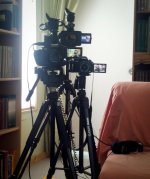
Anyone have experience matching HMC150 to AF100 footage?

Phil1076

Well-known member
I set both these cams to the exact same scene file (let's say, for example, Abel clean), same white balance (for example, 5.6K), and same focal length. I then shot the same scene with both cameras...

Surprisingly, they're reasonable close. I mean, there's a difference of course, but it's not night and day.

Essentially, I will be doing multi cam shoots with an AF100 and HMC150...I'll use the AF100 for as much as I can and the HMC for wider shots, shots that require zoom, and run and gun stuff.

What's the best way to match these cams, either in post or in-camera? Has anyone does this? What were your findings?

The plan is to shoot flat and apply a preset to the HMC footage in Premiere which will make it match the AF100. However if I could get it close in-camera, that would be a bonus.

I'm more than willing to actually do this myself but I thought I'd ask here and see if anyone has done this before; maybe I'll save myself a few hours.

Thanks
 
Phil, have never done this myself, but I can contribute some ideas.

Maybe try and use each camera for different lighting situations, that way it both looks HD but the different light could hide the fact that it's a different camera (if you can do this, don't know if they're going to be in the same location).

Also, maybe try to use the HMC150 with shallow DOF to match the AF's abilities.

It just seems like if they don't look identical when put side by side in the same light then you should try and hide it somehow by shooting the HMC in slightly different situations, so the brain thinks it's not the camera that changed, but the shooting conditions.
 
I'm not concerned about DOF or lighting, that's not the point...I just need proper color matching so I can cut between the two cams.
 
Well. if you're going to be shooting side by side I guess the best you can do is match them up identically in their settings and then do color correcting in post. Good luck, my friend.
 
I shoot with those two all the time.... they cut together nicely. There have been a few threads on the subject. I can only find one of them:
http://www.dvxuser.com/V6/showthread.php?235902-Af100-hmc150-gh2&p=2233997&viewfull=1#post2233997

Match the scene file settings & tweak in post. The biggest difference is DOF (as you can see in my example).

Just did a music video shoot, the HMC150 was on the crane...and the AF100 in my hands (and tripod...and slider).
Worked out well.:thumbsup:
 
I took a look at that thread Zaza, and that's exactly what i'm looking for...color matching.

Would you be willing to share your secret, or do you just eyeball it per scene and adjust color levels?
 
20120328-MM-01.jpg

I'm shooting with a AF100, HMC150, and GH2 (hacked). Since it's just me, I do interviews & use all three and focus on the interview instead of zooming. MW (GH2 w/ Canon nFD 28mm/f2.8), CU (AF100 w/ Contax Zeiss 50mm/f1.7), and ECU (HMC150). I intentionally picked out the Canon and Zeiss lenses to help match the GH2 and AF100 (and they were cheap). Before I started filming I shot a X-Rite ColorChecker chart and just tested and tested until I got something that I could easily match in post with minor gamma and saturation adjustments. I start every interview with white balancing the cameras and shooting the color chart for a couple of seconds to give a reference in post.

HMC150:
Detail -4
V Detail -4
Coring 0
Chroma Level -2
Chroma Phase -1
Master Ped -2
Gamma Cine-Like V
Matrix NORM2

AF100:
Detail -5
V Detail -5
Coring -3
Chroma Level -3
Chroma Phase -1
Master Ped -2
Gamma Cine-Like V
Matrix NORM2

GH2 (hacked with EOSHD's Vanilla Patch)
Film Mode Smooth w/ contrast, sharpness, saturation all set to -2. Noise reduction set to +2

Works for me
 
View attachment 51078

I'm shooting with a AF100, HMC150, and GH2 (hacked). Since it's just me, I do interviews & use all three and focus on the interview instead of zooming. MW (GH2 w/ Canon nFD 28mm/f2.8), CU (AF100 w/ Contax Zeiss 50mm/f1.7), and ECU (HMC150). I intentionally picked out the Canon and Zeiss lenses to help match the GH2 and AF100 (and they were cheap). Before I started filming I shot a X-Rite ColorChecker chart and just tested and tested until I got something that I could easily match in post with minor gamma and saturation adjustments. I start every interview with white balancing the cameras and shooting the color chart for a couple of seconds to give a reference in post.

HMC150:
Detail -4
V Detail -4
Coring 0
Chroma Level -2
Chroma Phase -1
Master Ped -2
Gamma Cine-Like V
Matrix NORM2

AF100:
Detail -5
V Detail -5
Coring -3
Chroma Level -3
Chroma Phase -1
Master Ped -2
Gamma Cine-Like V
Matrix NORM2

GH2 (hacked with EOSHD's Vanilla Patch)
Film Mode Smooth w/ contrast, sharpness, saturation all set to -2. Noise reduction set to +2

Works for me

Thanks for posting this, I'm working on a doc w/ the GH2 + HMC150. My last interview wasn't matched as well in camera as I would've liked. I'm curious to try your settings.
 
Anybody know if the HMC and HPX170's range of settings are similar?

Would these settings give a good match for the AF100 and HPX170?
 
I own both. They seem to match pretty well. One thing to remember is the HMC150 master pedestal has 100 steps and the AF100 master pedestal has 15 steps.
 
Back
Top