Anyone else doing film transfers with their GH!? Here's my video test.

Cavemandude

Well-known member
8mm (Regular 8 not Super) Film Transfer using a hacked GH1 with kit lens at 720 60P. Color corrected in Canopus Edius 5 and exported in HDV 720 60P before uploading to YouTube.


Here is a video still from GH1 showing the enlarged film gate of the projector before color correction and cropping in Edius:

8mmFilmGateGH1.png


Randy
 
Last edited:
That's a really clean tele cine. Did you use a macro lens straight on to the film gate, or are you using a relay lens?
I've dabbled a little bit more recently using the GH1 for transfers and I'm starting to get some okay results, though not as clean as yours. I've found 1080 to be way too jellowy.
 
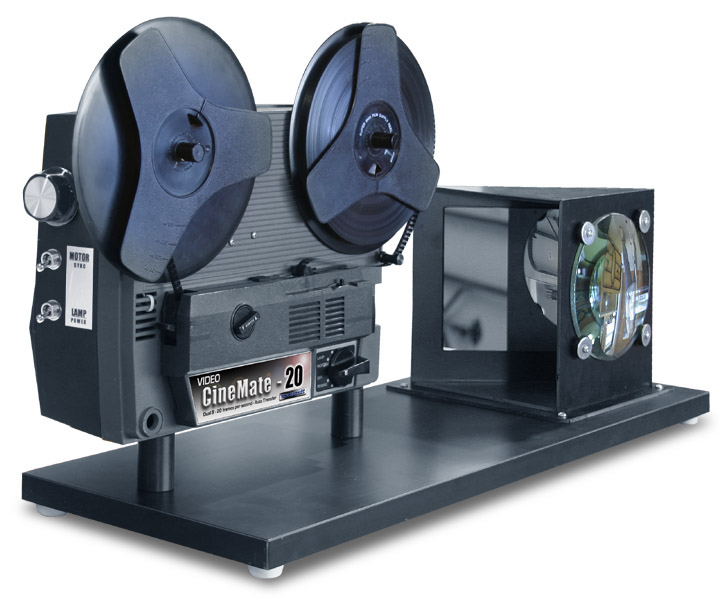
I'm using a CineMate-20 from MovieStuff.TV:

http://www.moviestuff.tv/c_20.html

I'm only using the kit lens at full zoom (140mm) which doesn't fill the frame (see pic in my last post) since the zoom is not long enough. When zoomed in and cropped to fill the frame in Edius, it actually ends up being about the resolution of DV 720x480 but I still export it at 720 60P. Doesn't look like DV resolution video does it?

I may end up getting the Panasonic 45-200mm lens ($300) to see if that will zoom in far enough to fill the frame. There is also the Panasonic 100-300mm lens ($600) that is coming out that will zoom in further. This is one scenario where you want as sharp an image as possible and the kit lens is great at doing that.

Used Standard Mode with all settings at 0, 1/60th, 100 ISO, f5.8.

By the way, I'm the youngest/shortest guy in the video.

Randy

new_c20_large.jpg
 
Last edited:
............. or you send your 8mm footage to BOLEX of Switzerland.... BOLEX - The Legend ........ www.bolex.ch

"Bolex-Digital brings your memories back to life in High Definition. Bolex, since 1924, is the swiss leader of Super8, 8mm, 9,5mm and 16mm film. We offer high quality film digitization services and the best available digital restoration technologies"

BOLEX Digital http://www.bolex-digital.com/en/services/film-scanning/

http://www.youtube.com/watch?v=qmgn_74vABM

Bolex use the Flashscan HD http://www.flashscanhd.com FlashscanHD User in your country: http://www.flashscanhd.com/vertriebspartner.htm

(No, I'm not working for Bolex or Flashscan

Scope
 
Last edited:
You really need a macro for this job, that's really the right way to do it - a Canon FD 50mm f/2.5 macro with an extension tube would be perfect, cheaper than those other options and is incredibly sharp.

I'm using a CineMate-20 from MovieStuff.TV:

http://www.moviestuff.tv/c_20.html

I'm only using the kit lens at full zoom (140mm) which doesn't fill the frame (see pic in my last post) since the zoom is not long enough. When zoomed in and cropped to fill the frame in Edius, it actually ends up being about the resolution of DV 720x480 but I still export it at 720 60P. Doesn't look like DV resolution video does it?

I may end up getting the Panasonic 45-200mm lens ($300) to see if that will zoom in far enough to fill the frame. There is also the Panasonic 100-300mm lens ($600) that is coming out that will zoom in further. This is one scenario where you want as sharp an image as possible and the kit lens is great at doing that.

Used Standard Mode with all settings at 0, 1/60th, 100 ISO, f5.8.

By the way, I'm the youngest/shortest guy in the video.

Randy

new_c20_large.jpg
 
You still need a projector with the proper modifications to do a decent transfer though, it's not as simple as just buying a macro lens. If you want to go the direct macro lens route with an HD camcorder, here's a good guide:

http://issuu.com/filmmaker8.com/doc...www.filmmaker8.com/issuu/basicGrey/layout.xml

I may do that modification in the future but I'm making money now with my current setup without any additional expense or time invested and getting excellent results.

Randy


BEFORE

2010-11-13_1148.png


AFTER

2010-11-13_1149.png
 
Last edited:
Some of that may have come from the 400' plastic reel I had feeding that film. It was pulsing a bit during that section and the film was rubbing on the reel too much possibly causing the vertical shift up and down.

Actually, I have the latest version of ProDad's Mercalli and that has been working great on DV video. I guess I'll have to try it on 720 60P and see if I run into any problems. Here's the Mercalli link:

http://www.prodad.com/home/products/videostabilizing/300391667,l-us.xhtml

Randy
 
Last edited:
Back
Top