
Navigation
Install the app
How to install the app on iOS
Follow along with the video below to see how to install our site as a web app on your home screen.
Note: This feature may not be available in some browsers.
More options
You are using an out of date browser. It may not display this or other websites correctly.
You should upgrade or use an alternative browser.
You should upgrade or use an alternative browser.
Any FrameForge 3D Users?
- Thread starter Kerplunk
- Start date

Martti Ekstrand
Veteran
Sounds about right. It's probably a bit wider than the GH1 as Super35 is 22 mm wide negative area and GH1 has 18 mm wide image on the sensor in video mode and 16:9 photos.
Martti Ekstrand
Veteran
Yup, just as long as it keeps a 16:9 proportion. Can't you set your own frame sizes in FrameForge 3D?
Martti Ekstrand
Veteran
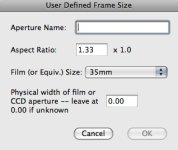
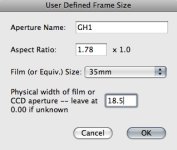
Well, 1.78 in Aspect Ratio and for Physical Width... check manual if that's millimeter or inch for that value or experiment. I draw my storyboards in Photoshop or on napkins so haven't had a reason to buy FrameForge or similar app yet.
It's in mm. My pictured settings below seem to translate about right. Searched to get the 18.5 (thanks Barry), but have also seen it as 18.9. Martti, maybe you can tell me if I'm in the right ballpark with these.
The beauty of FrameForge that goes beyond sketches is something they call Optically Accurate Previsualization. There's a pretty good explanation here: http://www.frameforge3d.com/newsite/previz/
I currently have version 2.5. The new version (3.0) includes a ton of cameras, lenses (including primes) and equipment like dollys, cranes, etc.
Kind of a steep learning curve, but once you know your way around it, can really save some time in that it limits surprises once you get on set or location -- if you didn't have the luxury of being there when visualizing the shoot.
This is especially nice for those of us who are inexperienced and can't immediately imagine the results of a combination of complicated variables.
The beauty of FrameForge that goes beyond sketches is something they call Optically Accurate Previsualization. There's a pretty good explanation here: http://www.frameforge3d.com/newsite/previz/
I currently have version 2.5. The new version (3.0) includes a ton of cameras, lenses (including primes) and equipment like dollys, cranes, etc.
Kind of a steep learning curve, but once you know your way around it, can really save some time in that it limits surprises once you get on set or location -- if you didn't have the luxury of being there when visualizing the shoot.
This is especially nice for those of us who are inexperienced and can't immediately imagine the results of a combination of complicated variables.
Attachments
Martti Ekstrand
Veteran
Looks right to me. Can't see what options you got at the Film Size drop down menu or if it's of importance at all once you set the aspect and width manually.
I'm sure FrameForge is a good tool, I just haven't had any gigs that would motivate the investment in time for me. Any kind of pre-viz is good in my opinion whether is CGI or stick men on paper. I spent days in my youth looking on with the rest of the team while director and DP were arguing about a camera placement.
I'm sure FrameForge is a good tool, I just haven't had any gigs that would motivate the investment in time for me. Any kind of pre-viz is good in my opinion whether is CGI or stick men on paper. I spent days in my youth looking on with the rest of the team while director and DP were arguing about a camera placement.
Thanks for your help and comments, Martti. When comparing the FrameForge pre-viz with what I'm actually seeing through the lens, these settings are pretty much dead on.
The other options for Film Size are 16mm, 70mm, HD Video, Super 16, and Video (Pro).
You're right - seems that the Film Size and Aspect Ratio/Width is an either/or kind of thing. Although their manual doesn't really cover this very well and it's not discussed much in their forums, from what I could find.
A tool like this definitely requires a serious time investment and is not cheap either. The only way I have it is through a university via educational discount.
The other options for Film Size are 16mm, 70mm, HD Video, Super 16, and Video (Pro).
You're right - seems that the Film Size and Aspect Ratio/Width is an either/or kind of thing. Although their manual doesn't really cover this very well and it's not discussed much in their forums, from what I could find.
A tool like this definitely requires a serious time investment and is not cheap either. The only way I have it is through a university via educational discount.
Fresno Bob
Well-known member
Anyone know what settings to use in FrameForge for the GH2 - but with masking to 2.40:1 in mind?
I'm going to be using a 12mm lens and a 50mm lens. Is it easy to arrange the settings in frameforge to work with this?
I'm going to be using a 12mm lens and a 50mm lens. Is it easy to arrange the settings in frameforge to work with this?
Fresno Bob
Well-known member
Thanks man. I'll give it a try