GH2 and once more: SMOOTH vs CINEMA ???

roei z

Veteran
Hi-

i shot some static footage - switching between smooth and cinema trying to keep most of the skies in the background.

http://www.mediafire.com/?2nptxlm4yb2qm

i have a hard time deciding, but my guts tell me smooth.
although most of you prefer cinema, it seems to me that smooth still manages to be more of
an "all around" natural picture provider. the shots might be a little underexposed in order to
maintain just a bit of sky in flashing "rec highlight", but overall i really like the GH2 color and dynamic range in the regular tweaking: -2, -2, 0, -2, 1/50 shutter, 160 iso, and aperture between 5.6 - 8. did anyone calculate how many stops differ between the modes in order get
an equal exposure?

BTW can someone help on a best way to calibrate the evf/lcd brightness to get an exact
picture recording? there seem to be some minor color or brightness/contrast shifting when recording starts, it's confusing, so i think it did make the final result a bit underexposed.

however, the tele mode ( i think it was smooth ) came out too underexposed and showing the "ugly" sides of lowlight.

hope you'll have time to download and give your opinion.

thanks :)
 
Last edited:
I, too, believe "Smooth" to be the workhorse setting for this camera. "Cinema" seems designed as a curve for doing a film-out, if anyone still does that these days. Cinema gives you more headroom in the highlights but sets middle-gray way down at like 35 IRE. So if you follow the GH2's meter, it basically makes you underexpose the image to keep the highlights. The idea being the process of going to film will change the gamma curve in such a way as to brighten the midtones back up without sacrificing highlight detail. I'm no expert on this, but have been doing tests and reading up in just the last few days. "Smooth" on the other hand, seems designed to give you wide latitude when your final exhibition is for TV or computer monitors. The highlights are compressed and both the shadows and midtones are lifted, so you get a good-looking exposure right out of the box. You may just need to add some contrast to taste in post.

Roughly speaking, "Cinema" needs 1/3 stop more light than "Smooth" to expose middle-gray at the same level. So "Smooth" with aperture at f5.6 will need "Cinema" to be at f5.0 to match. But be careful, because since their curves are different, setting the midtones in Cinema to match Smooth may cause Cinema to clip in the highlights. That kind of reinforces my point about why Smooth is better for general shooting.
 
I, too, believe "Smooth" to be the workhorse setting for this camera. "Cinema" seems designed as a curve for doing a film-out, if anyone still does that these days. Cinema gives you more headroom in the highlights but sets middle-gray way down at like 35 IRE. So if you follow the GH2's meter, it basically makes you underexpose the image to keep the highlights. The idea being the process of going to film will change the gamma curve in such a way as to brighten the midtones back up without sacrificing highlight detail. I'm no expert on this, but have been doing tests and reading up in just the last few days. "Smooth" on the other hand, seems designed to give you wide latitude when your final exhibition is for TV or computer monitors. The highlights are compressed and both the shadows and midtones are lifted, so you get a good-looking exposure right out of the box. You may just need to add some contrast to taste in post.

Roughly speaking, "Cinema" needs 1/3 stop more light than "Smooth" to expose middle-gray at the same level. So "Smooth" with aperture at f5.6 will need "Cinema" to be at f5.0 to match. But be careful, because since their curves are different, setting the midtones in Cinema to match Smooth may cause Cinema to clip in the highlights. That kind of reinforces my point about why Smooth is better for general shooting.

great input, thank. but then again, it's starts to be very confusing to get hold of this...
you can say the opposite, like, it is better to underexpose smooth to save some of the natural highlights.. grrr... and add the lcd not reliable on actual brightness... i have to find a fixed workflow for those decisions.

* nostalgic is also an option, but i find it a little yellowish
 
+1 for Smooth

I just like the clean neutral image it gives, allowing you to manipulate it a bit in post if you want.
 
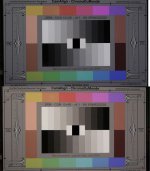
Nostalgic has it's good qualities, but it is not neutral by any means. It adds a sepia or yellow cast across the whole image. Here's a photo that compares the 2. Smooth is on top. Nostalgic is on the bottom.

SmoothvsNost.jpg
 
Of your shots here I prefer the Smooth setting, though I'm not experienced enough to have a wider opinion between the two. The Smooth does look to have a bit more exposure (unless that's part of the Smooth curve); maybe that's part of my preference.

If the Nostalgic has a warm cast, that's probably why I liked it whilst testing my camera in the miserable cold fog and drizzle.


And you need dancers, roei z...
 
I think you will find a consensus over the history of this camera for SMOOTH. What seems to be all over the map is the 0 vs -1 vs -2 settings within the film mode. I am unsure if anyone has done any real technical tests to prove if 0 is no processing or -2 is no processing.
 
I think you will find a consensus over the history of this camera for SMOOTH. What seems to be all over the map is the 0 vs -1 vs -2 settings within the film mode. I am unsure if anyone has done any real technical tests to prove if 0 is no processing or -2 is no processing.
Here's a practical lesson I learned about Sharpness settings. I shot a short film on Smooth with everything at -2. Then I took somebody's advice and shot one day of footage with Sharpness at 0. One of those shots was a close-up of a beautiful actress, well-lit. But the zero sharpness didn't do her wrinkles and freckles any favors. It made a thirty-something actress look ten years older because it accentuated every "flaw" on her face. So I had to add lots of diffusion in post. The next day, I returned the Sharpness to -2 and she went back to looking Hollywood beautiful. Needless to say, when shooting close-ups, -2 Sharpness is a must for me.
 
I've actually used "Nature" to good effect when I want colors to "pop". And if you really, really want super-saturated candy color, set it to "Vibrant". The cool thing is that you can use different film modes for different moods. But yeah, Smooth is pretty much the best for general use.
 
So is everyone using Smooth with all the settings turned to -2 on the GH2?
I leave Color at zero. If I go above 400 ISO, I may switch NR to zero instead of -2.
Also, some of my old manual lenses from the 60's and 70's are pretty low-contrast compared to the Panasonic lenses, so I may set Contrast to zero when I use them. But when using Panasonic lenses, contrast always at -2 when using Smooth.
 
Thanks for all the info. It takes me one step further in understanding
What I'm dealing with.
I guess i'll need to test again
trying to match the exact aperture difference.
so what's the advice on setting the LCD brightness?
Below or above my needs?
or forget about it and only judge by the exposure meter?

Thanks :)
 
I leave Color at zero. If I go above 400 ISO, I may switch NR to zero instead of -2.
Also, some of my old manual lenses from the 60's and 70's are pretty low-contrast compared to the Panasonic lenses, so I may set Contrast to zero when I use them. But when using Panasonic lenses, contrast always at -2 when using Smooth.

Yeah, thanks! Guess I'll have to do my own testing with my Nikon Nikkor AI-S lenses and ISO settings in conjunction with Neat Video when my GH2 finally gets here.
 
Oh, so you too joining the GH2 club? :)
I Somehow mistook you for a canon guy

Nah. I had a GH1(3), sold it a couple of months back, and have been using my girlfriend's GF1(3) until my GH2 arrives. Can't wait!
 
Last edited:
sorry for the crappy picture:
exposure .jpg

how do i judge from the exposure meter on the exact stops to over or under expose ? every little line is a stop?
 
Back
Top