Anamorphic Cinemascope in Native 1920x810 MJPEG Mode

stonebat said:
...can u apply it on 720p60 avchd to produce 1920x810 image? if not possible, how about on 720p30 avchd?
Sorry, AVCHD frame dimensions cannot be usefully altered at this point.

In case we are able to shoot even 1440x1080 we can use those cheap 2x Japanese anamorphics to get 2880x1080, which is a 2.66 aspect ratio... 2.66 can be easily cropped to 2.39 (2.35) or even a little less wide to view on a Philips 21:9 tv, which has a 2560 x 1080 resolution.
While a 1440x1080 MJPEG frame can be created with PTool, it doesn't produce a good aspect ratio for use with a 2x anamorphic adapter (such as the Singer 2x lens I described earlier). The compression from the 1440 width magnifies the 2x squeeze of the anamorphic lens, producing a 2.66x horizontal squeeze factor. To compensate for this, you'd need to stretch the 1440x810 frame out to 3840x1080, twice the width of a 1920x1080 FHD frame.
 
Last edited:
Sorry, AVCHD frame dimensions cannot be usefully altered at this point.


While a 1440x1080 MJPEG frame can be created with PTool, it doesn't produce a good aspect ratio for use with a 2x anamorphic adapter (such as the Singer 2x lens I described earlier). The compression from the 1440 width magnifies the 2x squeeze of the anamorphic lens, producing a 2.66x horizontal squeeze factor. To compensate for this, you'd need to stretch the 1440x810 frame out to 3840x1080, twice the width of a 1920x1080 FHD frame.

Unless you shoot 4:3 which was the whole point of my post. If it can be done, like Vitaliy assumes, the 4:3 MJPEG VGA (and QVGA) mode would shoot in a much higher resolution (than the current 640x480), effectively giving us HD but in a 4:3 aspect ratio. At least that is my hope. 1440x1080 would allow us to shoot 2880x1080 (2.66) and crop it to 2560x1080, which is the 2:37 you mention.
 
Last edited:
Unless you shoot 4:3 which was the whole point of my post... 1440x1080 would allow us to shoot 2880x1080 (2.66) and crop it to 2560x1080, which is the 2:37 you mention.
Ah, I see what you mean now. Yes, a 4:3 MJPEG sensor mode would be very useful. In addition to 1440x1080, a 2160x810 MJPEG frame used with a 2x anamorphic lens would produce 2.67:1 widescreen videos that would not require further post-processing.
 
would it be possible to tweak mjpeg mode to chop off top 88 pixels and bottom 88 pixels so that evf and lcd do not display that portion during recording?

this is for the poormen who cant afford to buy anamorphic lens. that wud make 1280x544 resolution. i can crop it when exporting... but it would be nice to frame it while recording. because of less total pixel counts, if 60Mbps can be achieved, im hoping for acceptable IQ. only wishful thinking?

otherwise i wud put some tapes on the lcd screen... hehe.
 
Last edited:
Hi. I'm a newbie here so please bare with me.
I've use lpowell 's 40Mbps AVCHD High Reliability Patch and love the results. Great work by the way! I'm interested in trying this anamorphic patch but I don't have an anamorphic adapter.

I doing post on a mac. So what are the best apps and settings to do the vertical stretch to 1080? I have the FCP Studio 3 and Adobe CS5 Master Collection, yet it looks like this vertical stretch can be done with something like MPEG Streamclip easily enough. But are there any recommended workflows to do the vertical stretch with high quality results?

Any input would be appreciated.

Thanks.
 
Last edited:
would it be possible to tweak mjpeg mode to chop off top 88 pixels and bottom 88 pixels so that evf and lcd do not display that portion during recording?
The precise MJPEG 2.37:1 widescreen ratio would be 1280x540, which is easy to set in PTool. As it's literally half the 1080-pixel height of FHD mode, the MJPEG bitrate would probably not reach as high as 60Mbps, unless you were shooting an extremely detailed subject. On the other hand, MJPEG maximum recording time would likely be extended.
 
Last edited:
Get naked with you? Newbie or not, I hardly know you.

Here's what I did:

Shoot 1920x810 MJPEG clip with LPowell's Anamorphic setting at beginning of this thread;

Resize to 1920x1080 ProRes HQ in Compressor;

Open new 1920x1080 sequence in Final Cut Pro;

Drop resized clip into sequence;

Click on Motion tab, crop top and bottom 12.5% each;

Export 1920x1080 ProRes HQ;

Shake head in disbelief that I can shoot Cinemascope with a GF1.

Must remember to send LPowell some Zingerman's this Xmas.


Hi. I'm a newbie here so please bare with me.
I've use lpowell 's 40Mbps AVCHD High Reliability Patch and love the results. Great work by the way! I'm interested in trying this anamorphic patch but I don't have an anamorphic adapter.

I doing post on a mac. So what are the best apps and settings to do the vertical stretch to 1080? I have the FCP Studio 3 and Adobe CS5 Master Collection, yet it looks like this vertical stretch can be done with something like MPEG Streamclip easily enough. But are there any recommended workflows to do the vertical stretch with high quality results?

Any input would be appreciated.

Thanks.
 
I would send Vitality an e-hug if this were pulled off...My GH1 arrives tomorrow and my 2x anamorphic will be here in 3 mo (availability). I would run every test I could under the sun to help make it stable once all my gear arrives.

Edit: My entire message didnt post...heres the rest:

Thank you for making this patch...Just out of curiosity, if you had a 2x couldn't you use a ratio of 1280x810 when filming? You would end up with a 2560x810 unstretched which you could then drop into a timeline back at the 1980x810 from the OP. Its a non-standard format but it seems like it would work unless I am missing something.
 
Last edited:
Thank you very much lpowell.
This patch is absolutely great.
This patch is absolutely great!
I tried 3 aspect ratio; 1920*810,1920*540(to suit my 2X anamorphic attachment), and 1920*720.
I end up with 1920*720(1:2.667 ratio) because it can be compromised with my 2X anamorphic attachment.
The average bitrate I check via KMPlayer read 60 Mb. I'm not sure this bitrate is correct. Unfortunately, with this patch the in-camera VDO playback doesn't work.
Let's hope the HD 4:3 aspect ratio be possible to hack
soon.
 
Last edited:
...if you had a 2x couldn't you use a ratio of 1280x810 when filming? You would end up with a 2560x810 unstretched which you could then drop into a timeline back at the 1980x810 from the OP.
Yes, 1280x810 would work with a 2x anamorphic lens, but you would still need to stretch the video out to 2880x810 in post. The 1280 frame width would give you an additional squeeze factor of 1.125x, which would be multiplied by the anamorphic lens' 2x factor for a total squeeze of 2.25x. Multiply this by the 1280-pixel frame width and you get 2880x810.

The compelling reason to use a 1920x810 frame, however, is to maximize in-camera horizontal resolution. Stretching 1280 out to 2880 would reduce your horizontal resolution by over 55%. When stretching 1920 out to 2880, resolution is reduced by only 33%. With a 2x anamorphic lens and a 16:9 image sensor, an ideal frame size would be 2880x810. This would require no stretching in post. If we had a 4:3 sensor mode, the ideal 2x anamorphic frame size would drop down to 2160x810, and again require no stretch. In all cases, the final result would need to be cropped down to 1920x810, regardless of the amount of stretch required in post.
 
Ah I see, thanks for clearing that up...How are you calculating the squeeze factor? I seem to be missing this part as it must be more then just horizontal width x2 which I what I have been doing. It also doesn't make sense to me why you would want to stretch both the 1280 and 1920 horizontal widths to 2880.
 
I find it easier to understand the anamorphic scaling factor by working in terms of the native isomorphic frame size. With a 16:9 image sensor at a vertical resolution of 810, the isomorphic frame size is 1440x810. Using a 2x anamorphic lens will then require a stretch to a 2880x810 frame, regardless of the horizontal width of the source video.

Since 1920 is our target frame width for FHD or Blu-Ray video, it is a convenient width for image acquisition. It also happens to be the widest frame we can set in PTool, and it matches the scaling factor of popular 1.33x anamorphic lenses. For a 4:3 image sensor at a vertical resolution of 810, the native isomorphic frame size is 1080x810. Since we're aiming for a 1920x810 widescreen format, 2160x810 would be the most convenient frame size, and it would perfectly match a 2x anamorphic lens.
 
I end up with 1920*720(1:2.667 ratio) because it can be compromised with my 2X anamorphic attachment.
The average bitrate I check via KMPlayer read 60 Mb... Unfortunately, with this patch the in-camera VDO playback doesn't work.
Thanks for posting a sample of your results, the image quality looks very clean. At the expected bitrate of 60Mbps, the GH1 will be unable to play back the video in camera, regardless of the speed rating of your SD card.

As you mentioned in your Vimeo comments, the aspect ratio of your rendered video looks a bit compressed horizontally. With a frame height of 720 pixels, you should stretch the source video from 1920 out to 2560 pixels wide, and then crop it to 1920x720 for a super-wide 2.67:1 aspect ratio. If you'd prefer a more standard 2.37:1 widescreen ratio, I'd recommend shooting at 1920x810, stretching it to 2880x810 in post, and cropping the final render down to 1920x810.

Also, I'd appreciate it if you could correct the spelling of my name - it's "LPowell".
 
Gotcha!....well I would love to help move this process along. My GH1 is arriving today so anything I can do (or try) to help I'm pretty available.
 
Last edited:
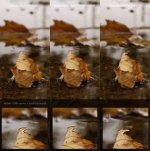
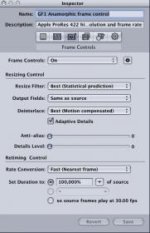
I did some testing on my GF1 with Anamorphic patch. As you can see first two examples are recorded in 1920x810 and upsampled in Compressor to 1920x1080. Third shot is from AVCHD 720p upscaled in Final Cut to 1920x1080. First example was upsampled with basic Compressor settings (based on source frame rate, resolution and square pixel aspect). I was happy with results but at 100x preview video has strange interlace (same as I saw in Shaveblog last footage). Then I turn ON Frame controls in Compressor and put best setting for Resize filter and Interlace as you can see in screenshot bellow (Deinterlacing in Final cut or Quicktime didnt help). Then I menaged to get best possible results. And as Lpowell said Anamorphic footage upsampled to 1920x1080 is definitely better then 720p upscaled as you can see. Now GF1 owners can be prouder. I shooted my footage in Nature Film mode with all zero settings. One thing strange to me is resolution Im reading from upsampled footage. MediaInfo reads resolution 1888x1062 but when I import it to Final Cut it shows 1080i. I read around web and it should be normal because of some SMPTE 274M standard. Im just confused cause video format are kind of new thing to me.


Attachments

  • poredjenje.jpg
    poredjenje.jpg
    15.5 KB · Views: 1
  • Screen shot 2010-10-20 at 23.28.11.jpg
    Screen shot 2010-10-20 at 23.28.11.jpg
    10.8 KB · Views: 1
lpowell - I am a bit confused here. wasn't it agreed on another thread that 1080p MJPEG is just upsampled from 720P ? So there is no gain in using 1080p mjpeg ?
 
Back
Top