mshakeshaft
Active member
One of the problems with all DSLR cameras used for video, is the limitations of audio capture. Whilst the Panasonic GH2 is better than most (it has an onboard stereo mics and VU meters), it still falls short in some areas. The biggest issue is that there is no headphone monitoring and level adjustment is crude, via the menu. Various solutions have been tried including recording separate sound using SD recorders, such as the Zoom H4N. This separate audio can then be synched in post production using software like Plural Eyes or natively in Apples FCPX. Whist this works fine it does take extra time. With some of the work I do, I dont have time for a lot of post production, so my goal was to find a quick solution, suitable for run'n'gun situations.
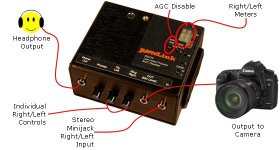
Initial tests showed that the audio circuitry of the GH2 wasn't too bad. At low levels the noise was acceptable, I decided to try a preamp. I tried a few different manufacturers. The main problem was that they were all too big. In most cases the form factor of the preamp was bigger than the camera. In a lot of cases this was because they used XLR connectors. Whist there are obviously many advantages to using these connectors in professional situations, for the type of work I was doing and with the type of microphones I was using, it was overkill. I found one preamp that used 3.5mm connectors, the Juicedlink DS214. This features preamps, headphone monitoring VU meters and AGC disable. The VU and AGC disable where both features I didn't need for the GH2. It has onboard VU meters and the AGC is redundant, using this setup.
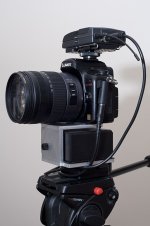
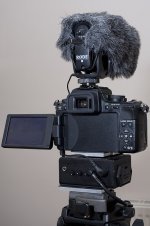
My initial experiments were very encouraging. I could finally hear what was being picked up by the mic and with the switches on the front, fine tune my levels. Mounting the preamp was my only problem. at first I had everything in a waist bag, but it just meant there were wires everywhere. The mounting solutions offered by Juicedlink were also a not quite what I was after, so I decided to have something made. I approached a local engineering firm with some plans. They built the bracket in the picture for me. This mounts to the bottom of the camera, via the tripod screw, with a Manfrotto quick release plate on the botton. I use the Manfrotto 323 Adapter on all of my tripods and rigs.
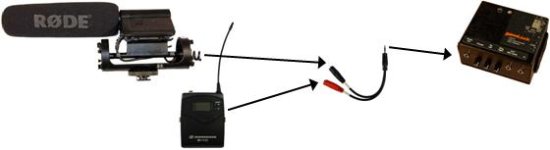
This setup works great. For run'n'gun/documentary situations I use either a Rode Video Mic Pro, or a Sennheiser radio mic with a lav. My only change would be to have locking 3.5mm jacks on the Juicedlink, similar to the ones used by Sennheiser. I have just come back from a week covering the elections in Greece with this setup and the sound was excellent.
I have had a few people ask me about the setup and where I got the bracket from. I am toying with the idea of having some made up. There are a few little modifications I would make, such as including some accessory mounting holes, but basically it would be pretty much the same. If anyone has any questions or comments please feel free to post.
Initial tests showed that the audio circuitry of the GH2 wasn't too bad. At low levels the noise was acceptable, I decided to try a preamp. I tried a few different manufacturers. The main problem was that they were all too big. In most cases the form factor of the preamp was bigger than the camera. In a lot of cases this was because they used XLR connectors. Whist there are obviously many advantages to using these connectors in professional situations, for the type of work I was doing and with the type of microphones I was using, it was overkill. I found one preamp that used 3.5mm connectors, the Juicedlink DS214. This features preamps, headphone monitoring VU meters and AGC disable. The VU and AGC disable where both features I didn't need for the GH2. It has onboard VU meters and the AGC is redundant, using this setup.
My initial experiments were very encouraging. I could finally hear what was being picked up by the mic and with the switches on the front, fine tune my levels. Mounting the preamp was my only problem. at first I had everything in a waist bag, but it just meant there were wires everywhere. The mounting solutions offered by Juicedlink were also a not quite what I was after, so I decided to have something made. I approached a local engineering firm with some plans. They built the bracket in the picture for me. This mounts to the bottom of the camera, via the tripod screw, with a Manfrotto quick release plate on the botton. I use the Manfrotto 323 Adapter on all of my tripods and rigs.
This setup works great. For run'n'gun/documentary situations I use either a Rode Video Mic Pro, or a Sennheiser radio mic with a lav. My only change would be to have locking 3.5mm jacks on the Juicedlink, similar to the ones used by Sennheiser. I have just come back from a week covering the elections in Greece with this setup and the sound was excellent.
I have had a few people ask me about the setup and where I got the bracket from. I am toying with the idea of having some made up. There are a few little modifications I would make, such as including some accessory mounting holes, but basically it would be pretty much the same. If anyone has any questions or comments please feel free to post.
Last edited: