Almost ashamed to post this.

Shauno

Active member
Hello guys,

After a successful shoot this week I have run into a problem that I am almost ashamed to post.

But...
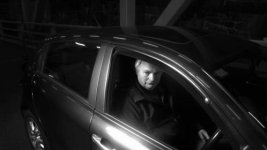
vlcsnap-2011-11-18-16h07m34s163.jpg

As you can see, my DP (and in turn me), has got a shot with a mic stand in the background, behind the car.

Aside of re-shooting, what post options do I have?

Any help is appreciated.

Shauno
 
I know, that's not a direct representation of the full resolution of the image, but it can be seen in HD. Aside of reframing it in post, I can't think of anything else I can do.
 
I know, that's not a direct representation of the full resolution of the image, but it can be seen in HD. Aside of reframing it in post, I can't think of anything else I can do.

Is or does the car move?

If not, then the following...

Make a still frame of the car shot. Take in to photoshop and cut a mask just to cover the equipment, and clean it up.

Bring the cleaned and masked psd file back into AE. Place it over the live media. The masked PSD file should just show the 'clean' plate.

I'm thinking you need only a sliver of 'mask+clean' to eliminate the equipment.

The other issue, which I've not had time to come up with a 'really good' solution, is the following problem... now that you have a 'clean' plate... it will be absolutely static relative
to a small amount of noise... someone, a pixel peeper, may pick up on that.

I've thought about using clips of 'grey cards', at the ISO and lighting near the levels in the shot, then use one of the layer modes to 'inject' noise into static plates like this. With a little blending
it should cover any obvious still you've brought in.

If the car does move, then there's an amount of rotoscoping required to eliminate the equipment...
 
I had to slam that in photoshop to see it -

The noise is really an after effects job, not photoshop. I've often made plates in photoshop by exporting a frame from AE, that's gangbusters. You can make the plate from pieces of shots of the bridge, go back and shoot a clean still (doesn't even need to be that close to exact, you can distort/etc in photoshop.)

But to make a still plate work, you'll need to use the grain matching tools in AE - ain't no thang, sample the grain from the motion shots and go to town.

One thing that helps to make plates in PS - if you're bringing in a digital still and will be distorting it - it can really soften the still up. So, import your frame grab, and enlarge it using image size. Double or triple the resolution. Then create whatever elements will "float" above it, using high-rez stills (which will be far larger than even a tripled frame in most cases). Then reduce the layered file back down to the correct size. Reducing will really clean up a lot of the softness that comes from distorting.

If your new plate will include elements from the old plate, re-import the original frame export and replace it in the layered file - since your frame will have been enlarged and then reduced, it will take a quality hit as well - so drop in an untouched version.

REALLY eyeball the results in AE - you may have to soften, or even slightly blur and then re-sharpen the plate (which can mimic video compression). Check it by viewing R, G and B separately and look for color and density mismatches, correct with levels.
 
Blurring the edges of the plate (except where it comes to a sharp edge, like the outline of the car for example) will also help hide where it starts and finishes.
 
Back
Top