GH5 Aliasing in slow motion

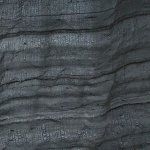
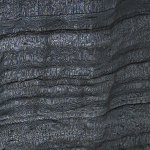
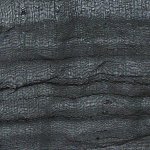
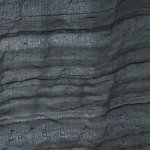
Apologies for wall of images. Moire test of GH5 using Vivid profile, +5 contrast, +5 sharpness... so a very crunchy image of two layers of fabric. All shots 8bit (variable frame rate doesn't work in 10 bit so max speed is HD 60p in 10bit which is clean, and there's nor 4K 60 in 10bit)
gh5 moire01.jpg
HD 30p = clean

gh5 moire02.jpg
HD 60p = clean

gh5 moire03.jpg
HD 75p = next highest frame rate,moire begins
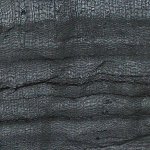
gh5 moire11.jpg
4K 30p = clean

gh5 moire12.jpg
4K 60p = clean

Conclusion: anything above 60p gives moire on GH5
 
Thanks very much for going to the trouble, hyalinejim. Interesting. I wonder if the GH5S is the same? I’m guessing it should go a little higher than 60 FPS at Full HD before skipping lines? Since the GH5S’s readout time is about 11.5 ms.
 
Thanks very much for going to the trouble, hyalinejim. Interesting. I wonder if the GH5S is the same? I’m guessing it should go a little higher than 60 FPS at Full HD before skipping lines? Since the GH5S’s readout time is about 11.5 ms.

Its (the Gh5s) is unlikely to have a magic little extra.

--

Overall we clealy see the camera falling off a quality hill.. BUT declaring any individual shot to prove a certain setting clean is flawed.. moir happens when the subject 'weave' interferes with a the pixel depth its about matching frequencies... so a subject might be clean at 4ft and horrid at 5ft or 3 feet.

All the HD versions look suseptible to moire. but more testing would be needed.

----
As an owner of an FS7 I clealy feel I have 'two' cameras.
A camera that can make HD up to 60FPS for cinema or broadcast. (shoot set to '4k')
A camera that can make HD up to 150FPS for web and youtube (shoot set toHD)
You note that nowhere did I suggest I have a 4k camera
 
Last edited:
I've never seen a normal frame rate HD GH5 shot with moire out of thousands I've shot. That's in V-Log with sharpness at minimum.
 
Last edited:
I just got a pocket 4k and one of the reasons I got it over the GH5S is due to slow motion. The P4k uses a window mode of the sensor but the same level of image processing which when shooting BRAW is very little. 1920x1080 120p is of course HD resolution but very clean.

The camera can also shoot 2.6k mode up to 120 fps so its a lot better than HD resolution. Not as detailed as 4k but the extra detail can help upscale to 4k a lot better. Plus starting with a minimal compressed 4:4:4 image helps upscaling as well and not making artifacts show up easier. The 2.6k also down scales to HD great and helps oversample the image to where it will likely look as good as 4k scaled down to HD.

As mentioned another alternative is t shoot 4k 60p and use some form of optical flow technology in a NLE to turn it into 120 fps. 60p to 24p is 2.5x slow motion. Changing that to 5x slow motion would be like starting with 120p. What it then does is a very slow process to attempt to create the in between frames by looking at how the pixels move around between frames. Sometimes optical flow can cause odd artifacts but that happens when the shot has too much motion blur or not enough frames to start with. Shooting 24p for example and doing 5x slow motion is much harder for the math to create that many in between frames. Starting with 60p means the distance between each frame is much less and easier to predict. Plus 24p may not always capture complex motion that moves very fast so it gets confused. 60p has a much better chance of capturing the trajectory of the motion. Going from 60p to 120p is also only creating a single frame between each existing frame so its a much easier gap to fill and predict. The more gaps the worse the artifacts may be.

Finally the shutter speed makes all the difference. For good 180 degree slow motion and 120p you would want to shoot 1/240th of a shutter. Same is true if you shoot 60p with the intention of 120 fps or 5% slow motion. You shoot with the shutter speed based on how much slow motion you will do in post. That way each frame has the shutter speed it would if you were actually shooting at the frame rate and when you use optical flow each frame will have the correct amount of motion blur. Optical flow will also have an easier time predicting motion because there will be less motion blur. So for example 60p would be shot at 1/240th since that 60p will be optical flowed into 120p. Each of the new 120 frames should have motion blur as if they were actually shot at 120p.

Now if you are going for a different motion blur then adjust accordingly. For example if for whatever reason you like 360 degree shutter look then you would shoot 120p at 1/120th and shoot 60p at the same 1/120th if it will be adjusted in post to fill in the missing frames. The key is to make sure you shoot slow motion that matches the motion blu in each frame to your regular footage.

Another way to explain the motion blur is lets say you wave your arm fast and it takes one second to wave that arm from above your head and to your side. That arm movement would have a certain amount of motion blur to it at 24p and 1/48th. Now lets say you wave your arm the same way but do it a lot slower so it takes 5 seconds. Thats the same thing as 5x slow motion but there is now very little motion blur in each frame of the arm moving.

I have seen optical flow slow motion look virtually artifact free when starting with 60p but totally fall apart with a similar shot at 24p. The higher the starting frame rate the better. Technically the P4k at 2.6k 120p should be able to optical flow to 10x slow motion or 240 fps very easily. At 2.6k that's a much better option for 4k projects than any other camera limited to HD and badly processed slow motion.

To be honest 5x slow motion is already a lot and should be used sparingly. 10x starts to turn into science experiment levels or capturing something that would normally happen way too fast like an explosion. Someone picking their nose at 10x slow motion is extreme and rather kind of boring to watch. Slow motion has become the new shallow DOF rack focus or lens flare for creatives. Over used and abused to absurdity. Its great to have tools that can do it but sometimes just because we can doesn't mean we always should. The fact that I can get a very likely clean 2.6k 10x slow motion out of the P4k with a bit of optical flow is pretty insane and likely the upper limit of any usable slow motion. I personally think 5x is the limit which I can either do with 4k and slight optical flow or 2.6k upscaled to 4k.
 
Last edited:
I’m trying to decide which camera to get to dabble in video with more intent. So I’ve been looking at some footage online.

I would be careful of using online footage to judge the results because many times moire/aliasing can be caused by how the camera footage was processed. The CINEFORM CODEC became one of my favorite CODECs to edit with because it rarely showed any imaging issues when transcoding camera footage into the CINEFORM CODEC, which could then be manipulated without these artifacts showing up.

The second thing to be aware of is your data bit-rate because high frame rates often demand a minimum data rate to capture the image data you are recording, shoot with too low a data rate and you will also see imaging issues pop out of nowhere.

The last thing is to always view the original camera footage at it's full resolution because video-cards/computer-monitors can also introduce image artifacts when viewing your footage at different resolutions. ( pro systems normally won't have these issues )
 
Morgan_moore: understood.

Thomas Smet: thanks for that explanation about frame rates and optical-flow options. There are a few things that make me lean toward a GH5S rather than a Blackmagic camera, chief among them the metal body, viewfinder, and the fact I already know how the Panasonic camera menu system works. Do you know why Panasonic doesn’t give the same slow-motion options as the Pocket 4K? Just different priorities or a technical reason? I understand the sensor is the same Sony unit.

TheDingo: noted.
 
Morgan_moore: understood.

Thomas Smet: thanks for that explanation about frame rates and optical-flow options. There are a few things that make me lean toward a GH5S rather than a Blackmagic camera, chief among them the metal body, viewfinder, and the fact I already know how the Panasonic camera menu system works. Do you know why Panasonic doesn’t give the same slow-motion options as the Pocket 4K? Just different priorities or a technical reason? I understand the sensor is the same Sony unit.

TheDingo: noted.

I don't think its the same sensor at all. That was a myth mainly started due to the fact that both had Dual Native ISO. The Dual Native ISO is however at slightly different amounts and the DR is slightly different. Plus the biggest difference is the fact that the GH5S sensor is 4x3 while the P4k sensor is 16x9. I think they are similar sensors but I do not think they are exactly the same. Even is sensors seem like they are the same the readout of the sensor s can be very different and the GH5S just may not be able to readout that many frames from a good looking part of the sensor. Could be lots of reasons really.

It also comes down to processing. raw and ProRes use much less processing than h.264 or HEVC use on the GH5S.

I had the same concerns as you as a GH user since the GH1. The menu system on the P4k is insanely easy to use however and in almost every possible way the slow motion is superior unless you really want the 180 fps slow motion on the GH5s. I think it looks like garbage but to each their own. I would much rather have 2.6k 120 fps slow motion vs a horribly line skipped HD slow motion. That line skipped looks even worse upscaled to 4k. At least the raw 4:4:4 2.6k clean 120p upscales well on the P4k.

If your intention is to have good looking slow motion I see absolutely no contest between the GH5S and P4k. If I went with the GH5S I would absolutely never use anything beyond 4k 60p and take my chances with optical flow in post. With the P4k at least I have a solid 120p solution now. Visually perfect for a HD delivery and much better than any other sub $10k camera for 4k upscale.
 
I don't think its the same sensor at all. That was a myth mainly started due to the fact that both had Dual Native ISO.
Is it the BGH1 or a Z CAM or something that has the same sensor? I’m nearly sure I read some other camera shares the GH5S sensor.

If your intention is to have good looking slow motion I see absolutely no contest between the GH5S and P4k.
Point taken. I have no particular desire for super-high frame rates. I want to learn video with something solid that will produce reasonably up to date footage for the next five years (I’m not the sort of person who upgrades every cycle. I like to keep things and learn them inside-out). It’s hard for me to know what I will want or what sort of style I will develop. I’m a reasonably accomplished stills photographer, but video is a different kettle of fish.

I think the GH5S is the camera for me, but the timing is awkward in that any GH6 may slaughter its value overnight. What would you pay for a clean used GH5S right now?
 
"There are a few things that make me lean toward a GH5S rather than a Blackmagic camera, chief among them the metal body, viewfinder..."
These are not minor considerations. As usual it comes down to what it is you want to use it for, ie, is it suited to the job. In some instances weather sealing and a decent viewfinder are essential. Also, optical flow, whether you mean the frame blending option in After Effects or a standalone app like Twixtor, does not just magically work. For a lot of shots it's a disaster with more artifacts and distortion then a weak codec would ever provide.
 
Back
Top