AG-DVX200 4K Large-Sensor Handheld Camcorder

So, new question, do I really need a odyssey q7+ or a atomous 4k recorder, I am wanting 2 things from this, a good screen so I can See what my footage will look like when I get it into post, the other is will the quality be better than just reacrding on internal cards,
If I read into your question it sounds like you are asking if either are necessary. In most cases probably not. I think the monitor on the DVX200 is a great little monitor but a larger monitor is always better at least from a framing standpoint. A nice calibrated monitor is even better. We've seen some really nice footage out of the DVX200 straight from the SD card.

I think an external device is just the next step in quality but by no means absolutely necessary to get great video out of the DVX200.

I'll use the analogy from my younger days. People, mainly younger kids, would go through a process of having the computer in their car reprogrammed to get a little more horsepower out of the engine or tweak the performance of the vehicle. This made a subtle but often times noticeable difference in the automobile. Was this required if you bought that certain model car? No, but it was an extra step that certain individuals felt was necessary to achieve something a little greater than the initial design. Would those cars have sat unsold on the showroom floor because they didn't have these programming changes....no. They were just fine the way that they came from the factory and 99% of these same model vehicles were on the road without any modifications. I see this as a very similar situation.
 
Last edited:
I spent about an hour or so trying to get the P2 ROP app to work with my DVX200. It's not that I have an immediate need to use the app but I had one of the USB-N53 adapters around so I figured I would give it a shot.

After some messing around with the limited information that I could find online I was eventually able to get connected to the DVX200 but I have to say that it wasn't by the help of the documentation that I found online. I have a pretty extensive networking background so I was able to figure out a few things that were left out of the documentation. I wasn't able to start or stop the camera or see any thumbnails so I suspect that they still have something left to complete with this. If I turned the camera off the iPad displayed that I was now disconnected from the camera. In the beginning by using there notes I was not able to get connected to the camera at all. It appears as though these notes were written for other cameras long before the release of the DVX200. I was hoping to post a breakdown of the steps that I did but until I can get it working or they get it working there's no use in posting partial information. I think they still have something left to complete with this interface. I may try some more this weekend.

http://eww.pass.panasonic.co.jp/pro-av/support/content/faq/EN/faq_rop.htm
 
Beware El Captaine! If you are on a Mac and try to install the update, it won't work unless your operating system is still Yosemite.. Panasonic support has been alerted to the problem.
 
Hey Barry if you're talking to those guys at Panasonic I'd appreciate if you would pass on my findings while trying to setup the iPad app to control the DVX200

I should start by saying that I have about three hours into attempting to get this to work with no success. When I go into the network settings on the iPad I can see the DVX200 as an available network. If I click on DVX200 it asks me for a password. It appears as though the password has to be a minimum of 8 characters. Nowhere on the web do I see a listing of what the password should be. It's not an option to bypass the password. The network settings in the camera allow you to change the password and shows astrists for the current password. I deleted the astrists and typed in "panasonic" so that I knew what the password would be. It still would not allow me to connect.

I decided to try and connect the camera to my wireless router and then access it with my iPad over the network. The camera can see my network and it promoted me to enter my wifi password. I typed in my password and it appear to connect to my wireless network. The display on the DVX200 either shows you a connection symbol or a smaller version of that same symbol with an X next to it if you have no connection. By the time I typed in the IP address of the DVX200 into the settings on the iPad, the camera had disconnected from the network.

At at one point in time earlier today it appeared that I had the camera and iPad connected together but the iPad wasn't able to control the camera or see any of the thumbnails on the camera.

These guys either need need to put out an application guide that shows how this is done (if it really works) or remove the option from the firmware until they can get this working. It doesn't appear to be rocket science but I have to believe that I've tried all of the options that should have made this work. I have over 20 years under my belt in computer networking and all of the settings in the app and camera make sense to me so I have to believe that something isn't right on Panasonic's end.
 
"I have to believe that something isn't right on Panasonic's end."


I said always been too..
for example:
several months necessary to improve noise, be carried out V-Log L View Assist function
but this is the thing I care about is me
now I ordered a USB stick
well don
 
@ pancam
"now I ordered a USB stick"
Panasonic or ASUS? Because I found this:
[h=1] Panasonic AJ-WM30[/h] Wireless System for AJ-HPX3100, HPX600, AJ-PX270 and other P2 camcorders
Product Now discontinued
 
ASUS USB N 53
I hope it works
That's the one that I have been trying to use. It appears to work with the camera but the app doesn't seem to connect to it. I think Panasonc still has some issues with this working with the DVX200. I tried an iPad 2 and a brand new iPad Mini 4. Neither worked.

I'm not doubting that this will eventually work but I have 4 hours of my time into trying to get it to work with no success.
 
Are you trying to ASUS?

New features in firmware, which no one has yet worked
drop the money in the trash
why are you doing this to us the development team?
 
Are you trying to ASUS?

Yes, I am trying this with the ASUS USB stick. I'm under the impression that Panasonic has this working with other cameras but I suspect that they thought they could drop this function into the DVX200's firmware and it would work. Like I mentioned earlier I think they will get this issue resolved but it was obviously not tested with the DVX200. There's not too much in the way of network settings needed to make this work and being in the network field for a significant number of years I have to believe that I'm doing everything correctly on my part. We'll be seeing another firmware update to resolve this issue or possibly another firmware update to remove the feature.
 
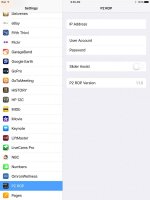
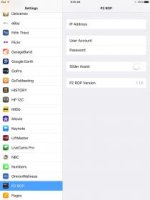
I noticed that he left out one step that I found in the online troubleshooting tips. There is a page for the P2 ROP app in the Settings page on the iPad. I've attached a screen capture. The information that I found online said that you need to enter the IP address of the DVX200 (192.168.0.1) into this page in order for it to connect. I've blanked out the settings that I originally had on this page and see what happens and I'll report back.

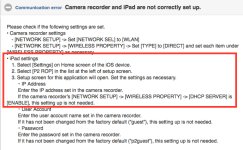
This guy also shows DHCP server ENABLE which I believe is correct and also something that I tried because something needs to assign the iPad an IP address in the same IP segment as the camera. If the camera does not hand out an IP address to the iPad they won't be in the same IP segment to connect. In the notes that I found online, shown below it says "this setup not needed" but I believe that it would be mandatory.

These notes also suggest putting the IP address of the camera into the settings of the iPad app which I tried. This guy did not show that so that is the only thing different that I can tell between my setup and the guy in the You Tube video. I'll try that later and report back. It won't bee until early this evening.

UPDATE: I think I've misunderstood the poor English translation of the troubleshooting document. After reading it a few more times with respect to what the guy showed in the video, it now sounds like they are saying if the camera is set for DHCP server then you don't need to change the settings on the settings page of the app. Maybe this is where my problem was. Again, I'll try that and report back later.

If I can get this to work, I'll put together a more English friendly video and post it to You Tube to help everyone out.
IMG_0084.jpgScreen Capture.jpg
 

Attachments

  • IMG_0084.jpg
    IMG_0084.jpg
    7.7 KB · Views: 0
Last edited:
Back
Top