AG-DVX200 4K Large-Sensor Handheld Camcorder

Sorry if this has already been covered, but has anyone used this camera on a professional jib setup yet? The DVX200 seems like a perfect fit for my jib operator who likes using ENG cameras for full control, but it also meets my requirement of shooting with a large sensor camera to better match the other cameras (usually C100/C300) that we use in a live concert environment. I'd especially like to know if my jib operator will have full control of iris, zoom and focus with his existing controllers. Thanks in advance.
 
It has remote control ports for iris, focus, zoom, and record start/stop. The ports are backwards compatible with prior Panasonic cameras, so if he has controllers that work with the PX270, HPX250, HPX170, AF100, HVX200, HMC150, AC160, AC130, AC90, HC-X1000, or the original DVX100, then yes, they'll work.
 
Hi Barry,
great thanks for your deep reply and sorry for the "why". My English is not as good as I want and therefore sometimes I use the wrong phrases...
Anyway I understand now how it works!
Thanks again!
 
There's no doubt this has been a rough product launch, but I've always thought that the hardware was there and the bang for the buck was outstanding.

Barry,

SMH...after all these years with your knowledge and expertise, why hasn't Panasonic hired you??? especially prior to product launch...Time flies, technology changes...but you've remained the, "tell it like it is, no sugar coating" person. I love DVXuser and you're a huge part of the reason why I keep coming back and have enjoyed your posts since I've joined back in 2003. Congratulations on the DVX200 book! We still have your DVX100 book. :)
 
Last edited:
Barry,

SMH...after all these years with your knowledge and expertise, why hasn't Panasonic hired you??
I am sure I'd be too expensive; it would be hard to give up all my time. I mean, this is the kind of thing I get to do for a "day job"...


http://www.multivu.com/players/English/7724451-flightline-films-blue-origin-rocket-landing/

So trading that in for a desk... I dunno...

(although, if the job was actually in Japan, that might be more interesting... ;)

Thanks for all the kind words!
 
Finally put in an order with Jim at EVS this afternoon. I have a rather large Microsoft project I'll be using it and a GH4 or two on the beginning of February. Once they post it, I'll share here.

Not going to lie, I'm a little giddy to finally be getting a new camera. Wasn't quite this excited about the HMC150, AF100, or GH4. Not that I'm bouncing off the walls or anything, but I feel kinda like a 9 y/o on December 22nd :)
 
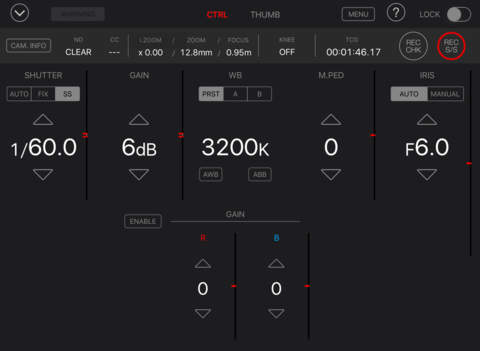
Panasonic DVX200 Firmware 1.40 Adds Remote Control from iPad

Panasonic DVX200 Firmware 1.40 Adds Remote Control from iPad

Here's the info about the new firmware for the DVX200:

http://pro-av.panasonic.net/en/sales_o/news_info/news2016/20160118.html

Ver 1.40- New features and Improvements:
  1. Support for ROP application software for iPad, “AG ROP App”, is supported. It enables remote control via Wi-Fi connection on an iPad.
    Wi-Fi module required for ROP : AJ-WM30 (Panasonic) , or USB-N53 (ASUS)
  2. Accuracy of Zoom Tracking (focus controlling during the zoom motion) is improved.
  3. V-Log L View Assist function is improved so that it starts/stops working by ON/OFF switching of USER button instead of holding it down.
  4. MODE CHK function is improved so that the states of AWB Ach and Bch (“OK” or “NG”) are also indicated.
https://itunes.apple.com/us/app/ag-rop/id1061859976?mt=8

AG ROP (AG Remote Operation Panel) App enables wireless remote control of the AG-DVX200 memory card camera recorder. The control screen of the AG ROP displays large numerals and provides upper and lower touch keys for easy understanding and use. In addition to the multitude of control functions, such as camera setting, picture quality adjustment, REC start/stop and menu setting, AG ROP enables the control of the AG-DVX200's internal lens for remote operation of the i.ZOOM, zoom and focus. This provides extra versatility when, for example, the AG-DVX200 is set up on a crane. It also displays a thumbnail view and a preview view, so clips*3 recorded in the AG-DVX200's memory card can be displayed as thumbnails and previewed on an iPad. AG ROP lets you check the image while recording.

[SUPPORTED MODELS]
Panasonic AG-DVX200

[SUPPORTED OS]
iOS7.1
iOS8.1
iOS9

[NOTE]
Optional Wi-Fi module, Panasonic AJ-WM30 or ASUS USB-N53 is necessary for wireless connectivity.

[FUNCTIONS]

(1) Camera recorder information display / Control User's button
Camera recorder output signal select (Camera/Color bars)
i.ZOOM
Zoom
Focus
Knee
Shutter
Gain
White Balance
Master Pedestal
Iris
Painting gain
Time code/User’s bit setting

(2) Thumbnail display / Playback
Thumbnail display
Playback

screen480x480.jpeg
screen480x480.jpeg
screen480x480.jpeg


Panasonic AG-DVX200 $4195

 
1) How do we get notifications when a firmware udpate?
2) Do we need to re-load scene files Berry provided after this firmware update 1.40?
3) Zoom: what is the best remote control for Zoom/start-stop recording?

Thank you All.
 
1) How do we get notifications when a firmware udpate?
2) Do we need to re-load scene files Berry provided after this firmware update 1.40?
3) Zoom: what is the best remote control for Zoom/start-stop recording?

Thank you All.

1. Keep watching this web site. Updates seemed to be released on Mondays.
http://eww.pass.panasonic.co.jp/p2ui/guest/TopLogin.do

2. No, you will not need to reload scene files. But keep in mind that if you store scene files on the SD card and you format the SD Card and use the newly formatted SD card to load the firmware update from, your stored files on the card will be gone. What was loaded into the camera prior to the update will still be in the camera.

3. I'll leave this question for someone else to answer.
 
You'll receive notices of updates if you have registered with the PASS site and have the camera listed in your database of assets there, but the emails seem to lag the actual availability of the files by a week or so.

- Greg
 
There is a delete all. You get to it up where the thumbnail button is under the clear cover on top. It's not a standalone button, it's a series of button presses.

As as long as you are not planning on restoring scene files that you have stored on the SD card, formatting may be a few key presses faster.
 
Last edited:
Hello, Does anyone know where I can get LUTS for the DVX200? I know some people use LUTS for the Varicam camera, but I'm looking for LUTS that are specific to this camera.
 
So, new question, do I really need a odyssey q7+ or a atomous 4k recorder, I am wanting 2 things from this, a good screen so I can See what my footage will look like when I get it into post, the other is will the quality be better than just reacrding on internal cards,
 
Back
Top