AG-DVX200 4K Large-Sensor Handheld Camcorder

Can you reduce shutter speed and f stops to reduce the gain 9dB to 6...might help noise..??? for 60pfs you can go 60-80 shutter speed and have a constant aperture of f/4...just a thought...comments please...

I used the lowest f stops for my UHD 100mbps 24 frames at 48speed...they look ok to me....
 
Can you reduce shutter speed and f stops to reduce the gain 9dB to 6...might help noise..??? for 60pfs you can go 60-80 shutter speed and have a constant aperture of f/4...just a thought...comments please...

I used the lowest f stops for my UHD 100mbps 24 frames at 48speed...they look ok to me....

Here's an ice hockey sample.

Please download the original 1080p60 file as Vimeo has messed up the encoding (and only publishes 30p).

Hockey rinks are low light, and I am stopping down for DOF and at 1/100 shutter for better slo-mo at 30p.

Unfortunately we do see AF hunting on the foreground glass at some focal lengths when the glass dominates the framing. And I think foreground players in a face-off at medium framing are in sharp focus with the rest of the subjects being a bit soft, even at f6.0. If Panasonic will deliver on a firmware update to provide a functional FINE setting of the focus ring drive then I think I could manage to improve the look with selective manual focus.

Is the exposure acceptable? Is the f6 DOF sufficiently deep on this micro 4/3 sensor cam for focusing on team sports? Is the image clean enough? Comments welcome.

Firmware v 1.25
Scene 6 (from Barry Green's Scene 2 set)
High Sensitivity
Rec Format – FHD 59.94 50M
1/100
f6.0
9dB
AF
 
Last edited:
Here's an ice hockey sample.

Please download the original 1080p60 file as Vimeo has messed up the encoding (and only publishes 30p).

Hockey rinks are low light, and I am stopping down for DOF and at 1/100 shutter for better slo-mo at 30p.

I get a flickering video that only shows the score board shows 3:15 and has alternating green flashes. I downloaded the 1080P60 file and get the same thing.
 
I get a flickering video that only shows the score board shows 3:15 and has alternating green flashes. I downloaded the 1080P60 file and get the same thing.

Sorry. I'm trying to download it myself so I can check it out. Did you download "original"? Also, did you download to your desktop or into a browser window?

Also, I see that it's way to big for anyone to trouble with (thanks for trying). Let me replace it with a shorter clip and then post back here when I have done that.

Apologies.
 
Sorry. I'm trying to download it myself so I can check it out. Did you download "original"? Also, did you download to your desktop or into a browser window?

Also, I see that it's way to big for anyone to trouble with (thanks for trying). Let me replace it with a shorter clip and then post back here when I have done that.

Apologies.

Mapper, if I download to the desktop and play in Quicktime I have no problem, but if I "download" into the browser, yes, I get the green frames.
 
HDMI signals have some limitations how far it can travel...depending on the quality of cable and strength of signal/bit rate/frame rate etc...it can travel 30ft-50ft max...I found this info online. So, I like to know if any body tested for 100 or 200ft HDMI or SDI etc. thank you.
 
Been shooting lots of hockey in small low-light venues. Barry's Scenes 1 and 4, 1080p60, high sensitivity, 9dB gain, f6, 1/100.

Except for the lack of manual focus refinement, I'm liking it.

Bluesgeek, just wondering, why wouldn't you get a PX270 instead of a DVX200 for sport shooting?
 
I downloaded the original and I think the DVX200 hockey footage looks remarkably good, considering that it's single-camera coverage, and with the depth of field limitations of the big sensor. I have both a DVX200 and a PX270 and agree that the PX would be my first choice for this kind of thing due to the longer lens and more forgiving focus. But the exposure, color, noise level and sharpness were all good, the equal of most regional network coverage I've seen.

The biggest complaint I have as a viewer, trying hard not to pixel peep, is actually that your tripod didn't appear to be very steady (or maybe OIS was on when it shouldn't have been). This is especially noticeable at the beginning of the clip when the action is a little slower.

Do you find that the LCD (or viewfinder, if that's what you're using) is adequate for following the puck? I haven't done hockey in ages, but often shoot flying models that present a similar problem of trying to pick out a small, fast moving object against the bright sky.

- Greg
 
I downloaded the original

I don't know guys...I downloaded the original video to my desktop and still get the green flickering and nothing but the scoreboard. I don't have a single device that can play the original video on. I tried my laptop, iPads and iPhone. I downloaded the video to my MacBook Pro which I've never had a problem playing a video on. I tried Quicklime, VLC & I even went as far as uploading the video hidden on my You Tube channel and in all cases, the video flickers green. In the last 2 seconds I see hockey players. Strange...
 
Last edited:
I downloaded the original and I think the DVX200 hockey footage looks remarkably good, considering that it's single-camera coverage, and with the depth of field limitations of the big sensor. I have both a DVX200 and a PX270 and agree that the PX would be my first choice for this kind of thing due to the longer lens and more forgiving focus. But the exposure, color, noise level and sharpness were all good, the equal of most regional network coverage I've seen.

The biggest complaint I have as a viewer, trying hard not to pixel peep, is actually that your tripod didn't appear to be very steady (or maybe OIS was on when it shouldn't have been). This is especially noticeable at the beginning of the clip when the action is a little slower.

Do you find that the LCD (or viewfinder, if that's what you're using) is adequate for following the puck? I haven't done hockey in ages, but often shoot flying models that present a similar problem of trying to pick out a small, fast moving object against the bright sky.

- Greg

Greg, thanks for your observations and comments, and for your critique.

The reason I have been hoping to get the DVX200 to handle sports is that it represents only about a third of our business and we are hoping to multipurpose the gear. However, I have come to the conclusion that in order to get a deep enough DOF I have to stop down to a point that requires heavy gain—the result of which is often an unpleasant ragged textured feel to the footage. This look is identical to that produced by the AC90 when it is gained up. A casual impression is that the footage is remarkably clean at high gain because it is not swimming with conventional noise. However (and I'm not sure about the technology but I seem to remember having read about it when the AC90 was first released) the subtle but blocky noise produced by these Panasonics is not acceptable, especially when it is amplified by motion artifacts, which of course are going to be rampant in sports shooting.

If there's any question about what I'm referring to, please let me know and I'll post samples.

Big thanks to you and Bassman for suggesting the PX270. I'll check it out.

Greg, also thanks for noticing the wobbly tripod. I should invest in better sticks... and pay more attention to smooth operation between plays.
 
Last edited:
Sorry to bother you, but I have asked some questions and hoping to get some answers (#2583)
Some additional infos:
To izoom:
"Optically, the camcorder utilizes a Leica Dicomar lens that provides a 20x optical zoom range and a 35mm-equivalent focal length of 30.8mm at the wide end. Intelligent zoom boosts that range up to 40x for Full HD and 25x for 4K recording. " This is from the HC-WFX991!

And to the resolution in linepairs:
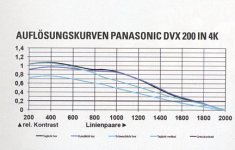
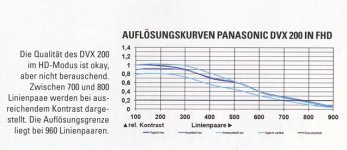
k Auflösung DVX 200 in 4K.jpgk Auflösung DVX 200 in FHD.jpg
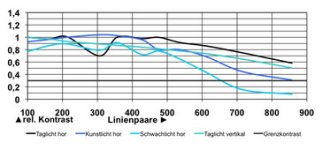
HCX-929 FHD:
k panasonic_x929_aufln.jpg


Tks for any help and reply!
 
Last edited:
I hope Barry can answer the questions:
I can take a stab at it. But any question that starts with "why" will be difficult to answer, because I am not a Panasonic employee, I'm not one of the camera engineers, I'm not in marketing, so I can't say WHY they did anything they did. I can try to explain as best I know HOW the camera works, but I can't say WHY their choices were made.

A) Why is the izoom limited to approx. x1,5? There are so many sensor scanning modes and pixels. So a x2 izoom should be possible. Like Sony can do it. What is the exact limit to x1,5?
The HC-X1000 also does a 2x iZoom. Why is the DVX200 limited to 1.5x? That's a "why" question, and I don't know the exact answer. I suspect that the answer is related to question B below; they may have found that the resolution of 1080p magnified by iZoom wasn't really satisfactory to them beyond the 1.5 range, I don't know.

B) A German testhouse has made some measurements and found that the resolution in 4K and UHD is excellent. But in FHD it is limited to 700 and 800 linepairs. FHD limit is 960. A €800,-- consumer Cam (X929) from Panasonic is doing a better job with 850 linepairs. Why? What is the real limit?
The Panasonic X929 is a 1080p-only camera, with native 1080p chips. The DVX200 is a 4K camera, that uses pixel mixing to create its 1080 image. If you want razor-sharp super-sharp incredibly sharp HD images out of the DVX200, set up dual codec recording and record 4K/UHD on one card, and FHD on the other card. The FHD image in that case is not made using the pixel mixing technique, it's downconverted 4K, and it's extremely good and exceptionally sharp, likely at the limits of what 1080P can resolve.

The pixel-mixed image is a result of needing faster read speed to get the wider field of view and overscanning to provide for the hybrid o.i.s. As a result, it's not as sharp as a pure 1080p camera, although it's still pretty good and definitely sharper than my AF100.

When in 4K or UHD, the camera is ultra sharp. If you put it in 4K or UHD mode and record 1080p externally from the SDI port or downconverted HDMI, it will create ultrasharp HD (or, if you use the aforementioned technique of dual codec recording). But if you put the camera in its normal "FHD" mode, it makes different choices by using the pixel mixing technique, which gives it some advantages (hybrid OIS, wider field of view) at the expense of some resolution.

If you want the sharpest 1080p 10-bit 4:2:2 camera on the market, that'd be achievable by using a DVX200 set to 4K/UHD internally, recording externally to a $295 Atomos Ninja Star or something comparable, maybe a Hyperdeck Shuttle or Blackmagic Video Assist.

C) 10Bit 4:2:2 for external recording is not possible for UHD/50p, correct?
Correct, in UHD at 50P or 60P it is limited to 4:2:0.

D) Any remote control (except wired like Varizoom,ect.) is not possible, correct? (This is very helpful if the Cam is on a tripod as a 2nd Cam for a dancing video or wedding, to start/stop recording)
Wired controllers are available today. For the rest of your question, I am not prepared to answer that at this time.
 
Last edited:
Back
Top