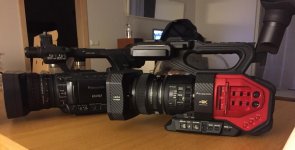
AG-DVX200 4K Large-Sensor Handheld Camcorder

One thing that I noticed that also seems like it could be a firmware glitch is that I have my camera's gain set to read in ISO, and I was manually shooting at ISO 1000. Anytime I turned the camera off and back on again the ISO defaulted back to 500. That's really annoying. The iris holds it's setting, not sure why the gain shouldn't hold it just the same.
I can't verify what you're saying. I put it at 1000, turned it off, turned it back on -- it still says 1000. I put it on 500 and turned on HIGH SENS (so it reads 1000), turned it off, turned it back on -- HIGH SENS is still on, and the ISO is showing as 1000. Not sure what you're doing different?
 
I can't verify what you're saying. I put it at 1000, turned it off, turned it back on -- it still says 1000. I put it on 500 and turned on HIGH SENS (so it reads 1000), turned it off, turned it back on -- HIGH SENS is still on, and the ISO is showing as 1000. Not sure what you're doing different?

Here is a quick unlisted video on You Tube of what I'm seeing. Just seems like my ISO setting should still be there on a reboot. I'm under the impression that I can dial in the ISO that I want to use by using the jog roller and it should stay there. Maybe that's not how it's supposed to work. I'm kind of a newbie with Panasonic.
 
Last edited:
Interesting. You were indeed doing something different than I was. I was setting it through the SW MODE menu, you used the wheel. And apparently it makes a difference. If you set it through the menu, it'll still be 1000 when you power down and power up. But I did verify that if I changed it using the wheel, it didn't retain that change when powered down/powered back up. Seems like it should. I'll report it and see what they say. Thanks for taking the effort to document the process, it made it much easier to verify!
 
All right folks, here's a scene file to play with.

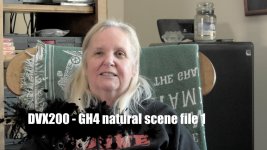
I was fortunate that I was able to get Adam Wilt to send me some chart shots from his GH4, and I have taken a stab at attempting to replicate the general color of the GH4 on the DVX200 with the following scene file. The gamma is not exactly the same, but it may be considered "in the ballpark". But, not having a GH4 to test with, I can't really test this side-by-side with the GH4; perhaps some of you could do so and let me know if it's anywhere close to being similar.

Here's the CamBelles under this new GH4 NAT scene file:
CamBelles-GH4-nat.jpg


And here is the scene file that you can download and install on your DVX200.
http://www.fiftv.com/DVX200/Scene_Files/GH4-Natural/SCENE1.TXT

Easiest way to load this scene file would be to save some scene files on an SD card (use the SCENE FILE menu -> SCENE FILE -> SAVE command, and save as SCNFILE1). That will create the proper directory structures. Then put that memory card in the computer and navigate into the PRIVATE/MEIGROUP/PAVN/SBG/P2SD directory, and replace the SCENE1.TXT that you find there with the one that you downloaded. Then put the card back in the camera, choose SCENE FILE->SCENE FILE->SAVE, and load SCNFILE1. That should install the new GH4 NAT scene file.

Unfortunately the DVX200 doesn't include names for the scene files, so you can't keep track of them like that. This scene file installs into the SCN1 position. You'll know you've got it if you see the BLACK GAMMA set to -8, and the GAMMA as FILMLIKE 1, etc. If you see those parameters, it's likely you've properly installed this scene file.

I'm not warranting it as perfect, nor am I charging anything for it, I'm just experimenting to see what can be done. If you like this, let me know, and I'll try to do more. If you don't like it, try modifying it to get it the way you want. Of course, if you don't like the look of a GH4 on the NATURAL profile, then there's probably not much reason to try this scene file...
 
Basically, for average scenes, they both come to similar conclusions - overexposing by about two stops will normally give the best compromise for quality of the end result. If you can't be bothered to read both articles, then just look at page 3 of Andy's. I really don't know what the Panasonic rep was thinking of when he recommended a normal 2 stop underexposure for log - it would lead to some very noisy pictures after correction.
What may make sense for one camera's gamma curve, may not make sense for anothers. SLOG and VLOG, for example, are generally equally divided -- same # of stops above middle gray as below it. VLOG-L is not that way; it has 8 stops below middle gray, and 4 stops above it. So if you go overexposing 2 stops, what do you end up with -- 10 stops below middle gray, and 2 above? Does that sound reasonable to you? Seems a tad disproportionate to me.

There's more to exposing a log gamma properly than worrying about noise. Noise is a consideration, yes, but hardly the only one. In any other circumstance would you think it a wise idea to overexpose video by two stops? In general, overexposing video leads to nasty results. Log gammas give more room for error, but it's still a video sensor, it's still generally not the best idea to go drastically overexposing.

As for underexposing -- I don't know who the Panasonic representative was who said it, I don't know what the circumstances were, but I do know this -- if you were to underexpose VLOG-L by two stops, you'd get (wait for it): six stops under middle gray, and six stops over middle gray. Interesting. Doesn't sound THAT insane, does it?

Secondly -- while you assert that you'd get "very noisy" pictures (which, you may, we'd have to see), consider that Sony recommends middle gray to be at 37.7 IRE in SLOG, and Canon recommends middle gray at 32.8 IRE. So where would middle gray end up in VLOG-L if you were to underexpose by a stop? It'd come in at about 32.8 IRE... or pretty much where Canon always recommends it to be. So would underexposing VLOG-L by a stop be a really bad idea? I don't know, I doubt it; it would give you 7 stops under and five stops over, and you'd have grays at exactly where CLOG likes to see 'em. Of course, the sensor on the DVX200 is probably inherently noisier than the sensor on the C500 and C300, so it may be more practical (noise-wise) to push into the shadows with those cameras, but -- I don't think it's outrageous to consider trying it, at least.

Two stops might be a bit much, but even one stop of underexposure doesn't seem like it'd be all that bad of an idea. And I don't think the idea of 7 under/5 over sounds particularly less appealing than the idea of 10 under/2 over!

If you want the most noise-free images possible then yes, exposing brighter and pushing down in post is a tried-and-proven technique. In general I just follow the guidelines as recommended, middle gray at 42, and it works fine. Pushing skin tones up into the 60s and 70s in log doesn't seem like all that good of an idea to me; I like to keep the very hottest caucasian skin tones below about 55 when working in log. Pushing them 2 stops over... eh, if you want to, go ahead, but I certainly wouldn't be endorsing that as a "best practice" unless someone has extensively tested it for themselves.
 
Interesting. You were indeed doing something different than I was. I was setting it through the SW MODE menu, you used the wheel. And apparently it makes a difference. If you set it through the menu, it'll still be 1000 when you power down and power up. But I did verify that if I changed it using the wheel, it didn't retain that change when powered down/powered back up. Seems like it should. I'll report it and see what they say. Thanks for taking the effort to document the process, it made it much easier to verify!

I think that's WAD for the wheel and gain... any changes made are temporary customizations of presets as determined by the gain selector switch. Every time you boot the camera, it is going to refer to the preset that is selected by the hardware. This would be different than shutter for example because changes made by the wheel become the new preset and are not overridden by a hardware switch.

I sure could be wrong, but there is some logic to that result if seen from the perspective of a hardware switch position.

I prefer it that way so that I can change a preset on the fly (e.g. push up the gain if I run out of iris headroom) and get the preset back by toggling the gain selector.
 
The other thing in the new firmware update is the addition of "Fast Scan" modes for 4K/24p and for UHD 23.98, 25.00, and 29.97P. These "Fast Scan" modes read the sensor much faster, and substantially reduce any "rolling shutter" effect. The normal modes are still there, where generally the camera has the widest field of view and sharpest images because it samples about a 5K-wide patch off the sensor (using around 13 million pixels). In the Fast Scan UHD modes, it samples a 3840x2160 patch off the sensor, which results in less data being read out and therefore faster scanning. It does result in narrowing the field of view; essentially the Fast Scan modes all have the same FOV as the existing UHD 50P/60P mode. I guess technically the 50P/60P mode could also be called "Fast Scan".
 
H Barry, first I have to say that I appreciate all that you have been doing to help roll out the initial release of the DVX200. I've have been a run a gun shooter for the most part using a Sony FX-1 for a very long time. Recently I've been doing a decent amount of things with my Nikon D800. For the kind of stuff that I do, it gives me the image that I'm looking for but that comes with a lot of hassle of just rigging the thing with all the stuff that I need to get a job done ie. monitor, audio adapter and things like that. The DVX200 offers the features that I am looking for in a sort of hybrid between the FX-1 and the D800. With the D800 I rely on the histogram when I'm moving about but in a lock down situation I typically use a Sekonic Light meter because I have time.

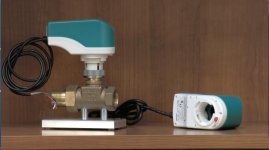
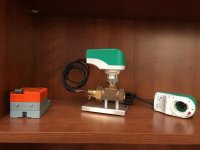
I figured I would preface my next comment with my abilities so that you understand where my next question is coming from. Not coming from the Panasonic world I hadn't heard of the GH4 so I did some reading and also looked up a few videos on You Tube and I was impressed with the quality of what people had posted as "Neutral setting, unedited". I was excited to try the file that you posted above. Maybe with my limited abilities I am doing something wrong but I wanted to post these two pictures and get your opinion. Again, I don't know much about the GH4 or it's Neutral setting but I was kind of thinking that Neutral might mean natural and I would see natural colors. The first picture is a screen shot from the DVX200 with your scene file that I reordered using a manual white balance, the scene was metered with my Sekonic light meter at ISO 1000 F5.0 1/60. The second picture was taken with my iPhone. The green caps, brass on the actuators and wood shelving was nearly spot on with what I was seeing with my eyes.


Actuator.jpgIMG_7176.jpg

Trust me, I'm not knocking your abilities, I'm just not sure why I'm not seeing the result that I was expecting which is probably the best way to put it. The iPhone picture is just a little oversaturated but the colors are very close. Sorry this is so long but I wanted to make sure that I wasn't coming across as bashing what you are trying to do. With someone like me, I can use all the help and guidance that I can get.

I have put your scene file in Scene1 position in my camera because it's much better than the Scene1 from the factory when I compare the two. I'm hoping that worse case is that hearing my background and comparing these two pictures may give you an other idea for a future scene file.

The stuff that I shot yesterday (posted above) with Scene2 was a little closer to what I was looking for although the skin tones were a little too red. Since then I have been manipulating that scene file to try and get more natural skin tones Maybe I'll post that scene file in a few days once I tweak it some more. It may be useful to someone one here but more than likely not as professional as other may be able to do. I'm all new to the adjustments that may be required when using the DVX200.
 
Well, understand that my goal with that scene file wasn't to create "accurate colors" or whatever; it was to try to replicate the GH4's "Natural" profile look. According to the test charts I've got, it does render colors the way the GH4 does. It'd be interesting to see what it looks like when compared to an actual GH4 shooting "Natural" on actual scenes.

I've posted "accurate" color scene files before; perhaps try one of those and see if it gives you more of what you're looking for?
 
Thanks Barry, so it sounds like I was misunderstanding what the GH4 file was for. Thanks for clarifying that. I've been searching around to find your accurate scene files and can't seem to find them. Can you point me in the right direction?

One other question. I haven't shot in V-Log yet and that's also new to me but if you shoot in V-Log do all of the other color adjustments get ignored and you are just shooting a base image that can be worked with in post, sort of like raw files in still photography?
 
Last edited:
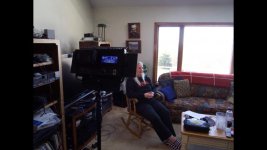
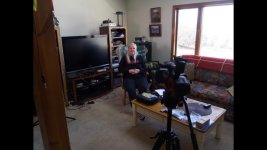
Here are two stills from a test using Barry's GH4 scene file emulation. The first two shots show the set up I used, then a shot with the GH4 followed by the DX200. These pictures were taken with the latest DX200 update. I white balanced with a white card. So, I think the DVX scene file needs to look a bit warmer is there still a bit of yellow here..still prefer to the GH4.....which controls do I adjust to see I can get closer to the GH4? I notice that the Knee is off in this scene file now.
setup2.jpgsetup1.jpggh4 natural.jpgdvx200_gh4_scene1.jpg
 
Last edited:
greytail - looks like your GH4 image is more in focus or sharper than the DVX200? is that on purpose or is it because there is added sharpness in the Natural look in GH4?
 
Gosh, it is early but there is some funky color coming out of the DVX200. A friend just got one and we are going to set it up sometime soon. I am really looking forward to twisting the dials. I hope for his sake we can iron this out.
 
So, I think the DVX scene file needs to look a bit warmer is there still a bit of yellow here..still prefer to the GH4.....which controls do I adjust to see I can get closer to the GH4? I notice that the Knee is off in this scene file now.
There are a number of ways you can go. First, it looks like the overall color saturation might be set a little higher on the GH4, so you can go into the "chroma level" and try boosting that up a little bit on the DVX200 and see if it does what you want. For warming up, there are generally two ways to go on that, you can go into the COLOR CORRECTION menu and start messing with the saturation and phase controls for the color vectors, or the much easier way is to go into the RB GAIN CONTROL setting and add a little bit of red or whatever you think makes it look better.

Just dropping the picture into Vegas and looking at the waveform, it seems like the skin is way overexposed on both shots. I would normally not let any highlights go above 75, and try to keep them below 70. On your shot, I'm seeing levels in excess of 100. To me that's way too hot. I wonder if you exposed it more along with the guidelines of keeping skin below 70, if you'd like the look better... I don't know, can't say without testing, but that would be my suggestion.
 
The GH4 was little overexposed but still within 100% in FCPX. I also set the DVX200 using the waveform monitor. I made sure than it wasn't going over !00%. Really did. I knew you would be on me about that so tried to be careful. I remember adjusting the exposure down and realizing that it was the light coming in from the window which was causing a spike. I definitely did not see any zebras on the face with both cameras and when I brought them into FCP x, there was nothing over 100% on its waveform monitor. I then used match color to match the GH4 color to the DVX200 and the images then looked pretty close. When I did the matching RGB jumped up slightly in the mid range on the FCPX monitor. Does this tell you more
I am going to upload to Vimeo this sequence incase the jpeg compression is leading you astray.
This is the scene sequence unprocessed from the FCPX timeline
https://vimeo.com/146047522
 
Last edited:
Finally got my dvx200, did the firmware upgrade and installed mr. Greens scene file. It is going to replace my HPX250 as a primary camera. Just have to see how they are going to work together.

FullSizeRender.jpg
 
Back
Top