AG-DVX200 4K Large-Sensor Handheld Camcorder

The C100 is an incredible camera and has a very distinct look. It has the DVX200 beat in low light performance, 1080p sharpness, and depth of field. I have shot so many agency and non profit pieces on that camera with stunning results. But...the DVX200 is not intended to replace my C100. It is just another tool in the bag and it's primary use will be for events. Sports, conventions, lectures, and concerts. The DVX200 is more comparable to an XDCAM than a C100.

I plan on posting some more test next week but my first impression is...I love it.

A couple things of note...
1. The noise in the shadows is very present when shooting Log. This is okay though because it will disappear once you grade the blacks.
2. WFM, when shooting Log, clips the highs way sooner. Agian, this is okay. It helps preserve the highlights so set your exposure according to the WFM.
3. The auto EVF on off is annoying. Even with the sensitivity turned all the way down. There should be a way to just keep both on (which is what I prefer but that might not be energy efficient).
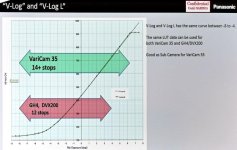
 
Sorry if this has been stated (so many pages I couldn't possibly read them all), we had the Panny rep come by and demo the DVX200 and he said for LOG, just like the GH4, you should underexpose by 2 stops. He actually showed us the curve where there are more "data" points in the lower part of the exposure curve, so give the highlights more leeway that was what you have to do! Anyone have real world experience doing this? I'm considering the camera, but purchase will probably be a month or two away.
 
He didn't really discuss much technical with them, other than that they were accessible in similar ways to previous cameras. I don't remember which he said he used, but I remember him saying that he tries to get the color as close as possible to delivery so color correction latitude wouldn't be a problem in post.
 
Sorry if this has been stated (so many pages I couldn't possibly read them all), we had the Panny rep come by and demo the DVX200 and he said for LOG, just like the GH4, you should underexpose by 2 stops. He actually showed us the curve where there are more "data" points in the lower part of the exposure curve, so give the highlights more leeway that was what you have to do! Anyone have real world experience doing this? I'm considering the camera, but purchase will probably be a month or two away.

underexposing LOG is a recipe for disaster. You will end up with extremely noisy images as everything is squashed in LOG and then stretched up and down in post. If you under by 2 stops , you'd bring up all that noise in the shadows up by 2 stops. Good luck with that. Look at the chart below.

NAB15-P1040164.jpg

Everything below 18% middle grey gets a tiny amount of image data per stop - and in an 8bit 420 image as in the DVX200 - you'd be totally screwed trying to recover an underexposed image as simply there is not enough data to work with. After middle grey - in the mids and highs - as you can see from the graph - the relationship between a stop of light and luminance per gradation of grey is equal as each stop increases, hence the linear relationship.

I've shot only in V-Log L on the DVX200 and did overexpose by 1 to 2 stops and got decent results. I've posted videos in past pages here. Without whorring my blog too much - if you want to read about my experience with the DVX200 and LOG, head over here: http://www.4kshooters.net/2015/11/04/heres-some-more-panasonic-dvx200-4k-v-log-footage/
 
....... we had the Panny rep come by and demo the DVX200 and he said for LOG, just like the GH4, you should underexpose by 2 stops. He actually showed us the curve where there are more "data" points in the lower part of the exposure curve, so give the highlights more leeway that was what you have to do!.........
I can only second what k0byashi says above, that with log it is normally far preferable to overexpose than underexpose, and I can't believe that a Panasonic rep should be saying otherwise.

The precise answer depends on the scene being shot, and arguably for the best end result exposure should be geared around the brightest object in the scene that is to be rendered - which translates that a very low contrast scene should be "overexposed" by more stops than a high contrast scene. (It's better to think of lowering the ISO value ("overexposure") or raising it.) In general, a higher exposure will give better noise figures in the blacks at the expense of highlight handling, a lower exposure will do the opposite - better highlight capability at the expense of noise in the blacks.

The best two reports I've seen about this are from Alister Chapman regarding basic principles ( http://www.xdcam-user.com/2014/08/e...-on-the-sony-a7s-part-one-gamma-and-exposure/ ) - he talks mainly about s-log, but the principles are the same - and a more practical demonstration from Andy Shipsides ( http://www.hdvideopro.com/columns/help-desk/the-rules-of-log-exposure ). I'd suggest reading Alister's article first, then Andy's.

Basically, for average scenes, they both come to similar conclusions - overexposing by about two stops will normally give the best compromise for quality of the end result. If you can't be bothered to read both articles, then just look at page 3 of Andy's. I really don't know what the Panasonic rep was thinking of when he recommended a normal 2 stop underexposure for log - it would lead to some very noisy pictures after correction.
 
Hi.
Sorry for this V-Log (interesting exchanges) interruption but..
Why the 75 fps from VFR mode are so soft ???
The 50, 100 and 120 fps stay sharp.
But the 75 fps mode is actually unusable !
Same with your stuff ? Or just mine ?
Thanks for checking !
 
Breaking the news... v.2 fw

Breaking the news... v.2 fw

Okay, time to break the news. There is a reason I haven't spent much time at all on scene files and the like, and that's going to be revealed on 11/16. There's a new firmware update coming for the DVX200, and it makes some rather notable changes in color rendition. The new version is said to be more accurate to the Varicam in VLOG-L, and in all cases it's supposed to reduce the yellow in the skin tones and especially to greatly reduce the shift to yellow that happens in overexposure. It also is going to substantially clean up the grit that can happen in the shadows. And there's another feature they've mentioned that they're adding, but since it doesn't directly have to do with color rendition, I'll leave them to say what that is.


I don't know if there will be any changes to the default scene file settings I sincerely doubt that the default settings are going to yield glorious beauty. But the way the sensor delivers color to the processing engine is being refined. Better input should lead to better output. I do feel like finally, this new version of the firmware will represent the camera the way that it should be viewed, and that with proper attention to scene file settings, it should be able to make the kind of images that the hardware is capable of. I'll work up an "accurate" scene file for it right away; I'll also try to match it to a GH4 using the "natural" scene file on the GH4, but I can't say how quickly that will get done.

Barry, aren't you under strict embargo not to divulge certain elements of the new firmware until the 16th Nov?
 
VFR (variable Frame rate recordings) Tip: Like the GH4, the DVX200 running at anything above 60p VFR under 24p requires vertical luminance sharpening to make it look good and most NLEs support this feature. Use it sparingly. Here's GH4 VFR at 96fps and upscaled to 4K to demonstrate;-

 
Barry, aren't you under strict embargo not to divulge certain elements of the new firmware until the 16th Nov?

Generally that would be the case but not this time. The new firmware was on display at a public show, the changes were visible to anyone who saw the camera. I asked for and was given permission to let people know what is coming.
 
Generally that would be the case but not this time. The new firmware was on display at a public show, the changes were visible to anyone who saw the camera. I asked for and was given permission to let people know what is coming.

That was a good move on their part. I think that may have saved themselves from getting a bunch of returns and fielding some tech support calls. I'm anxiously awaiting this update.
 
I installed the update a little while ago. The one scene file that I had started adjusting prior to the update was now a little too dark after the update and I expected that might happen being that I was trying to compensate for the original firmware. I just reset all of my scene files back to the factory settings and I'm going to start all over again. I have a small shoot today that's not very important so if I have to reshoot it with my other camera until I can get the DVX200 fine tuned, that's not a problem. At least it will give me a new baseline to see what, if anything needs tweaking.

After the update I'm hoping that we start seeing some refined scene files posted from DVX200 users. I'm not sure that I have quite the discerning eye that many of you guys do so any help would be much appreciated.

If you're a Mac user please note that last night on my iPad I saw that the update was available but when I went to download it with my Macbook Pro this morning the update did not show up, even after refreshing the screen. It appears as though Safari cached some data and it was only after I cleared my history and went back to the site listed above that the v1.25 firmware showed up on my laptop. Kind of strange, it may have been an isolated instance but I thought I would post that just in case someone else runs into this same issue.
 
Last edited:
I shot about 10 minutes of footage after the firmware upgrade. I think it looks better although some tweaking is definitely still in order. After comparing with my eyes what I was seeing in person and on the pull out monitor, Scene 2 looked the closest from a color standpoint. One thing I was noticing in the monitor is that the skin tones of the person on camera seemed a little more red than I would have liked to have seen and his gray hair a little bit of a green cast to it. Also, the chair in real life was a little more on the tan side. After importing the footage into FCP it seemed to have matched the pull out monitor.

Here were my settings.

Scene 2 (Knee Mode Off)
1080p
ISO 1000
f 4.5
(exposure with Sekonic L-478DR)
Manual White Balance


Can anyone suggest where I might start to work on that profile or possibly what profile I should be using. I think it's close but definitely needs a little work. This iPhone photo shows a much more accurate representation of the color of the chair. When I was watching the footage I thought I had an issue with the black level as seen between the two images of earth in the background. There is a sort of white haze visible. Notice that it's also in the iPhone photo.
IMG_7169.jpg
 
Last edited:
The skin looks quite reddish to me. Sort of going back to the DVX days. The chair looks way off if the photo above is closer. Might want to wait for Barry to cook something up that is color accurate as things still look sketchy.
 
Focus Ring Drive Update

Focus Ring Drive Update

Barry, I've now charted out the lens ring adjustments for FINE and COARSE, with MACRO ON and MACRO OFF.

Again, a smaller number change is preferable for FINE control, and AC90 numbers are included for comparison.

*** Of note is that there is often little or no difference between COARSE and FINE. And the only real semblance of fine control is at the more extreme telephoto lengths (Z99), and only at a close focus range of the less extreme telephoto lengths (Z75).

Doesn't this seem to reveal an issue? Shouldn't there always be a significant difference between COARSE and FINE?

Shouldn't FINE be fine enough to make it easy to quickly and accurately hit the desired focus number, especially given the large sensor DOF?

The operator should not be in a situation of overshooting the adjustment when the target focus number is known. My observation and my experience after shooting 4 theatrical and meeting events and 11 ice hockey games is that there is that FINE setting is not functional. There is no practical fine MF control of this camera. And I think this is a problem.

RED
= no difference between COARSE and FINE
BLUE
= small difference between COARSE and FINE
GREEN
= large difference between COARSE and FINE

______________


Z00

DVX200

FINE [macro on]

MF 99 number change per 75 degrees (00-99)
COARSE [macro on]
MF 99 number change per 75 degrees (00-99)

FINE [macro off]
MF 56 number change per 10 degrees (43-99)
COARSE [macro off]
MF 56 number change per 10 degrees (43-99)

AC90
MF 30 number change per 90 degrees (00-30)
MF 10 number change per 90 degrees (89-99)

_______________


Z25

DVX200


FINE [macro on]

MF 30 number change per 90 degrees (00-30)
MF 90 number change per 90 degrees (99-10)
COARSE [macro on]
MF 45 number change per 90 degrees (00-45)
MF 90 number change per 90 degrees (99-10)

FINE [macro off]
MF 56 number change per 15 degrees (43-99)
COARSE [macro off]
MF 56 number change per 15 degrees (43-99)

AC90

MF 25 number change per 90 degrees (00-30)
MF 10 number change per 90 degrees (89-99)

_______________

Z50


DVX200


FINE [macro on]

MF 15 number change per 90 degrees (00-15)
MF 70 number change per 90 degrees (99-29)

COARSE [macro on]
MF 15 number change per 90 degrees (00-15)
MF 70 number change per 90 degrees (99-29)

FINE [macro off]
MF 56 number change per 75 degrees (43-99)
COARSE [macro off]
MF 56 number change per 75 degrees (43-99)

AC90

MF 25 number change per 90 degrees (00-30)
MF 10 number change per 90 degrees (89-99)

_______________


Z75

DVX200


FINE [macro on]

MF 5 number change per 90 degrees (16-21)
MF 30 number changer per 90 degrees (99-69)

COARSE [macro on]
MF 10 number change per 90 degrees (16-26)
MF 55 number changer per 90 degrees (99-44)

FINE [macro off]
MF 30 number changer per 90 degrees
COARSE [macro off]
MF 55 number changer per 90 degrees

AC90

MF 30 number change per 90 degrees (19-49)
MF 10 number changer per 90 degrees (89-99)

_______________

Z99

DVX200


FINE [macro on]
MF 10 number change per 90 degrees

COARSE [macro on]
MF 15 number change per 90 degrees

FINE [macro off]
MF 10 number change per 90 degrees
COARSE [macro off]

MF 20 number change per 90 degrees

AC90

MF 10 number change per 90 degrees


_______________


Last edited:
One thing that I noticed that also seems like it could be a firmware glitch is that I have my camera's gain set to read in ISO, and I was manually shooting at ISO 1000. Anytime I turned the camera off and back on again the ISO defaulted back to 500. That's really annoying. The iris holds it's setting, not sure why the gain shouldn't hold it just the same.
 
Shouldn't there always be a significant difference between COARSE and FINE?

Shouldn't FINE be fine enough to make it easy to quickly and accurately hit the desired focus number, especially given the large sensor DOF?
Yes, yes, and yes. In my testing (of prior versions), COARSE would go from minimum to maximum distance by rotating the ring about 15 degrees. FINE would require about 540 degrees to go from minimum to maximum.

I just tested V1.25, and it does appear that COARSE and FINE are behaving identically in this version. Which isn't right. I have filed a report with the factory to get them to look into it.
 
Back
Top