AG-DVX200 4K Large-Sensor Handheld Camcorder

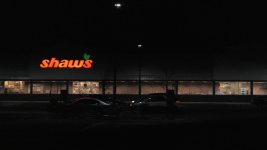
Many people are familiar with the big red sign used by Shaw's supermarkets in the northeast, but according to the DVX200's Scene file #1 it is not really red and more yellowish

Scene file 6 says, yes it is mostly red.

Which one is right, or are they both wrong

shaws_scenefile1.jpgshaws_scenefile6.jpg
 
I prefer what is labeled as 'original.jpg', but I would take the chroma down quite a bit. The sky in both looks artificial
 
the stripe on the beach ball changes totally - slightly washed out red on the top image, but orange on the lower

Yes Barry, what you've shown is part of my problem. If you have another go you should be able to get rid of the orange and keep the ball red.

Also the 3rd girl suddenly looks like she's been through an spray tan booth with that orange 'glow', another problem we often have with dance concerts!

As a matter of record I've had this problem with school concerts mixing my HC-X1000 with the AG-AC160/130 combo and having pink tee shirts go orange (with the X1000), but it wasn't as bad and I could fix it.

This one's got me though, it's too hard, but it does show how similar the camera science is between the DVx200 and it's predecessor.


Cheers,

Vaughan
 
Grade choices

Grade choices

Been experimenting with some settings on Scene File 1. Here's a stock Scene File 1 picture, and the adjusted one (in no particular order):

View attachment 106980View attachment 106981

Do you prefer one over the other?

The girls from left to right numbered 1 to 4

Girl #1 -the 2nd grade looks better

Girl #2 - the 1st grade looks better - the 2nd grade on this girl looks strange - orange'ish tint

Girl #3 - the 2nd grade sort of looks better but I am not crazy about either

Girl #4 - I slightly prefer the 1st grade but both grades are decent.


No one has mentioned the sky yet, but to me it almost looks purple in the second grade.
 
Sky is off in both of them and the entire image is quite grainy. Perhaps it is the jpg compression, but neither image has the sharpness and smoothness that i expected.
 
Sky is off in both of them and the entire image is quite grainy. Perhaps it is the jpg compression, but neither image has the sharpness and smoothness that i expected.
The picture itself looks like that. It's not the camera adding that gritty grain, it's the source image.

No grading -- I'm just fiddling with internal color controls. This was a first stab at it.
 
Many people are familiar with the big red sign used by Shaw's supermarkets in the northeast, but according to the DVX200's Scene file #1 it is not really red and more yellowish

Scene file 6 says, yes it is mostly red.

Which one is right, or are they both wrong
Depends on how hot you're exposing it. If you overexpose it some of the color channels will clip. Lighted signs changing color is a classic case of at least one of the chroma channels being clipped. I can't say for certain that's what's happening here, but I'd suspect it is.
 
Depends on how hot you're exposing it. If you overexpose it some of the color channels will clip. Lighted signs changing color is a classic case of at least one of the chroma channels being clipped. I can't say for certain that's what's happening here, but I'd suspect it is.

The two videos were shot in completely auto mode. One would think, that in this day and age of highly sophisticated camera electronics, provision would be made for the possibility of clipping in auto mode. In addition, with the camera's ability to "paint an image" why does Panasonic not provide a decent "baked in look" for its default scene file? Is the average user equipped to correctly set up their own baked in look? The manual indicates a whole myriad of combinations which are baffling to all but the cognoscenti!
 
The two videos were shot in completely auto mode. One would think, that in this day and age of highly sophisticated camera electronics, provision would be made for the possibility of clipping in auto mode.
If you shoot a largely dark area with a small percentage of the frame showing a glowing sign, you should expect overexposure on the sign. How does the camera know if you're intending to expose for the sign, or for the much larger dark area around it? That is pretty much the definition of a worst-case scenario.

Of course, if you wanted the sign to be most accurately rendered, you could have simply used the "area" function to tell the camera to concentrate its exposure on the sign itself, and I would suspect you would have gotten much better results.

why does Panasonic not provide a decent "baked in look" for its default scene file?
I cannot answer any "why" questions; the reasoning for their decisions takes place in the factory and is not made available to outsiders.
But I can say this -- I took the time to set up the color with a professional chart, trying to get as accurate a color representation as possible. I then compared the results against the "baked in" look that you and others were complaining about. Those results are posted here earlier in this thread. And you want to know the funny part? Well, I'll let the comments speak for themselves. These are the comments I received on the pictures, edited to specify which picture was the new one and which was the Panasonic default scene file:

The default Panasonic Scene File 1 image looks much better to me. All the skin tones are improved, most especially in the face on the left. Also, the orange in the beach ball and in the flowered top of the second girl is richer. Big improvement overall, and I think you could even go a little further with the correction on the leftmost model.

Starting from the girl on the left, I find the default Scene File 1 image more pleasing - the modified accurate color one seems on the cold side - possibly a bit magenta. Blonde girl second left the other way round - I find the accurate color image more pleasing, she looks somewhat jaundiced in the default Scene File 1 image. Two girls on the right I find difficult to say. Accurate color image makes their skin tones look a little cold, default Scene File 1 image makes them (slightly) jaundiced.

Sure the default Scene File 1 looks better. But I want the one closest to reality. People should see an animal (that's the sort of video i do) in it's true color. IMO

I prefer what is labeled as 'original.jpg' (the default Panasonic Scene File 1), but I would take the chroma down quite a bit. The sky in both looks artificial

The girls from left to right numbered 1 to 4

Girl #1 -the default Scene File 1 looks better

Girl #2 - the new accurate color image looks better - the Scene File 1 on this girl looks strange - orange'ish tint

Girl #3 - the Scene File 1 sort of looks better but I am not crazy about either

Girl #4 - I slightly prefer the new "accurate color" but both grades are decent.

Based on those reactions, I would hardly say that the scene file 1 is any sort of "disaster"; people prefer it (generally) over a theoretically color-accurate grade (note: I didn't adjust saturation or contrast or gamma or any other parameter, I just set the color vectors in the boxes on the vectorscope).

The conclusion? There's no accounting for taste. A good-looking scene file is a matter of personal preference.
 
Last edited:
Is the average user equipped to correctly set up their own baked in look? The manual indicates a whole myriad of combinations which are baffling to all but the cognoscenti!
What can I say, other than "patience please"? I've spent the last few months of my life working on The DVX200 Book, which is around 250+ pages of extreme de-bafflement (or, at least, I hope it will be), which explains every single function in fairly excruciating detail. It should be released this month. It will be a free download to all DVX200 buyers. Hopefully it will empower you to be able to tailor the camera's performance to deliver what you are looking for.

Second, I am working on some alternative scene files. You may like them better, or maybe not, because (as said above) a preference in scene files seems to be highly subjective. I encourage other owners to develop their own scene file recipes as well, and share them here.
 
Hooray! But how do develop a scene file...what do you need...the beach ball girl's chart? I have contacted the Toronto based firm that publishes it. They were very interested in this thread!
 
Last edited:
What can I say, other than "patience please"? I've spent the last few months of my life working on The DVX200 Book, which is around 250+ pages of extreme de-bafflement (or, at least, I hope it will be), which explains every single function in fairly excruciating detail. It should be released this month. It will be a free download to all DVX200 buyers. Hopefully it will empower you to be able to tailor the camera's performance to deliver what you are looking for.

Second, I am working on some alternative scene files. You may like them better, or maybe not, because (as said above) a preference in scene files seems to be highly subjective. I encourage other owners to develop their own scene file recipes as well, and share them here.
Truely adding value to the purchase. Thank you Barry and Panasonic!
 
If you shoot a largely dark area with a small percentage of the frame showing a glowing sign, you should expect overexposure on the sign.

This is why I tell people to never let a computer algorithm make their creative decisions for them. No camera can know what to expose for unless you tell it.
 
Barry, is this a difference between the consumer and broadcast sides of the company? My PX270 still to this day floors me with the color/image it produces. I am admittedly a tweaker by nature and I have a custom setup which emphasizes accuracy but overall the skin tones are amazing with this camera. If I remember, the base scene file was not bad at all. How could the DVX200 be so, "different"?
 
Barry, is this a difference between the consumer and broadcast sides of the company? My PX270 still to this day floors me with the color/image it produces. I am admittedly a tweaker by nature and I have a custom setup which emphasizes accuracy but overall the skin tones are amazing with this camera. If I remember, the base scene file was not bad at all. How could the DVX200 be so, "different"?

I can't say exactly why. The development teams were certainly different, and there are other factors that have me again urging patience...
 
Just to be clear, I was misquoted slightly in the first of the five user quotations in reply #1970 -- I actually strongly preferred the "tweaked" picture in almost every way compared to the original, and the other things I said there were in support of that opinion.

Can you share the specific changes to settings you made for that comparison? I have an opportunity to try out the camera in a major way in the field tomorrow (not a critical production, but some good subject matter to practice with), and would like to start from the best base possible. Thanks. I'm sure the book will have more detail about the procedure and I'm looking forward to that. Doing in without a built-in vectorscope is a bit tedious, however.

- Greg
 
Just to be clear, I was misquoted slightly in the first of the five user quotations in reply #1970 -- I actually strongly preferred the "tweaked" picture in almost every way compared to the original, and the other things I said there were in support of that opinion.
I think I quoted you accurately; the top picture was the tweaked picture; the bottom one was the original default Scene File 1. Your comments showed a strong preference for the bottom one. Is that not correct?

Can you share the specific changes to settings you made for that comparison? I have an opportunity to try out the camera in a major way in the field tomorrow (not a critical production, but some good subject matter to practice with), and would like to start from the best base possible. Thanks. I'm sure the book will have more detail about the procedure and I'm looking forward to that. Doing in without a built-in vectorscope is a bit tedious, however.
Those settings are lost in the ether, as I have continued refining it. There are things that I can say that might explain why, except that I can't say them, so all I can say is... patience please. But there is a built-in vectorscope; it's not great, but it's in there...
 
Yeah, you fooled me. I ignored the "in no particular order" part and assumed they were before-and-after. So yes, it's the original that I preferred.

I'll continue to have fun moving along my more subjective path until you are able to share!

- Greg
 
Okay, from all of this I still do no understand what happened to make the camera come up with an image like the one here. My workflow was the same as when I have used an AF100A or a GH4. I lit the scene, I had the talent hold a white paper to his face. I zoomed the camera onto the white paper and pushed the white balance button while in Scene 1 and in preset B. Does the picture look okay or not?Tricycle.jpg I don't think it does. It looks ugly and mostly because of the color, so what was the operator error here, if it wasn't the camera's fault.


and here are two pictures from an orchestra shoot. The first one is the from the GH4. Looks pretty good to me. The one below if from the DVX200. They do look different. I could see that in the viewfinders at the time, but there was no way I could make the DVX200 look like the GH4....still from orchestra_gh4.jpgstill from orchestra_dvx200.jpg
 
Last edited:
Back
Top