After Effects 5.5 and MTS. file from GH13...won't play?

AE may not be as footage-friendly as Vegas - I'm on a mac and just transcode everything to prores. Check AE's specs and see if you need to transcode. You may need to export them from Vegas, say to an image sequence, if you don't have something that converts footage. If you expert from your NLE for After Effects, just do so in a way with little or no compression - a TIFF or PNg sequence should give you files for AE without visible generation loss.
 
Yes....AE will not load native MTS but I can transcode from Neoscene (Even though I can notice a difference from original) I'm just concerned about AE sequences cutting with Vegas and matching???
 
Hmmmm. Not sure what you mean by "will not load native MTS". I have what I think are native MTS (GH-1 AVCHD clips and from lpowell 100bmps patch) and they load just fine; even play (well, as well as my system allows). Using AE 5.5, Win 7 64.
 
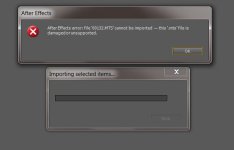
These are the files right of the GH13 SDHC card...here the error message I get and the files are NOT corrupted??Capture.JPG
 
These are the files right of the GH13 SDHC card...here the error message I get and the files are NOT corrupted??View attachment 49330

I just tried it with an unhacked GH-1, and the MTS file was imported correctly. I don't know why the GH-13 file would not be, but there are tools that one can run to transcode to other codecs and formats.

While not that convenient... at least you can get on with life...
 
OK, apparently you are using the same card feeding Vegas as AE. Is there any possibility of the card reader either being different or being used on a different machine?
 
workstation reader from comp is the same......frustrating because I believe these files are fine with new class 10 card and they read in Vegas very clean??
 
Back
Top