AF101E Video Noise on Black parts of the image - looks like snow

Remember if you are looking at AF clips in VLC and on a laptop screen that's pretty much the worst possible combination to enhance noise that's in the footage.

To shoot with Cine D is like begging for noise. It looks as bad as the "superflat" setting that came for the Canon DSLR cameras. I don't know why anyone would use this gamma setting when trying to avoid noise.
The AF has a highly detailed image so turning down the detail only looks better and makes the noise much smoother.
 
Last edited:
Okay, I have finally gone through all the videos. This was done on a MacBook Pro, with an Nvidia 9600M GT graphics card and a glossy display. The screen was calibrated using the apple expert calibrator and the gamma was set to 2.2 instead of the default 1.8.

First and foremost, I know that noise is subjective to a certain extent. I went through these clips twice. For simplicity I have used 3 designations for how I feel about the clips, and some notes. They mean

(A) No noise seen, or if I did see any, it was so small, it was really hard to notice from 2 feet away.
(B) Some noise in the scene, but it looked natural. Sometimes more than I'd really like, but compared to other cameras, I think on par with expectations.
(C) Noise was dancing around a lot like I saw on the candlelight video. I would not use and we reshoot because the noise pulls your eye to that location as it is SO different than any other noise in the same video.

Here are my notes for each of the files:

0001 (C) lower right gray box is VERY noisy to me, as with the black border around it, everything else clean
0007 (C) lots of noise in the lower right gray box
0008 (C) noise in the lower right gray box.
0013 (C) VERY noisy at bottom right blacks and grays
0014 (A) LOOKS AWESOME
0019 (A) LOOKS AWESOME
0020 (C) lower right gray is very noisy, blacks clean, left of chart on wall is noisy.
0025 (C) lower right gray is VERY noisy. wall to left is very noisy too. do not like
0026 (B) For detail 0 was surprised, much cleaner dark gray. left of chart on wall is noisy. usable.
0031 (B) noise is a bit less in the right lower gray, and on the wall on the left, but still a little jumpy to me.
0032 (B) DECENT. little noise on the right side of chair, but looks natural, would use
0033 (C) noise in face and on right side of chair and chair arm
0034 (C) lots of noise in the right side of the chair
0035 (C) chair right is noisy in blacks, more than I'd like
0036 (B) a little more noise in chair on right, but looks much cleaner
0037 (A) LOOKS AWESOME
0038 (A) LOOKS AWESOME
0039 (C) top right of chair is dancing noise, rest of image looks okay
0040 (B) DECENT. Looks clean with a little noise, but more natural looking

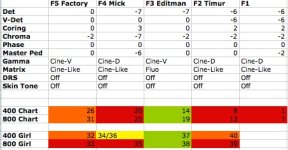
So after I wrote what you see above, I went through and made a table of all the settings and cross referenced the file names and lined everything up. I then color coded for:

(A) = green
(B) = orange
(C) = red

Yellow is because there were 2 files with the same settings, and one I reviewed as B and the other C, which just points out that some things can be border lined (subjective).

compare_chart.jpg

You will also notice that two files were not there to review. However, what I did like is that the results were VERY consistent to my viewing and I had NO clue which file I was reviewing at the time as I wasn't keeping track of which F# it was.

I also notice that the ISO800 for this display got a lot worse in the chair and such, which is also consistent.

Lastly, this shows that editman's settings really so far seem to be the best. Now, does that say because I too used a 7D for A LOT of stuff the last year that we both have the same predisposition for what we expect? Could be. But when I marked something A, it was CLEAN. REALLY CLEAN.

There are my observations anyways.
 
Great work in going through all those clips and making that chart. I stared until my eyes went dry on my Marshall so I know it takes alot of effort doing this.
 
Well by trade I am an electrical engineer during the day, and I'm actually a microelectronics engineer, so charts, analysis, experimentation, that's my thing. :) As you can imagine, I was excited to see that after I went through everything, the consistency in your settings made me very happy.

My camera gets here in the morning, and later tonight, I plan on spending some quality time with it. I viewed everything in QuickTime and went through ALL of them about 3 times. (3rd time to make the chart). I did this all on the system that I saw the most noise of all my viewing mechanisms so I could be sure. (Since this is the machine that I spent a lot of time looking at 7D footage as well after I capture it to HD after a days shoot).

Outside of this, I have some skew tests to do as well so I can compare the rolling shutter mathematically to the 7D (which is about 21ms read/reset in 1080p24), but that is a different topic altogether.

I am not sure about everyone else, but the crux of my issue with some of the noisy shots is the inconsistency in the noise. When I look at noise on my 7D, the noise signature (as I like to call it) is consistent regardless of what is noisy. That is not the case with some of these really noisy (to me) settings. For instance, in the light gray around the charts (the wall), the noise is mostly what I'd see on the 7D and other cameras. Very film grain-esque but with a slight bit of chroma to it (which I am okay with). Also, in some of the shots, there is color banding in that noise as well. That said, for the dark gray and some of the black, the noise does not look like that at all. It is clumpy, and VERY monochromatic in color. It's like 2 shades of really dark, and it's very flickering around. Because the noise is so different AND in generally one localized area on a test chart, it really jumps out at you. It's like BAM!!! hello! :)

It also does not resemble sensor noise. I know what sensor noise looks like, I have enough different CMOS cameras, and have used them without noise reduction and with, to see a typical distribution of noise off the sensor.

For those of you that see the noise in the grays on the bottom right, does it look different as well, something you are not used to seeing?

What I also don't understand is that Timur's settings as I imagine were used on "Verse" here produced REALLY noisy footage to me on the chart. I just went and looked again and sure enough, there was NONE of this on "Verse". From the factory setting and Editman's settings, coring is set to 0. Where the coring was higher, in these tests it looks noiser. In addition, anything with Cine-V also produced better results.

Editman, with your settings, when you changed the coring from what you have there, what did it do up and down?
 
Coring did nothing to improve or degrade any noise issues. I took every parameter and adjusted them each having every other at their neutral setting thus narrowing down which influenced noise the most.
 
Coring did nothing to improve or degrade any noise issues. I took every parameter and adjusted them each having every other at their neutral setting thus narrowing down which influenced noise the most.

Well it looks like Cine-V is the biggest difference between all of them. Also, everyone else is using Cine-Like, but you :) Tommorow I will start with your settings and work from there and see if there is anything else I can determine.

Thanks for the update!
 
Well it looks like Cine-V is the biggest difference between all of them. Also, everyone else is using Cine-Like, but you :) Tommorow I will start with your settings and work from there and see if there is anything else I can determine.

Thanks for the update!

I'm having flashbacks to the HVX200 release. Was about to shoot a film with a pair of them and a similar conclusion was reached. Cine-D is the noisiest and Cine-V (and B.Press) are considerably better. I think we ended up shooting B.Press for interiors and night exteriors, and Cinelike-D for day exteriors.
 
After seeing some obvious noise in my footage with what is being called F1 above, under perfect outdoor light, iso200 & 400, Cine D and V. I tried the exact same settings last night outside in the city but only changed the gamma to Cine V and the MAtrix to Fluo and shot at iso 400. On my MBP in FCS2 where I have seen noise in my other well lit footage, I saw NO noise what so ever; not in the highlights, mids, shadows or blacks. Watched the footage first on my 46" Bravia through SD card slot on Blue Ray and it looked fantastic. Was floored when it looked as noise free on my laptop. Now of course I should of shot the same scene's at Cine D as well for a comparison but I was way under dressed. I shot very high contrast scene's with dark shadows on purpose and that scene file passed with flying colors. Thanks Editman!..
 
I am still seeing more noise than I think is acceptable. It is amazing how much noise you can see on a waveform monitor.
 
So now we're REALLY getting to the bottom of the noise problem, right?
From what I'm seeing with my camera, yes. Im going out today and shooting the same scene's from last night in daylight and see how it looks. For web, Cine V is fine but for some of my broadcast clients it might be a little to contrasty if what I saw on my TV is a indication. Would love the option of a flatter profile that is "noise free" as well. Of course, I never saw noise on my TV when I shot Cine D with Cine Matrix, only on my laptop.
 
Well what I meant was that we're now getting to know the cause of the problem, solving it is another thing.
And Fotojorno, does this mean that it's not possible to shoot a neutral image suitable for post grading without having noise?
 
I wish I knew the answer to that. They're way more qualified and experienced technical people here who will probably be finding that out very soon. I've just been following their lead and experimenting with suggested settings, so far they've been extremely helpful. Thank you to everyone who has been proactively contributing to resolving this issue.
 
Is there a graph anywhere with the gamma curves? I looked through the manuals and didn't see anything. Would be interesting to compare Cine-V and Cine-D.
 
Back
Top