africanmarty
Well-known member
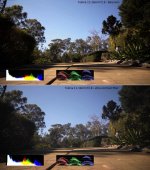
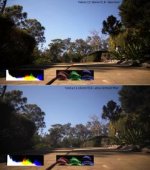
I thought i would check out the Tiffen contrast filters since i wanted to see if i could squeeze any more usable latitude if at all into my AF100 footage. If I can gain a 1/2 stop to me that's enough to be worth it. The footage from the following screen grabs were captured via HD-SDI out to the Blackmagic hyperdeck shuttle2 @ 8-bit uncompressed 4:2:2 1080p23.976 in REC709. The picture style used was Marvel Cine's flat picture style. The lens was Canon FD 55mm f1.2. Camera settings were ISO 1600, camera ND set to clear, 180 shutter angle, lens stopped down to f2,8. The shot was lit only from 1 desk lamp. The uncompressed files were encoded to cineform .avi files with 'filmscan1' as the encoding setting and colour grading done in Firstlight. I have posted images of the same scene shot with and without the TIFFEN contrast filter and to both i have added a s-curve and corrected for clipped highlights. I think that's all the information regarding this test, if I have left anything out just ask and i will be happy to answer. What do you guys think ??
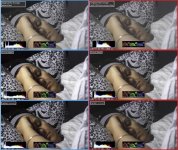
Here is a link to the same side by side comparison image, only much larger. Each frame is 1280x720 in this TIFF file :
https://dl.dropbox.com/u/30860711/side by side complete LARGE.tif
I found from this short test the TIFFEN contrast filter subtracts roughly 10 IRE from the highlights and shadows (according to the AF100's live waveform) while leaving the mid-tones unaltered. Look at the original unaltered flat footage with the TIFFEN contrast filter (top image) it has that "mountain in the middle" with a decline to both sides. The shot without the filter does too but its not as flat. Also after adding a s-curve the shot with the TIFFEN filter has more information in the highlights compared to the shot without the filter (look at the pillow to the right of the woman's face), and while allot of that detail could be recovered (bottom pic) the shot with the TIFFEN filter i was able to recover even more (although unnecessary as the s-curve shot with the TIFFEN filter had pretty much the same highlight information as the final shot without the filter with highlight recovery performed !)
This was a very quick test as I just got my filter today and wanted to do a quick test, so far i'm happy with it The only drawback i have found (from my very limited testing) is that these filters do not like to pointed directly at or into a light source.
Regards Marty.
Here is a link to the same side by side comparison image, only much larger. Each frame is 1280x720 in this TIFF file :
https://dl.dropbox.com/u/30860711/side by side complete LARGE.tif
I found from this short test the TIFFEN contrast filter subtracts roughly 10 IRE from the highlights and shadows (according to the AF100's live waveform) while leaving the mid-tones unaltered. Look at the original unaltered flat footage with the TIFFEN contrast filter (top image) it has that "mountain in the middle" with a decline to both sides. The shot without the filter does too but its not as flat. Also after adding a s-curve the shot with the TIFFEN filter has more information in the highlights compared to the shot without the filter (look at the pillow to the right of the woman's face), and while allot of that detail could be recovered (bottom pic) the shot with the TIFFEN filter i was able to recover even more (although unnecessary as the s-curve shot with the TIFFEN filter had pretty much the same highlight information as the final shot without the filter with highlight recovery performed !)
This was a very quick test as I just got my filter today and wanted to do a quick test, so far i'm happy with it
The only drawback i have found (from my very limited testing) is that these filters do not like to pointed directly at or into a light source. Regards Marty.
Last edited:

 picked up a matte box for my AF100 and began experimenting with filters. I had not thought of the low contrast filter but your results are very impressive. I'd love to see how it works in high highlight/contrast conditions in day exteriors. Especially if you it helps expose to gaurd against highlight breakup. The apparent midrange "boost" looks pretty useful.