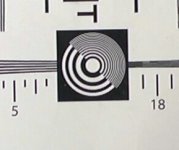
AF100 shows more aliasing and less resolution than Panasonic GH2 ?

Stip writes:


How do you know?
Because they only do video comparisons and video camera tests, never stills.

EDIT: Their statement to the GH2 ISO chart in the GH2 video review:

'Also the ISO chart is promising: there hasn't been such few scaling-artefacts at obviously good filtering from any DSLR in video mode so far. IN SHORT: You won't find such a clear image from any available camera with a big sensor. For a comparison we also show test results of Sony's NEX VG10 and Canon's 7D.'

http://www.slashcam.de/artikel/Test...kompakte-Ueberflieger--Aus-dem-Messlabor.html
 
Last edited:
Perhaps they took a still image with the GH2 and a video frame with AF100. If you would take a video frame with the GH2 it would look probably the same.
...If the GH2 frame was a still shot then you could easily count every external ring in the circle, or be able to see the spaces inbetween.

And I would be seriously worried about the GH2 still photo capabilities...
 
...If the GH2 frame was a still shot then you could easily count every external ring in the circle, or be able to see the spaces inbetween.

And I would be seriously worried about the GH2 still photo capabilities...


That the GH2 is a still and the af100 is a frame grab is the funniest thing I've read in a long time. Even if these guys dont use the most rigorous testing standards and apparently they do, it was zeiss prime on both afaik, then they wouldnt be that dumb?:Drogar-BigGrin(DBG)
 
Faust, this can be caused by having the AF100 sharpening set too high (at its default level it is set too high).
Do you mean the DETAIL LEVEL/V.DETAIL LEVEL parameter?
That does not increase/decrease aliasing, DETAIL LEVEL controls sharpen/unsharpen edges giving the illusion that more or less spatial high frequencies are visible.
But no actual higher frequencies appear or disappear, this means that sharpness parameters do not affect aliasing in any way.
 
Slashcam are giving you a lot of space of speculation of their settings, because they do not mention it and you should always think out of the borders ;-) Do you know the settings of the AF100? Do they recorded in 24p, 25p, 50i or what? That could really make a difference. I don't think the GH2 has a 24p option and all the clips of the AF100 are recorded in 24p. So, think twice!
 
Faust,

In camera sharpening can indeed cause aliasing on circular test patterns.
We have aliasing on straight lines too, the same aliasing I've noticed on some recently shot AF100 MTS files.
What I want to say is that aliasing problem on the german test cannot be a matter of sharpening, otherwise you'd have to soften video signal at the minimum value allowed, then you'd be ok...
Further lessening AF100 detail would equal to reach the resolution of a pixel-shifted imager, saying goodbye to FullHD and this doesn't make sense.
 
It's pretty easy to test if one already has the charts setup. You can monitor the image as you change scene settings to see how the detail setting is affecting the patterning.
 
AF100's OLP filter is there right to lessen aliasing.
GH2 has a far more moderate filter, then it should show a lot more video aliasing than AF100...

Assuming that Germans have made a fair test, I wonder what's the reason for this frustrating AF100 behaviour?

Shoot. My career shooting resolution charts is over!

Love this camera. Don't care about codec whining, sensor whining, crop whining, it's an iterated step in a long line of cameras. Love that it didn't bankrupt me either. Why shoot 4k, 1000 TV lines when everything is web compressed or mpeg2 for tv? Work within know limitations!
 
We have aliasing on straight lines too, the same aliasing I've noticed on some recently shot AF100 MTS files.
What I want to say is that aliasing problem on the german test cannot be a matter of sharpening, otherwise you'd have to soften video signal at the minimum value allowed, then you'd be ok...
Further lessening AF100 detail would equal to reach the resolution of a pixel-shifted imager, saying goodbye to FullHD and this doesn't make sense.

Faust,

Detail/sharpening adds hardly any real resolution, it just makes things look sharper. But the result of this is that on a test pattern you will see exaggerated false detail.

If you don't agree with me, then look at this report on the XF-305 done by the BBC:

http://cpn.canon-europe.com/files/news/xf305_xf300_pro_camcorders/Canon_XF300_305_report.pdf

On page 11 you see a test pattern done at no detail enhancement, Figure 1. On page 12 you see the same test pattern done at maximum detail enhancement, Figure 2. Which looks sharper to you? Are you really saying that the detail enhancement didn't affect the results?

The slashCAM tests seem to be done at factory default settings, from what I can infer from the translation. So probably detail was set way too high. BTW, the next test says that the AF has higher color resolution than the GH has.

Also a lot of what you're seeing as softness in the lines has to do with chromatic aberration, which can be corrected in camera but is really a result of the lens.

I'm not saying the aliasing in the chart can be explained away by settings and lens, but that very well might be the case.
 
Last edited:
The slashCAM tests seem to be done at factory default settings

Yes, they mention using the factory defaults, for AF100 as well as GH2. GH2 test was done using 'kit lens', they don't mention which one exactely, AF100 was tested with a 14mm lens they don't specify.
 
How about this: We know Guru Barry has both cams. Hey Barry, repeat the tests. Or go a step further. Do each cam in standard, then each cam adjusted to how you would set it up....So far, I'm liking my $900 investment.
 
my own test shoot pretty much looks like the germans af100 chart. I think I had all the detail settings turned down. I guess I should do another test to confirm this.
chartcenter.jpg
 
Last edited:
It's pretty easy to test if one already has the charts setup. You can monitor the image as you change scene settings to see how the detail setting is affecting the patterning.

Personally I am skeptical about those results and I am a GH2 fan. I don’t believe that the GH2 has less moiré than the Af100. I sure would love to test it though.

So why don’t we test it? I have the test chart they used printed out in poster size from a higher end printer. I have the GH2 and I have finally found what I consider to be the highest resolution settings for the test chart.

If you want to meet somewhere since we are in the same place. We can test the two against each other and put an end to this discussion. We can upload the original files and let everyone else judge for themselves on their own displays.

The 14-140mm between 18 and 25mm mm is the sharpest m4/3s lens you can buy. It is even better than the 14-45mm and more consistent across the whole lens than the 7-14mm. I would love to test the 14-140mm, 20mm, and a few of the MF lenses I have on both the AF100 and the GH2. I think the results will be outstanding with both cameras.

Just let me know if you or anyone else is interested.
 
Faust,

Detail/sharpening adds hardly any real resolution, it just makes things look sharper. But the result of this is that on a test pattern you will see exaggerated false detail.
Yes, definitely, that's what I've already written on the previous page.
If you don't agree with me, then look at this report on the XF-305 done by the BBC:

http://cpn.canon-europe.com/files/news/xf305_xf300_pro_camcorders/Canon_XF300_305_report.pdf

On page 11 you see a test pattern done at no detail enhancement, Figure 1. On page 12 you see the same test pattern done at maximum detail enhancement, Figure 2. Which looks sharper to you? Are you really saying that the detail enhancement didn't affect the results?
The figures show exactly the same number of aliased patterns with the sole noticeable difference in contrast and thickness (and in perceived noise too).
Sharpness (detail) control affects the perception of fine details without adding or removing actually anything.
You've already said it and how could I disagree?
Sharpness can enhance or lessen edge details on images, make shootings look more or less noisy, it can actually make moire or aliasing patterns more present, more tedious.
But unwanted patterns are already part of the image, regardless of sharpness settings.

That is to say that you can't get rid of aliasing by simply lowering DETAIL LEVEL controls or by electronically blurring your images.
If I need a brilliant, rich and crisp footage I wouldn't want to lower sharpness while shooting, I need a camera that mainly does a good >optical< job, most likely working good with standard factory settings.
If a low detail level setting could help me with Hvx200/Hpx171/Hpx500 aliasing I would be the happiest (though blurriest :Drogar-BigGrin(DBG)) camera operator on earth, but it doesn't help me at all.

Maybe lens aberrations have something to do with softening?
Why not?
They could have used an awful lens on the AF and a diamond on the GH2...
 
Back
Top