

GrahamH
Well-known member
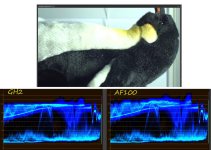
Until recently I have been shooting with my GH2, converting the MTS files to Cineform avi using Cineform Neo 5.5.1. build 323, and editing in Premiere CS6. If I inspect my footage in the YCWaveform display, the raw MTS and the transcoded avi look identical, with overexposed highlights sitting at 100IRE.
I've now started shooting with an AF100, and when I inspect raw MTS from that, the highlights extend to 109IRE. I can pull them down with a levels control and recover extra highlight detail. However the transcoded Cineform avi is still clamped at 100 and that detail in the "superwhites" is getting lost.
Here are my questions:
1) If you are transcoding AF100 footage using GoPro/Cineform on a PC, do you see your footage being clamped in this same way? (If not, what version of Cineform are you using?)
2) In the following post, EOSHD seems to be saying that there are superwhites in GH2 footage, equivalent to those in the AF100, that can be recovered. Can anyone confirm or deny? http://www.eoshd.com/content/8612/mac-avchd-gamma-issues-the-fix
Thanks for any feedback!
I've now started shooting with an AF100, and when I inspect raw MTS from that, the highlights extend to 109IRE. I can pull them down with a levels control and recover extra highlight detail. However the transcoded Cineform avi is still clamped at 100 and that detail in the "superwhites" is getting lost.
Here are my questions:
1) If you are transcoding AF100 footage using GoPro/Cineform on a PC, do you see your footage being clamped in this same way? (If not, what version of Cineform are you using?)
2) In the following post, EOSHD seems to be saying that there are superwhites in GH2 footage, equivalent to those in the AF100, that can be recovered. Can anyone confirm or deny? http://www.eoshd.com/content/8612/mac-avchd-gamma-issues-the-fix
Thanks for any feedback!