AF100 - First Screenshots

KyleProhaska

Veteran
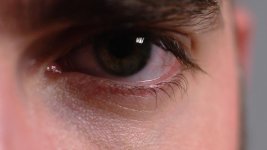
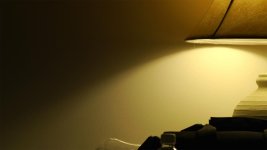
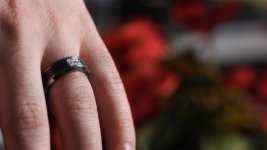
Just got my AF100 today. I took some shots outside but honestly that on-board codec got chewed up pretty good. I see where it can be of use, but I'm ordering a KiPro Mini ASAP. Luckily I was able to get an idea of what advantage the KiPro can give me since I hooked up my camera via HDMI to my Blackmagic Intensity Card to ingest into Final Cut Pro.

Loving the results...banding removed almost completely, and artifacting is a thing of the past. All these shot at ISO 200 with a 55m Micro Nikkor @ F2.8-4. I had a Lowel Softbox in the room, the shot of the light was with the lights off except that bulb to give it a situation where banding would definitely show up.

Added image from recent shooting outside. Did the best I could exposing her skin, but it didn't come out so great. Color corrected with grain added:
af100_deniseext1.jpg

kyle1.jpg

denise3.jpg
 

Attachments

  • af100_eye.jpg
    af100_eye.jpg
    35.1 KB · Views: 0
  • af100_flowers.jpg
    af100_flowers.jpg
    63.1 KB · Views: 0
  • af100_light.jpg
    af100_light.jpg
    26.4 KB · Views: 0
  • af100_ring.jpg
    af100_ring.jpg
    34.6 KB · Views: 0
Last edited:
I threw a few situations at the camera today while I still had daylight. I made sure I knew to check my waveform, made sure I had a good scene file setup, etc. and pointed the camera at a few things including a pond with some geese in it. The codec didn't handle it very well at all. Most of the footage was very milky and honestly if I hadn't shot the footage I would've guessed it was from a 7D or something similar. It handled it a bit worse though IMO with lots of wonderful blocks in the footage. Sometimes the onboard was fine, and other times it was unusable (or what I call unusable). I could use it if I absolutely had to, but I would never shoot anything of importance with it. Just my personal opinion having seen how it handles certain things. I would rather be safe and have the best quality I can for almost any situation. I'm not dealing with quick turn arounds or anything like some might.
 
Can you post screen grabs of anything unuseable?

I am really curious and alarmed about "very milky", "wonderful blocks", "unuseable" .

I have already shot a lot of material of "importance" successfully on the internal codec ... so I am keen to see what I may be missing here that you are seeing.

Also aware you have only had the camera 2 minutes but like to see where the "buzz" is with you.
 
Here's the worst from today...the whole frame is broken into pieces. Granted this IMO is a worst case scenario for the camera and any DSLR would've moired like crazy. Either way even my old HDV camera would've handled this much better than this shot shows. Static shots in decent light seem fine to me, which is expected but it seems like anything mildly complicated gives it more problems. The onboard codec makes the camera look very much like my 5D, with the way the codec compresses. The "milky" thing I referred to is just how it seems to handle and group things together as it compresses. I hear people all the time talk about how the 5D handles skin a lot of the time. It takes on a weird plastic appearance and the compression for the AF100 onboard looks to do the same. I won't post a picture of my wife because she doesn't want me to, but that had that problem in it. In motion the shot below is awful.
http://www.kyleprohaska.com/problem.jpg
 
The shots you posted in your original post look like great shots deserving of a production style camera.

Your problem shot looks like a "snap" shot to me. It is probably over exposed by 1 to 1.5 stops.

I can tell from the other shots you have a nice feel for photographic exposure.

but I think you need to do some more tests and learn a bit more about controlling the AF100 (native codec or external codec) .

We have seen many examples of straight out of the box "test shots" in this forum and an accompanying comment that this camera sucks or the codec sucks or it's noisy,
bandy etc.....

Good things take time.

I won't post a picture of my wife because she doesn't want me to, but that had that problem in it.

Hope you are not saying here that your wife is a problem!
 
Yea, here's a test I just shot a second ago of my wife. It's about 12:40am here so I tried to get it looking like the living room does when it's daytime. There's normally a big sliding door to the left of her that blasts light in. Granted the window behind her should be more blown (if the sun was really out) but I don't think you can tell. Just a simple Lowel Softbox on the left of her with a little 150w kicker bouncing off our white ceiling for fill. All other lights off.

Onboard codec still reminds me of my 5D. The way the codec makes the image feel really is like the DSLRs. For a shot like this it's more manageable. I did take other shots today that were OK too in good light. It's not so bad, but I still wouldn't use it very much unless I was forced to. I'm not paying all this money to be stuck in 420 color space and such, no way. I'm hoping to use this on a feature and the onboard simply won't do IMO, no matter how well my lighting is. Just personal satisfaction I guess! Got permission to put this one up from her, haha.

Better quality: http://www.kyleprohaska.com/af100/denise_cu.jpg

denise_cu2_sm.jpg
 
Last edited:
Post back once you get your external recorder and have tested that. Many will be keen on seeing the comparative

Hope it does it for you... but I am kind of thinking...you need an Alexa.

BTW: I am not disagreeing in principle. I also wish this camera was I- frame and 4:2:2
 
when you did direct capture, did you see the blocky compression clear up? nice shots btw. Love the 35mm adapter look, as always.
 
Absolutely...the footage was nice and smooth. I honestly can't wait to get the Ki Pro so I can take this thing all over the place with no fear of how the codec will handle things. One of the other benefits of the camera that was a reason for getting it is the size. For some reason this thing just feels like something I can pack up and take out really easy and shoot with. I think I'm going to end up shooting more stuff this Spring / Summer than I ever have before, sorta like how the DSLR's got some people out of their shell a little.
 
Some more shots...the flower pot one testing a new preset to get me 80% of the way to where I like my contrast to be. I shot my whole feature like this last time on my A1 and most CC only required me to fix a white balance problem, or boost the mids a little using Curves. It made things much better and IMO the image much cleaner since I wasn't stretching the HDV on the camera too hard. Very pleased with how clean these shots are. B.Press is a great gamma. Barry's book really helped a lot here to get me familiar with what's affecting what.

af100test.jpg

af100test2.jpg
 
Lack of detail in the blacks would worry me a lot... if I had to take those shots into a CC & grade. (Over crushed black)

Image feelsa wrong also becaue the eye never would see shadows like that in that scene. Its obviously a white room.

Nice highlight (white) and mid levels though.
 
I setup the scene file to crush them a little Shooter. Actually the Master Ped was only -1...the amount of crush you see really is a result of either B.Press as a whole, or the lighting. I didn't light the scene to look how my eye would see something, I just wanted a shot with varying degrees of light/shadow to test the preset. Everybody's a critic, LOL...

I spoke of in the Scene File thread that I might still use B.Press but raise the Master Ped to like +2 or +3 instead to bring out a bit more in the blacks.
 
Lack of detail in the blacks would worry me a lot... if I had to take those shots into a CC & grade. (Over crushed black)

Image feelsa wrong also becaue the eye never would see shadows like that in that scene. Its obviously a white room.

Nice highlight (white) and mid levels though.

My biggest problem with this camera is how hard it is to get blacks black.

So far I've gotten fairly mushy results, but that's due to my lighting most likely.

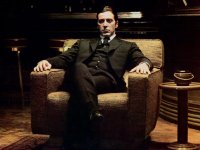
I understand preserving details in the shadows, YET, I don't get this predisposition against pure black in the frame.

For example: pacino_godfather_feb14.jpg
 
I saw and posted a comment in your other post after I saw this one.

My comments (not criticisms) were about leaving your self some room for CC and Grade. I do understand that your intention for this image was to crush and burn in the absolute black to the clip. Thats o.k if you like it like that. A Colorist would hate you (or any D.P) for doing so....but I guess this is only a test and part of your familiarisation with the camera.

If thats "80% of the way to where I like my contrast to be" what else will you do to that in grade and CC. You cant crush the blacks and you cant lift any detail out of them (noise) so where would you go to get the 20%? (Just asking)

Something I take out of this forum in all the many discussions about Scene Files is that they are "Looks" and that they replace lighting and exposure control like a "magic bullet".

Have you done any tests using the Default scene file settings yet?

the amount of crush you see really is a result of either B.Press as a whole, or the lighting.

BTW: I shot a TVC the other day using B-Press . Heres a couple of frame grabs that dont seem to display the blacks crushed.

coke-fringe.png


dave-key.png
 
Typically where I end up doing a boost is in the mids and I get the darkest darks and the lightest lighest where I want them. I CC my own stuff so the only person to hate on me is me if I screw up. A simple curves adjustment of the dead center is all I have to do most of the time to get a lot of shots I want after I use a setting like this. It's not an excuse to light poorly at all, and that example I gave was supposed to be dark and super contrasty. The B.Press doesn't automatically give you what I was talking about, but it does as Barry presents in the book "leaves the highs alone, and press the lows down a little, but raises up the midtones." This gets me very close to what I want but I don't push it so hard that I don't leave any room for me to adjust the mids myself in post. As I had said before I lit the shot for the specific purpose at hand.

I understand your concern about "looks" overtaking proper lighting, exposure, etc. but for a lot of projects getting what you're absolutely sure you want as quickly as possible is a great solution. Lighting will always be key, but I never intend to ever shoot a really flat image with intentions to make it what I want in post, not to the degree some do. Depends on the project I guess...

Nice grabs by the way, top notch stuff.

This is from my last film. It had a pretty rich and more contrasty feel. There's more detail in the blacks there than this little 640px wide image might let you see. On a properly calibrated NTSC monitor it looks as it should IMO. All each of these images had was a slight lift in the mids...the rest was in-camera + lighting.

a1notaf100.jpg
 
Last edited:
My biggest problem with this camera is how hard it is to get blacks black.

So far I've gotten fairly mushy results, but that's due to my lighting most likely.

I understand preserving details in the shadows, YET, I don't get this predisposition against pure black in the frame.

For example: View attachment 32009

There is no "predisposition" against pure black in the frame at all... but most D.Ps approach it with caution and skill. I suggest that the example you posted is not how the D.P shot that scene and there would be detail in the black of the cinema frame. ( BTW: that sample is most likely a still for a poster . Wrong aspect ratio is a clue)

Just me maybe... but my thoughts (imagewise) on Kyles test shot of the vase and flowers ...

It "denies the eye" information. The black holes in the scene serve no purpose as information, drama or composition.
It does not frame or focus the eye to any particular part of the image except the holes. It does not make the flowers beautiful or otherwise.

The black comes across as underlit in context of the rest of the space and how we perceive the rest of the room. (ie white ambience)

The shadows in the Godfather scene is exactly opposite and masterful use of contrast , light and shadow.

I know Kyle was testing so its unfair in some ways for me to comment this way...but I dont believe in "contrast for contrast" sake (ie. without purpose or reason).

"Horses for courses"
 
Back
Top