One of the most frustrating things is, despite loading the metadata, the clip names within Premiere Pro always end up being 0000, 0001, 0002, etc. I contacted Panasonic, and there's nothing i can do about that.
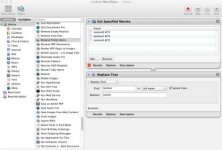
I'm able to use the Automater program on the mac to do this. I navigate to the STREAM folder and drag the .mts files into the Automator window. I have a Rename Finder Item workflow that I use to do this. I tell Automator to replace 00, the first two zeros, with my name, Woody.
That works fine.
Within PP, it reads the video clips as woody1, woody2, woody3, etc.
I give the SD card to my producer, he starts a new PP project, imports the same files, edits them together, exports a project file for me. I download it, open it, reconnect the media, and everything works fine.
The one thing I have noticed, is that after the re-name, when I put the card back into the camera, the camera can no longer read the files. I don't know if this would be a big deal to me.
So, everything seems to be working fine so far, but for the more experienced folks out there, do you foresee any other problems?
I'm able to use the Automater program on the mac to do this. I navigate to the STREAM folder and drag the .mts files into the Automator window. I have a Rename Finder Item workflow that I use to do this. I tell Automator to replace 00, the first two zeros, with my name, Woody.
That works fine.
Within PP, it reads the video clips as woody1, woody2, woody3, etc.
I give the SD card to my producer, he starts a new PP project, imports the same files, edits them together, exports a project file for me. I download it, open it, reconnect the media, and everything works fine.
The one thing I have noticed, is that after the re-name, when I put the card back into the camera, the camera can no longer read the files. I don't know if this would be a big deal to me.
So, everything seems to be working fine so far, but for the more experienced folks out there, do you foresee any other problems?