AF100 Bit Rate

Peter Pavlakis

New member
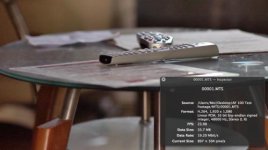
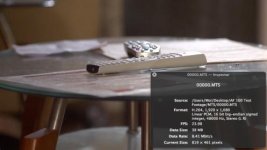
I recently bought a used AF 100, intrigued by the promise of a higher bit rate than my dslr. B&H's specifications promised an average bit rate of 21 mbit/s and a maximum of 24 mbit/s. I've been shooting a lot of test footage with it and when I import it, according to quicktime player the bit rate is usually around 9mbit/s. And it looks like it. The footage is noisy, blotchy, and completely falls apart when I try to do anything to it in post. I'm shooting PH mode, 1080 24p. Are any other AF 100 owners having this issue? Might this be due to having bought it used?
 
I've been using Adobe Media Encorder to convert the footage to apple pro res and bringing that into fcp 7. But when I say I'm checking the bit rate in quicktime player, I'm checking the MTS file right off the card.
 
All my AF footage (that I took a moment to check) says 24Mbps via the QT inspector. Are you absolutely certain you have it in PH 24?
 
Definitely in PH 24. Are there any other important settings that I might be missing? And I bought it used - is there anything the previous owner might have done that could change this?
 
All my footage says 24 Mbits/sec as well. Shot this yesterday.

Elmn8VC.png


Can you post a still of what you shot?
 
.
 

Attachments

  • Screen Shot 2013-10-09 at 10.51.57 AM.jpg
    Screen Shot 2013-10-09 at 10.51.57 AM.jpg
    17.9 KB · Views: 0
  • Screen Shot 2013-10-09 at 10.54.59 AM.jpg
    Screen Shot 2013-10-09 at 10.54.59 AM.jpg
    16.4 KB · Views: 0
Last edited:
If it's an absolutely still shot, the data rate may drop. For example, shoot with the lens cap on, you may get a lower data rate. It adapts and doesn't use more than it needs. But if it's a scene of, say, a crowd, and lots of motion and detail all over the place, then you should see at least 21 mbs and up to 24 mbs for that.
 
Try using a program called ClipWrap for your FCP conversion. See if your data rate changes. They have a trial version for download.
 
FWIW I have not found Media Encoder to be kind to anything I do. What used to come out of FCP looking clean and crisp now comes out of Media Encoder via Premiere looking like crap. Not to mention when I do a "Match Sequence Settings" export from Premiere, I get an mpeg from a Pro Res sequence, which is infuriating for many reasons. I would try to eliminate Adobe from the equation and figure out what you have from there.
 
Have you tried playing the original files in something like VLC, and seeing what that reports as data rate?

I can't help thinking the problem is most likely in the import rather than with the AF100 itself?

And what about playing the files directly from the camera to a monitor? Do you still get footage which is "noisy, blotchy"? If you do, that would show a camera problem, if not it seems pretty certain it's an import problem.
 
I would try to eliminate Adobe from the equation and figure out what you have from there.
If he was using Adobe Premiere he would not need to do a transcode at all. Not sure why he is having a data rate issue with original files but I suspect O.E.Maybe INspector is reading the metadata wrongly.
 
I don't know FCP, and am having a hard time reading your grabs, but why does Current Size say 897 x 504 and 819 x 461?

bobby's says 1873 x 1054.

Did you shoot 1080?
 
When you open a movie in Quicktime, you can resize the player window... that's what's displayed, not the actual dimensions (it'll actually display "(Actual)" when it's actually what the actual dimensions actually are). The file name suggests he's opening them directly from the card fie structure, as downloaded, so it doesn't look like any attempt to transcode is at issue. I just rolled a few seconds of lens cap out of curiosity, opened it in QT, and it still displays "24Mbps," so this whole thing has me flummoxed.
 
Back
Top