
Navigation
Install the app
How to install the app on iOS
Follow along with the video below to see how to install our site as a web app on your home screen.
Note: This feature may not be available in some browsers.
More options
You are using an out of date browser. It may not display this or other websites correctly.
You should upgrade or use an alternative browser.
You should upgrade or use an alternative browser.
AF100 Audio Input hiss (noise) and Audio Levelling Problems!
- Thread starter rudi
- Start date
Now that i had time to make more tests, here some files i recorded with the Cam and one File recorded with the DR100 in the same room.
The noise level in your sample WAV files is about the same as my HMC-150 camera, which has a noise-floor of about -63 dB, which is not great, but not terrible. ( Your #4 file was very noisy, showing a noise-floor of -48 dB )
I haven't had a chance to test the AF-100's audio capability yet, but I would recommend that you try using a good field-mixer ( any of the Sound Devices mixers are excellent ) and record LINE level signal from the mixer with your AF-100. ( so mics are plugged in to the Sound Devices mixer, and LINE level audio goes from the mixer to your AF-100 )
Also, make sure you calibrate the AF-100 audio channels by feeding a 1 kHz test tone from the mixer and adjusting the camera audio levels until the test tone shows as -12 dB. This should produce the best noise-floor possible with the AF-100.
The noise level in your sample WAV files is about the same as my HMC-150 camera, which has a noise-floor of about -63 dB, which is not great, but not terrible. ( Your #4 file was very noisy, showing a noise-floor of -48 dB )
I haven't had a chance to test the AF-100's audio capability yet, but I would recommend that you try using a good field-mixer ( any of the Sound Devices mixers are excellent ) and record LINE level signal from the mixer with your AF-100. ( so mics are plugged in to the Sound Devices mixer, and LINE level audio goes from the mixer to your AF-100 )
Also, make sure you calibrate the AF-100 audio channels by feeding a 1 kHz test tone from the mixer and adjusting the camera audio levels until the test tone shows as -12 dB. This should produce the best noise-floor possible with the AF-100.
Word .. i continue to sing the praises of the Sound Devices MixPRE .. this is a studio quality mic-pre in a durable rugged case. Lundhall transformers and all ... it's night and day.
jeff
Stephen Frost
Active member
Hi Rudi, are you using a 20dB pad? Your first two audio segments are certainly a bit noisy, but it's impossible to say at this stage whether they are unacceptable or not. Setting the gain input to "middle" (about 5 I presume) may be way too high and will generate artificially high levels of noise. You have a -20dB mismatch between the camera and your mic, so you need a 20dB pad to give the camera a fair crack of the whip. Jeff has shown (in another thread) that a similar set-up to yours can be made to work without a pad but he has to set his gain levels on the camera at slightly less than half (4.5ish) and that's for quite quiet speech. He has also stated in this thread that he is set more usually at around 3. Where there is a Mic/Cam sensitivity mismatch, the difference between 4.5 and 5 can be quite a lot of noise. I'm currently investigating the pros (and cons?) of using a pad and will report back as soon as I can. At the moment it seems there are two schools of thought - 1) that lowering the gain level will reduce noise, or 2) the exact opposite! The only answer is to test it to find out, which is what I'm going to do in the next few days.
I'm confused as to why there is so little, if any, room noise in sample 2 (NTG3 straight into Cam) as opposed to sample 4 (Tascam into Cam) where I can hear a ticking clock and traffic rumble. I'm really not sure what's being compared here and whether it is entirely fair. And what about recording some speech or something? As I'm sure you know, it's the signal-to-noise ratio that's important and you need to make sure your level is set for good signal. Setting your level to "middle" is just completely random and probably too high.
I'm confused as to why there is so little, if any, room noise in sample 2 (NTG3 straight into Cam) as opposed to sample 4 (Tascam into Cam) where I can hear a ticking clock and traffic rumble. I'm really not sure what's being compared here and whether it is entirely fair. And what about recording some speech or something? As I'm sure you know, it's the signal-to-noise ratio that's important and you need to make sure your level is set for good signal. Setting your level to "middle" is just completely random and probably too high.
So .. I did some measurements on my AF100 to see where it lies ...
Here's the path to the ZIP of the audio http://techbreakfast.com/af100/pre/AF100_Pre.zip
I didn't have the FFT window up, so ignore anything below 30 Hz or so.
No bad .. I think a little noisier than I'd like it .. but in range for this range of camera.
At LINE level, it's perfectly fine.
Measurement 1: Line Level, no inputs, gain 5

Measurement 2: Mic level, no phantom power, no inputs, gain 5

Measurement 3: Mic Level, No Input, Phantom On, Gain 5

Measurement 4: Mic Level, No Input, Phantom On, Gain 10 (Max Gain)

Measurement 5: Mic Level, Neumann U87, Phantom On, Gain 5
* Bird chirped at the end giving that super cool 4k spike


Here's the path to the ZIP of the audio http://techbreakfast.com/af100/pre/AF100_Pre.zip
I didn't have the FFT window up, so ignore anything below 30 Hz or so.
No bad .. I think a little noisier than I'd like it .. but in range for this range of camera.
At LINE level, it's perfectly fine.
Measurement 1: Line Level, no inputs, gain 5
Measurement 2: Mic level, no phantom power, no inputs, gain 5
Measurement 3: Mic Level, No Input, Phantom On, Gain 5
Measurement 4: Mic Level, No Input, Phantom On, Gain 10 (Max Gain)
Measurement 5: Mic Level, Neumann U87, Phantom On, Gain 5
* Bird chirped at the end giving that super cool 4k spike
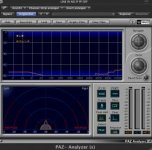
Measurement 1: Line Level, no inputs, gain 5
I get nearly the same results. I compared with your files and used the same adjustings you used.
I only posted one measuring result. Thx for uploading them.
Now i know that the noise is normal. Any tips for a small, cheap mic pre that i can mount on the cam ?
THX
Last edited:
Any tips for a small, cheap mic pre that i can mount on the cam ?
If you can afford it, I would recommend buying the Sound Devices MixPre, which is not that small or cheap ( $665 at B&H Photo ), but it has very good mic pre-amps ( 100+ dB SN ratio ), a very good head-phone amp ( you can hear everything ), a good 2-stage limiter, and will power everything for a full day with 2 AA rechargeable batteries. This was probably the best audio investment I've made to date.
...Otherwise, I would look at something like the JuicedLink CX231 which is less than half the price of the MixPre.
Measurement 1: Line Level, no inputs, gain 5
I get nearly the same results. I compared with your files and used the same adjustings you used.
I only posted one measuring result. Thx for uploading them.
Now i know that the noise is normal. Any tips for a small, cheap mic pre that i can mount on the cam ?
THX
For what purpose? .. you want a mini shotgun, stereo mic ??