AF100 and Manfrotto 502 Video Head

sabbott

Member
Anyone else tried the Manfrotto 502 video head with the AF100? I'd say 'Don't'.

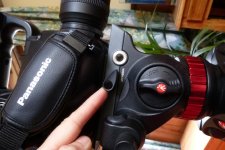
When the camera is mounted on the head, the tightening screw to lock the camera in place can't be turned - because the camera body is in the way (see photo - sorry it's sideways).

I emailed Manfrotto over a week ago to ask about potential solutions to this problem but haven't heard back.

Seems like I can only either cut the tag off the screw (so that trying to turn it will be very difficult) or try to track down a much longer version of the screw so that it pokes a long way out the side. Not very happy with either prospect, I have to say.
 

Attachments

  • P1020249.jpg
    P1020249.jpg
    80.7 KB · Views: 0
The controls on your tripod head have a ratchet mechanism so you can adjust the angle of the lever and prevent it from bumping into parts of your camera.

Pull the lever toward you, straight away from the head -- there is a spring in there -- and you can rotate the lever without turning the locking screw underneath. In a few cycles of this, you should be able to get it positioned so you can lock and unlock the plate without anything hitting the camera. It only takes a fraction of a turn of the knob to release the plate enough that it will slide out.

Easier done than explained in writing!

- Greg
 
Greg is right- I have four of these heads and I have set the locking screw to secure my af100 and ac160 cameras with just half a turn from free to locked. So from 3 o,clock to 9 o'clock, keeping easil;y clear of the camera. It is a fabulous head I reckon and you will love it once you understand how this spring loaded turnkey works.
Cheers!
Rod
 
Hi Greg and Rod,

Thanks for your replies - glad to hear you've both had success with this video head. Yes, I realised the tag of the locking screw could be pulled out and twisted independently of the screw, but I still had trouble because the screw has to be undone a fair way to allow the plate to slide into the head in the first place, then once the camera is in place with a still very-undone screw that needs doing up, the pull and twist mechanism on the screw is useless, because the screw has no purchase in the hole at that point - very frustrating. I'll keep at it if you guys say it works though...

Cheers,
Sarah
 
I think that the worst shortcoming of that head is the wrong placement of the tilt lock/unlock screw. It should be on the left side but apparently the engineering team forgot that little detail...
 
Hi Greg and Rod,

Thanks for your replies - glad to hear you've both had success with this video head. Yes, I realised the tag of the locking screw could be pulled out and twisted independently of the screw, but I still had trouble because the screw has to be undone a fair way to allow the plate to slide into the head in the first place, then once the camera is in place with a still very-undone screw that needs doing up, the pull and twist mechanism on the screw is useless, because the screw has no purchase in the hole at that point - very frustrating. I'll keep at it if you guys say it works though...

Cheers,
Sarah

Yes, it can be tedious to get it set up the first time. If the screw is loose, it will tend to rotate a little even when the lever is pulled out. You'll probably need to go through a few frustrating cycles of pull-turn-release-tighten until you get it in the right place. Working with the mounting plate alone, removed from the camera, will help since you won't be bumping into any camera parts along the way. Start with the lock fully tightened and then reposition the lever to the right place.

The good news is that once you have this set up properly, you shouldn't need to mess with it again for a long time.

Good luck!

- Greg
 
Back
Top