AF100 and DNxHD.mov What it gives to my footage.

Igelkott Film

Well-known member
There are NO findings in greater latitude in DNxHD tho I claim to have found it

Hi,

After getting my Hyperdeck shuttle 2 I wanted to know what I now can do with the af100.

I google and I googled, searched here and there.
What I read was the same thing, it really does not get much better then our in camera pro line AVCHD.

But hey, why give up?
There must be something.

Dynamic stretching and noise reduction.
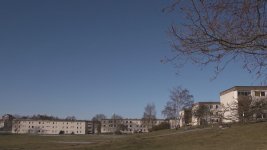
If you look closely you see the transitioning line going from left to right, it goes from AVCHD to DNxHD.
The level is raised to 2 in the mids and finetuned at the ends so the footage match each other. Then cleaned with Neat Video.

Its not very apparent in that video or over YouTube for that matter but 4:2:2 and DNxHD in other tests gives you MUCH cleaner footage after noise reduction by Neat Video.
One can say that the image looks calmer, no jumping comp artifacts.
I suspect that it transfers better to film print because of the great result that can be achieved with noise reduction and sharpening.


Whats left for us that want something useful in our bluray and YouTube production.
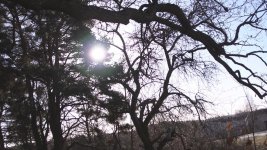
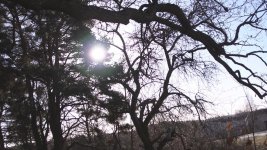
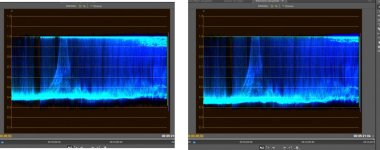
I noticed greater latitude:
Waveform.jpgWoods DNxHD.jpgWoods AVCHD.jpg

This is by far the thing i LOVE most with the Hyperdeck and the codec.
Look at the branches in the white part of the sky, I have done nothing to this material.

What you see in the AVCHD can't be reversed. In the DNxHD its very pleasing amount of detail.
As you see in the waveform there is a lot more there, even in the dark its smoother roll of.


I also wanted to see what it would do with banding in the sky.
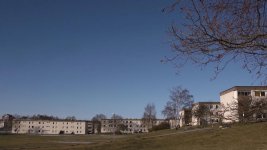
comp skogstext.Still006.jpgdnxhd skogstext.Still005.jpg
AVCHD to the left

To my pleasant surprise there is improvement.
If you want to goo super pixel peeping there is edge artifacts in the "compressed" footage in the tree and not in the DNxHD.


Once i tried all of this I wanted to hook it up to my HX-WA10

And oh what a joy :grin:
First of all getting to see what I'm shooting while I'm shooting is a blast, with my Hyperdeck and SmallHD up on dry land.
And you see all these detail and motion, the onboard codec does NOT hold up to this.
It was fun until my badly constructed HDMI seal filled my camera with water :( hope for the best..


Gears and facts:
AF100 with HDMI to the Hyperdeck Shuttle 2.5 beta 3
Windows 7 with Premiere pro CS5.5.2
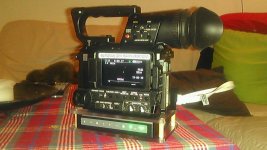
561CB44B-1458060.jpg
Bottom mounted with my own construction. There are connection holes on the bottom of the mount as well.

Scene file:
V detail level -2
Detail coring -1
Chroma Level -2
Gamma B.press
Matrix Norm1
Knee Mid

Hyperdeck:
DNxHD mov container

Conclusion, I love how the Hyperdeck records my footage :beer: and color grading gets more fun.
 
Last edited:
Very interesting! I'm going the AF101 + SD PIX240 route soon, so very interested in findings like this. Please keep us posted :)
 
It seems to me that the DNxHD files either have wrong levels or that the files are interpreted wrong. When recording to PRORES via the Samurai the levels are exactly the same AVCHD/PRORES in CS5/5.5 as it should be. You can't gain more DR with an external recorded really, just higher chroma resolution and less compression than the internal recording.
 
It seems to me that the DNxHD files either have wrong levels or that the files are interpreted wrong. When recording to PRORES via the Samurai the levels are exactly the same AVCHD/PRORES in CS5/5.5 as it should be. You can't gain more DR with an external recorded really, just higher chroma resolution and less compression than the internal recording.

If I´m right its really exiting, if I'm wrong I want to know.
How do you think we can test it?
 
I have put footage from AVCHD and PRORES on top of each other in PP CS5.5 and running the footage reveals no visual difference what so ever when switching between them. The big difference is when you start to push the footage in post, then the PRORES holds much better and when you look at a pixel level that shows PRORES to have just a tad more detail. Levels stay the same between them.

What often happens is that video levels get interpreted wrong and you'll end up with either a bit washed out footage, like the sample you show, or the other way around with clipped and crushed levels. The washed out footage can seem to have higher DR but it's just RGB 0-255 and Video 16-235 levels that are screwed up.
 
DNxHD is better then anything :grin:

Uncompressed
avchd to unc winter.jpgunc winter.jpg
DNxHD
avchd to dnxhd winter.jpgdnxhd winter.jpg
AVCHD to the left

I tested against uncompressed and it looked the same as AVCHD but DNxHD gave me more REAL latitude.
Don't ask me how but I'm never updating my hyperdeck, I love it how it is.

And see for your self www.igelkottfilm.se/video/DNxHD_test_2.zip (All four raw files)

Homework:
Try and make the uncompressed footage look as good as DNxHD

Man this is COOL :beer:
 
Last edited:
I have put footage from AVCHD and PRORES on top of each other in PP CS5.5 and running the footage reveals no visual difference what so ever when switching between them. The big difference is when you start to push the footage in post, then the PRORES holds much better and when you look at a pixel level that shows PRORES to have just a tad more detail. Levels stay the same between them.

What often happens is that video levels get interpreted wrong and you'll end up with either a bit washed out footage, like the sample you show, or the other way around with clipped and crushed levels. The washed out footage can seem to have higher DR but it's just RGB 0-255 and Video 16-235 levels that are screwed up.

"push the footage in post, then the PRORES holds much"
I'm kind of trying to find when that happens but I haven't so far.

Can you give me a test to run through?
 
There's always some headroom on AF footage that can be brought back in post and that is just what I did. I suspect that when you import the DNxHD footage into your NLE (which one?) the RGB 0-255 level got pushed to fit within 16-235 and that showed what is hiding in the headroom of the footage. But it can be done just as easily in post.
 
There's always some headroom on AF footage that can be brought back in post and that is just what I did. I suspect that when you import the DNxHD footage into your NLE (which one?) the RGB 0-255 level got pushed to fit within 16-235 and that showed what is hiding in the headroom of the footage. But it can be done just as easily in post.

Hi Editman,

can we hope that Samurai DNxHD files will be 100% windows compatible? BMD Hyperdeck Avid files seems to have a mac profile when wrapped in a *.mov container and when wrapped in a MXF container it seems they can be managed only by Avid systems. To avoid any gamma and color space issue now I'm recording uncompressed files with Hyperdeck while Samurai is sleeping on the shelf. If Atomos don't give me 100% compatible files (with EVERY sw) with the Avid update I probably will sell my Samurai

Regards

Gary
 
There's always some headroom on AF footage that can be brought back in post and that is just what I did. I suspect that when you import the DNxHD footage into your NLE (which one?) the RGB 0-255 level got pushed to fit within 16-235 and that showed what is hiding in the headroom of the footage. But it can be done just as easily in post.

My NLE is stated in my article.

Please post step by step on how fitt 0-255 to 16-235 in post?
And please post what treatment I can give it that AVCHD can't handle.


And just want to clarify i love the way it looks and movie making as all about love.
 
Last edited:
I guess when Samurai gets DNxHD into the Samurai it will be a quicktimefile encoded with DNxHD. I moved away from Avid because Premiere Pro handles files much better regardless of format. I also have used MXF workflow in Avid earlier and although it worked it had a few drawbacks.
 
Last edited:
Avid is largely configurable: it is a choice of BMD to use a mac profile. The only reason you need an Avid system is to export from Avid in QT with correct levels

:-(

Now I can only wait for Samurai's Avid

Thanks
 
My NLE is stated in my article.

Please post step by step on how fitt 0-255 to 16-235 in post?

And please post what treatment I can give it that AVCHD can't handle.


And just want to clarify i love the way it looks and movie making as all about love.


You do now the difference between RGB and video levels right? In my experience this was an issue when I worked in Avid but I haven't encounter these problems in PP and I only have two flavours these days and that's AVCHD or PRORES and they both are identical when it comes to levels. There's is no magic how the whole RGB vs video levels work. Video levels 16-235 were intended to have levels in a safe region with headroom (0-16 and 235-255). There's really no fitting to be made since video is RGB but what can happen is that when importing footage into Avid you have to make sure you use the appropriate video levels 0-255/15-235. So since DNxHD is an Avid format you have to choose the right video/RGB level when encoding. You can reverse what seems to be happening with footage from the Hyperdeck in DNxHD by choosing the corresponding level when importing footage. I can't do this since I have no DNxHD files to play with but I know from my experience from Avid that it sometimes caused wrong levels.

AVCHD is one effective codec but implemented in 8-bit you can see i.e banding when you start to stretch footage and remember you only have half chroma resolution in 4:2:0 so any manipulation is done with less resolution than you have in 4:2:2. You have an uncompressed recorder so experiment yourself what happens when you grade AVCHD vs uncompressed or DNxHD.
 
How to I make this AVCHD


Look like this DNxHD


You use a "YUV" labelled filter in premiere like fast color corrector on the native video, not RGB image . Those filters labelled "YUV" can access YUV data before it gets converted to RGB in premiere

All that's happening is the difference in levels mapping from Y'CbCr to RGB . The native AVCHD contains the same data in terms of levels, but just a bit less detail due to lossy compression. The range is the same

When taking a RGB screenshot and using a standard Rec601 or Rec709 matrix, you are clipping the data, Y' 0-16 and 235-255 are thrown away. But that data is there and recoverable in the native AVCHD video. Think of the RGB screenshot as a partial representation of the Y'CbCr actual video , a small window if you will . It's not "seeing" all the data in Y'CbCr space that the video contains - but it's there.

The DNxHD only "appears" to contain more data (in terms of levels), only because of how the software treats it when converting to RGB for display. It's actually compressing the range to fit into RGB 0-255 (in 8bit values, or the equivalent in 32-bit float). You're not viewing the video directly in Y'CbCr; you're only viewing a RGB representation of it. But Y'CbCr is much wider color model than RGB (i.e. it contains a lot more information than RGB color model can show you)

Other ways to do this: eg. full range conversion in 5DtoRGB, avisynth
 
Back
Top