

Don L
New member
I'm curious if anyone has any other workflows than what I'm about to describe.
What I am doing is simply navigating to the Streams folder and selecting all of the MTS files. I set my Avid import settings at DNX 175MB and everything comes in fine.
The first time I tried this I didn't get audio then I went back and checked the audio tab on the import setting and I found that with this box below set:
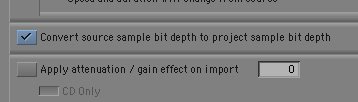
everything works fine.
My issue is I get a dialogue like the one below for each and every clip I'm importing.
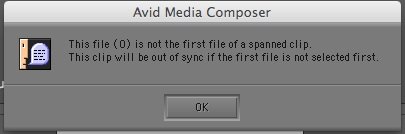
Anyone know why this is happening? These clips do not seem to be spanned. I'm only importing about 20 very small test clips. The longest one might be 20 seconds. And this all came off of a single SD card that was moved to my hard drive.
I'm running MC 5.5 on a mac laptop OS 10.6.6. 8GB of RAM.
So things are working, footage looks amazing, just curious if there's a way to get this box to go away?
Thanks.
DL
What I am doing is simply navigating to the Streams folder and selecting all of the MTS files. I set my Avid import settings at DNX 175MB and everything comes in fine.
The first time I tried this I didn't get audio then I went back and checked the audio tab on the import setting and I found that with this box below set:
everything works fine.
My issue is I get a dialogue like the one below for each and every clip I'm importing.
Anyone know why this is happening? These clips do not seem to be spanned. I'm only importing about 20 very small test clips. The longest one might be 20 seconds. And this all came off of a single SD card that was moved to my hard drive.
I'm running MC 5.5 on a mac laptop OS 10.6.6. 8GB of RAM.
So things are working, footage looks amazing, just curious if there's a way to get this box to go away?
Thanks.
DL
Last edited: