Advice on a monitor for video-artist

ymotion

Member
Hi,
I've been reading a lot lately about the issue of external monitor for video editing, but still find myself a bit confused here (Well, it seems like there are so many things to take into consideration here...) Anyway, I hope you can help me with the following issue.

I'm a video-artist and most of my works - both production and post-production - are done by me. So far I've been working on my 15" Macbook Pro, but now I'm interested in buying an external monitor for the editing part. This will be around mid-high consumer level (~700euro). I know that such computer monitors are not very trustworthy for color correction/grading, and some people are strongly against using there. I still thought to buy a decent monitor that can be calibrated, work with it and then export it to HTV to check the result.
[1] Does is make sense to buy something like that or would it be just a total waste of money? I mean, I can always buy something around 150euros.

Most of my works are intended to be exhibited in galleries/museums (meaning by a projection) and some may take part in film festivals for video-art. It's not going to the web, although I'm posting stills of my work there.

There is also the question of bits. I know the newer and more expensive monitors offer 10-bit (with both sRGB and Adobe RGB color spaces). So, for example, considering the two following monitors by Viewsonic which are relevant to me:
a. https://www.viewsonic.com/us/vp2770-led.html
b. http://www.viewsonic.com/us/monitors/professional-vp-series/vp2772.html
[2] Would it make sense to get the more expensive model (2772) with 10-bit and sRGB/Adobe RGB, if I'm using the monitor mostly for video-editing?
I'm working with Macbook Pro Retina Mid 2012. My guess is that my graphic card (nVidia GeForce GT650M) is only 8-bit, which I should also take into consideration.

BTW, the color space is something I still didn't fully understand. Many on-line sources suggest that you shoot in the same mode you edit: so, for example, go to your camera setting and change the color mode to Adobe RGB if you want to edit it on an Adobe RGB monitor. Most of my projects are done with Sony a7, and Sony has completely different color spaces: Movie, Cine1, ITU709, S-Gamut. Not sure I should take that into consideration as well.

Thanks a lot for taking the time to read. I'll be very happy to hear any suggestion here.

ymotion
 
BTW, the color space is something I still didn't fully understand. Many on-line sources suggest that you shoot in the same mode you edit: so, for example, go to your camera setting and change the color mode to Adobe RGB if you want to edit it on an Adobe RGB monitor. Most of my projects are done with Sony a7, and Sony has completely different color spaces: Movie, Cine1, ITU709, S-Gamut. Not sure I should take that into consideration as well.

The modes in sony cameras are for acquisition (it is an acquisition device.. a camera!). If you were going to do no grading you would want to aquire in your 'delivery space' but if you are grading you can aquire in any (larger) space and then apply the appropriate transforms to make the image fit your delivery space.

Many delivery devices (monitors, projectors, screens) have few colours so by capturing in your delivery space you are somewhat reducing your options to grade.

As for your question about the monitor Im guessing that is tricky because you deliver on a projector in the main. You need to find the 'space' of the projector and find a monitor that can emulate this space(or just grade on a projector)

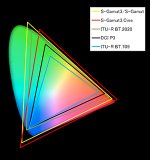
Gamuts..? Here you will see the 709 monitor has the smallest range of colours it can show..

img_01.jpg

S
 
Last edited:
Hi Morgan,
Thanks a lot for your reply.
I have a feeling that each venue has its own kind of projector and there is really no uniformity here (it's only a guess; I know very little when it comes to projectors). So maybe a monitor would be the best way to approach it.

I didn't really get:
"Many delivery devices (monitors, projectors, screens) have few colours so by capturing in your delivery space you are somewhat reducing your options to grade."
Do you mean that if your capture device and delivery device are in the same color mode, then it would require less work?

You indicate the 709, do you mean the ITU709 color mode in the Sony - or the Rec 709? (maybe they are just the same...)

Thanks again :-)
 
It may require less work but not leave you any grading options.

there are two things to consider.. gamut (how many colours) and gamma (the bright to dark curve)

Most of us are not really aware of gamut because most of us only own small gamut 709 monitors.. anything else is costly.

Overall Id make a total guess.. grade on a monitor, make a punchy image and keep important detail out of the blacks.

Most projectors I have seen seem to have little contrast (mainly due to ambient light in the room) and lose shadow detail.. so the above grade opposes that.

Im talking about projectors Ive seen in art galleries and schools.. not cinema projectors (2020?) which are excellent and probably show more colours than a 709 monitor.

S
 
OK, thanks a lot Morgan! I'll be paying special attention to the blacks and contrast.

Would it make sense to get the better monitor of the two I mentioned above? I mean, the sRGB color space (the space for editing videos) will look better on a better monitor?
 
OK, sure.
I guess I can ask a more general question: would buying a monitor with 10-bit color and both Adobe RGB & sRGB color spaces is worth the money for video editing.
 
Hi,
Does anyone have experience with having a 10 bit screen connected to a 8bit video card? Thanks so much.
 
I think most of the monitors less than say 5k euro are 8-bit dithered to 10 bit anyway, and you need a quadro or firepro videocard to get 10-bit....(on the same, an 8-bit monitor that does supposedly 100% of sRGB and maybe 80 of adobeRGB...asus pb279q)...consumer video cards won't put out a 10 bit signal. Prbly irrelevant in your case if you want to project on a wall regardless...I would probably worry more about the projector than your workflow at that point! Iff you had a lot of bucks, maybe I would look at the LG 4k monitor, or maybe even some higher end ones, but perhaps you should be worrying more about the exhibition spaces and projectors that will be used (and ambient lighting etc etc). To me 10-bit videocard/monitor workflow sounds like the kind of rarifed Hollywood thing that us mere mortals most likely won't see. Certainly not projected onto a wall....but man I'm a total newb, so take that with a pinch of salt! The LG monitor, does look very tasty tho! http://www.lg.com/uk/monitors/lg-31MU97 !! My 27" ips 4k monitor is actually way too small...but didn't have the bucks for one of those 32+".....or bigger...

As far as being a waste...I think not...you can always onsell (ok take a bit of a loss, but recoup some moneys!)...provided you don't buy anything too exotic. A mid-high range ips monitor should be resellable if it doesn't work out. Frankly am wondering what you are doing working on a laptop tho! Perhaps priorities should be Hackintosh, then monitor! Given 4k and all...(ok I did as you...laptop to good external monitor, then finally workstation!)...at some point tho you will have to pick up/build a workstation tho...laptops especially in 4k just don't cut it...man my damn dual xeon 2x 8 core is still slow as molasses here rendering away in media encoder while I type...can't wait for 2x 18 cores (72 threads)....can't happen soon enough...and for Adobe and ors to get their sh!tt together...:lipsrseal

Edit: maybe my FIRST purchase would be a colorimeter like the x-rite I1 Pro or the Spyder...then at least you get decent color on your macbook pro! Or are at least assured of as close to rec709 as possible! And if you're really anal, maybe a color-checker passport by x-rite....like a grey card, but Davinci Resolve can automatically grade/correct the footage to an extent if you have one in frame....man I need one...

Edit 2: no seriously? Like you..the first thing I did after many years on a laptop was buy the biggest baddest screen I could afford...haha! Go for it dude! (It was a 1920x1200 pretty bad TN samsung monitor with TV reception...that was key! one of the first HD monitors)...

Edit 3: If you're willing to buy 2nd hand, you could perhaps pick up a good deal on an IPS 4k monitor...provided it's relatively unused. If you're going to project on a wall, frankly I don't see the stress with being super-anal about color correction unlike say prepress or print jobs where you have to match camera to screen to press etc. IPS does make a difference (sitting in front of an IPS and TN now) but a good colorimeter can make up for a lot of that. The newest TN panels are apparently really good. My IPS panel doesn't exactly blow me away...and I'd have no trouble grading on the TN panels I have, even the old (10yrs!) one...

Edit 4: Just remember no monitor is going to look like a mobile whether mapple or samsung amoled...and workflow is the key...ultimate audience etc...(what the hell is it with these so-called creatives and mapple? Us 3d artists know that when push comes to shove, you need serious horsepower, not that mapple BS...)...

Sorry :2vrolijk_08: Hehe couldn't resist a dig at the stephen jobs acolytes! Bloody religion it is! Dude good luck with the monitor...it really is worth it...survived 7? years on a laptop and external crappy monitor before going to a workstation (the 10 hdd's on usb hubs eventually gave me the sh!ts)....

Last edit: actually my first purchase along with my first old hv20 Canon videocameras (amongst the first, and best hdv cams) was a grey card. If you really want your color to be right, then maybe your first purchase should be a color checker passport...Resolve is free after all..no I don't work for them...
 
Last edited:
Back
Top