GH13 Advice from GH ** Wedding shooters

rambooc1

Well-known member
I know we have a few experienced Wedding shooters on the forum and i'm looking for some feedback on whether i'm overdoing things here editing. This was my first time shooting a Wedding as i'm normally a Sports shooter so this is completely out of my realm.

Is this too cheesy, over graded, unacceptable for wedding videos. It was shot with lpowells Max Lat 100Mbps and 14 - 140 kit lens and Gh13.

 
for my taste is a bit over graded but know couples would love that.
I'm also wont used that song but again probably is a matter of taste ;) .

if you upload a frame of the original footage probably someone will give you his take.
 
It really does depend on your clients. I mean really, as wedding videographers, the biggest difference between any of us is style...how we edit. For the most part we all have very comparable equipment, but how we use it and edit are the real differences. My personal philosophy is let the footage speak for itself, so I do grades and stylized intros, but for the most part let people see what it looked like without too many effects. Nothing is right or wrong as long as the client is happy. But I will say this, that you can drive yourself nuts trying to come up with combinations of effects etc to try to keep each video unique, when really, every video has everything it already needs to be unique...the very fact its a different wedding.
 
It's to much for me but 'whatever the clients likes/wants' is the way to go.

Just remember you are editing for a very limited audience that are not necessarily film savy - brides don't know or care about rack focus, vignetting, bleach bypass etc etc. so unless an effect really adds to the show, is it worth adding?

While an effect heavy clip might go down well now, it becomes dated very quickly. I think brides simply want to relive the day and even a highlights clip needs to be 'simple'

just my opinion

all mine are shot with GH13's

http://vimeo.com/album/1545319
 
Thanks guys. you confirmed what was troubling me. Vignette is gone, rackfocus is gone, the transitions are cuts, cross-fades, dissolves and the dreamy look is now just a warm diffusion. Hey gimme a break, we Sports shooters need effects to cover up poor camera work...hehe.

The big problem was i shot with the 14 140 kit lens and not my FD's otherwise i would have had the look i wanted out of the camera, live and learn.

Does everyone agree the audio is even harder to do well???

R
 
I think that even a simple solution such as a Zoom H2 delivers good enough results for the sound.
Sure, if you go with wireless mics it will be much better
Good decision to offer a less graded footage. The vignette was too harsh as was the dreamy glow.
Maybe more subtle grading is more desirable.
 
I think that even a simple solution such as a Zoom H2 delivers good enough results for the sound.
Sure, if you go with wireless mics it will be much better
Good decision to offer a less graded footage. The vignette was too harsh as was the dreamy glow.
Maybe more subtle grading is more desirable.

I thought i had audio covered with a Zoom H1 recording a lapel mic on the groom via wireless transmitter, another H1 placed near the Celebrants PA speaker and my on camera mic. But still things went wrong. The Celebrant also had a wireless mic and whenever it came within 1ft of my lapel grooms lapel mic a huge rush of static recorded on the H1. So the backup audio from the PA had to be cut with the Lapel and obviously you can hear the change.

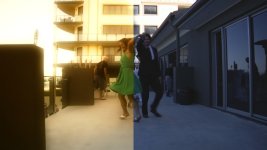
One reason i had to grade pretty heavy in the entry dance sequences above was it was shot badly in shadow. (see below)

half graded.jpg
 
I have a whole new respect for Wedding shooters, you guys definitely earn your money.

This is the rough cut being submitted to the bride and then it will be tidy up time.

All suggestions welcome.

 
When editing wedding videos I usually try and keep it pretty simple. Mostly just straight cuts with a few dissolves, CC and very subtle grading (eg to make it slightly warmer if it was shot on a cloudy day), perhaps some slight vignettes on locked off shots (because on moving shots its looks too fake), and the occasonal B & W shot.

I try to only add any effects if I feel it will add something to the shot - for example, a vignette might hide an overexposed sky and keep the attention on the foreground object, or black and white might make colourful background elements less distracting etc.

One thing I do with most weddings as the final grading stage is to nest the entire project into a new timeline, duplicate it, then increase the contrast a lot and add a blur to the top layer. Then I'll drop the opacity on that layer back to about 20%. The result gives a slight glow to highlights, smooths over any noise in the blacks, gets rid of minor skin imperfections, helps prevent aliasing in the down-conversion to DVD, and gives it a slightly dreamy appearance that unifies the entire film with a consistant look.
 
Back
Top