Adventures in the PCU

Yes, it will work perfectly fine on the D7100. No idea about the 220, does that even take custom styles? (if not, I would go for portrait with minimum contrast).

Sorry, my post was not very clear, I will record to a Sound Devices Pix 220 through the HDMI port.
 
hehe, that makes more sense (I thought it would be a small brother of the Nikon P330)

For external recording, pushing the curve in-camera doesn't give you great advantages, I think the biggest thing there would be the Portrait colors (i.e. better skin tones)
 
So you think the best results are likely to be obtained with the portrait profile? Is there anything I can try to minimize the fixed pattern noise?
 
I haven't done enough tests, but for external recording I would certainly rule out Flaat_12, and I would compare Flaat_11, Flaat_10, and plain-old Portrait. Because yes, I like the colors of Portrait better: with Neutral, some bright colors may be more accurate, but skin goes a bit towards yellow. I'd rather have correct skin color than correct wardrobe/props color.
 
Great work Samuel! Do you recommend the new profiles for d800 users over the old one?

Just finished a pretty heavily graded ad-piece shot with the flaat_11 beta: https://vimeo.com/67275731#

The weather turned to **** just as I started shooting, so had to try and make the sky look blue etc.
I was really glad with the flaat profile for this shoot because I could get a very light picture without clipping the highlights, thus making the scene looking very bright and nice-weather-ish. Noise is a problem for the compressed footage though and I did not have Neat Video to clean it up. But I think in this kind of grading you could really benefit from the higher bitrate external recorder-alternative.
 
I didn't test the new version on the D800, but given previous experience, they will work just the same in all Nikon modern cameras. So yes, I would update for the D800 too.
 
I haven't done enough tests, but for external recording I would certainly rule out Flaat_12, and I would compare Flaat_11, Flaat_10, and plain-old Portrait. Because yes, I like the colors of Portrait better: with Neutral, some bright colors may be more accurate, but skin goes a bit towards yellow. I'd rather have correct skin color than correct wardrobe/props color.

Thanks Samuel, I'll follow your advice and try Flaat_11 and 10, together with portrait and neutral for comparison. Do you think it's possible to study a specific profile for external recording?
 
The thing with external recording is that the profile becomes less important for the final result (because you can push harder in post and the footage doesn't break). I don't have an external recorder, anyway.
 
Out of curiosity: Why is the histogram not clipping in all the way out when using flaat? Is the profile not using all the color?
 
Mmmm... it should be clipping if really over/under-exposed. Do you mean the histogram in the camera, or in your editor? Does it clip with other profiles?

edit: sorry, I thought I was in the Canon side of the forum!

Flaat v1 lifts the black point a bit, so it won't clip to black. I found that this reduces noise issues in the shadows. Those issues are still there, but they are slightly reduced. The price for that is that you now have to put the black point back at 0 as the first thing you do in post. Test here: https://vimeo.com/67542641
 
Last edited:
Ok! Yeah i usually just pull down the shadows so that the darkets part is black on scope. Its the same with the brightest part also. Standard profile clip further out than flaat.
 
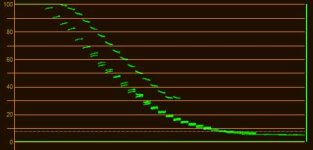
I'm pretty sure the whites clip at 100%, though they may do so later than other profiles, and you may see some extra space if your monitoring tool is expecting 109% values.
 
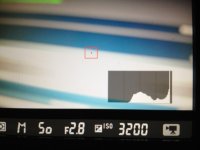
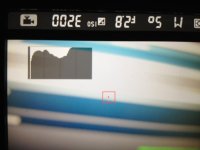
On my D800E they are not clipping at 100%, assuming the histogram in live-view is working correctly. All the other profiles are clipping at 100% though. Also noticing that flaat 10 clips earlier than flaat 11.


bild.jpg
 

Attachments

  • bild.jpg
    bild.jpg
    47.8 KB · Views: 0
  • bild.jpg
    bild.jpg
    48.2 KB · Views: 0
Well, unlike the black clipping point, this one is not intentional. I see it clipping at 100% in the editor, no idea why it's not clipping in the camera's histogram (I never checked it there).
waveform.jpg
 
Back
Top