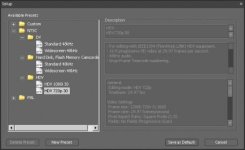
Adobe Premiere HDV Project Settings- No 24f?

fotobywes

Active member
I've just imported my first batch of d90 720p 24f files into Adobe Premiere Elements, and the video keeps freezing, although the audio plays on. If I quit the program and restart, I'm just fine. But if I don't quit, Premiere Elements will crash.

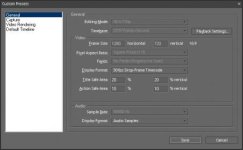
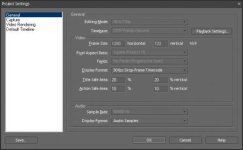
I'm thinking that it's an issue with the frame rate: the d90 file is 24f, however the Project Settings do not allow for a Timebase change- the drop down menu is ghosted out, reading "29.97 frames/second." (see attached image)


The really annoying thing is that Premiere Elements does allow for the export of 24f 720p files, just not the import, apparently.

Has anyone else encountered this issue? I'm running the latest version of Premiere Elements (4.0).
 

Attachments

  • Premiere Project Settings.jpg
    Premiere Project Settings.jpg
    17 KB · Views: 0
Never heard of premiere elements...wish I could help you. If you had just premiere pro...i'd be able to lend a hand.

but, I think it's a codec issue. get the latest mjpeg codec from main concept or morgan.
 
Come January I may be able to upgrade to Premiere Pro. The problem is that Adobe separates the video & sound effects from Premiere Pro that are bundled into Premiere Elements. So I'll have to install After Effects & Sound Booth.

Have you run into such issues in Premiere Pro, and if so, how have you addressed them? Bu downloading the latest mjpeg codec?
 
yeah, i think a lot of people were having issues with importing/playing their files...most of them were solved by installing the newest mjpeg codec.

also under your settings you should be able to change editing mode to "desktop"...not sure in elements, and you can make your settings custom.

and can you change your display format to 24p? In your picture it's at 30fps timecode.
 
This may be of no relevance (I don't own a D90 so it is guesswork) . . .

Your title reads: "Adobe Premiere HDV Project Settings" - but the D90 is not a HDV camera, nor does it produce HDV (MPEG2) files, so perhaps your project is set up incorrectly?

(??)
 
Time to Upgrade

Time to Upgrade

Thanks for all of the responses.

Unfortunately, Premiere Elements only has only a couple of HD desktop options: either 1080p or 720p, and both are 30f. The dialog boxes are ghosted out, and I've found no way yet to activate them.

I work in the "creative" department of a Fortune 500 corporation, and I have to request all upgrades be installed by my IT Department. They're rather paranoid of any open-source shareware, such as free-codecs.

Does anybody have a suggestion on a robust codec package that costs money? In my corporate world, free = evil, and pricey = good...
 

Attachments

  • premiere elements setup 1.jpg
    premiere elements setup 1.jpg
    16.1 KB · Views: 0
  • premiere elements custom presets.jpg
    premiere elements custom presets.jpg
    16.5 KB · Views: 0
Thanks for all of the responses.

Unfortunately, Premiere Elements only has only a couple of HD desktop options: either 1080p or 720p, and both are 30f. The dialog boxes are ghosted out, and I've found no way yet to activate them..

Custom is the good one !! Not HDxxx
 
Would somebody please confirm whether Premier Elements 7 works well with 720p MJPEG MOV files, either 24 or 30.0 (not 29.97) fps?
And is it a problem if the MJPEG file contains the whole range of RGB values from 0 to 255 instead of the more video-like 16 to 235?

I'm looking to buy PE7 and a Panasonic P&S stills camera with MJPEG movie-mode (the FZ28, possibly an FX37 to accompany it) and would very much appreciate knowing whether I'm likely to have any success producing edited output for Youtube which will look anywhere near as clear and fluid as the original clips straight from the camera.

At the moment I have only the low-def FZ18 and I have been meddling with converting to WMV (with 'Super (c)' freeware) to edit in Windows Movie Maker... the results are predictably dire. Even if I can get the motion smooth, the clarity is blurred compared to the original clips and the blacks crushed and hightlights clipped (that 0-255 / 16-235 issue I presume). I'm on Vista, with VLC player installed, Media Player Classic, GSpot, Quicktime viewer, Mp4Cam2AVI, and VirtualDub which I can't make any sense of!

Any help or assurances gratefully received - or failing that, any pointers to any forums specially dedicated to MJPEG movie mode?

Thanks - & Merry Christmas :)
 
Last edited:
Back
Top