Adobe Premiere - Color Shift On Export Solutions

ReelWorksMedia

Well-known member
Hey there talented community. I know this is a very well known topic though I would like to start a thread to discuss this as it seems to be a significant issue. I would like to know others workarounds. There is a color shift / saturation adjustments that happen when exporting from Adobe Premiere. It seems to happen if you export to H.264 or ProRes. This seems to be general public knowledge that it happens.

For a lot of people, its not a huge deal as its a slight shift. For others, like myself, that work with a fairly intense production team...the details are everything. When I sit with a director, producer, creative director...things like deciding on the grade are super important. When they spend their very valuable time with me weighing in on decisions...they want to see those decisions exactly as they decided upon during post.

When Things get exported...Premiere alters the image a decent amount. I have heard this is a Quicktime issue and when viewing on players like the VLC player...its different. I found the youtube clips to contain the same color shift which it implies its the file itself and not the player.

1.) Are others experiencing this as well
2.) What work arounds have you come up with to ensure that the coloring in Premiere translates on export.


ps...sorry if this is already an older thread topic. I did not find something that was dedicated to the subject.
 
I think I noticed something like this recently. I exported a Pro Res HQ file recently from PP 2015.3 for a screening and it definitely looked a little washed out. The director wound up using a lower quality h264 that she downloaded from the film's Vimeo page. Not sure what the issue is and I hope someone can shed some light on it...
 
Yea, I am definitely noticing some significant differences from the video in Premiere as opposed to export. Professionals would definitely notice. I have not had anyone say anything yet....though when I am in the screening room and the team is watching with every intent to really look at the details...I cringe every time hoping that I am the only one who notices a color shift.

Its not bad....but its definitely not professional. I'm kinda shocked its not getting more coverage. Why would anyone go through the process and grade on solid monitors....after being picky about camera...settings...lighting....and everything that goes into an image...and then have the Adobe encoders crap on it at the last minute.

Again, its not terribly off...but its not right and definitely noticeable. In a recent video I shot, I noticed that the practicals (edison bulbs) in the background completely lost their life. All of the warm beautiful glow was just gone. Take that..and span that result across an entire project...and its like your soul gets kicked in the junk and little bit.
 
Thank you for sharing this. I'm interested in learning more about this as well. We just decided to go with PPro for an in progress long form project and I'm identifying potential workflow issues. We'll finish in Baselight, but obviously there are several intermediate steps.

Can you speak a little more specifically about what the color cast/desaturation issues are? Is there a measureable shift in the RGB Parade, Vectorscope, etc? I'd like to see if I can see if I can recreate what you're seeing.

Wishing you well in your investigations.
 
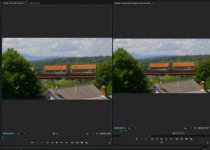
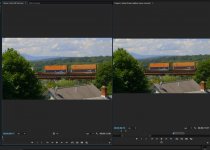
Okay, so I did a few tests regarding this issue with some footage in PP. My strong point is not tech/color science, so please don't hold them to too high of a standard or a definitive test. They were performed on my 2008 Mac Pro (ATI Radeon 5770) and the screen grabs were taken from my HP Dreamcolor Z24X which is set up as a second preview monitor on my system. Exports were QT Pro HQ.

Screen grabs: 1) Premiere Pro viewer 2). QT Player 3). Import and view in PP (Quicktime file on left)

Premiere viewer.jpgQT Pro export (from pp).jpgScreen Shot 2017-01-10 at 3.55.02 PM.jpg

IMO the imported QT file is pretty close to the original sequence when viewed side by side in PP. Although I think there is a slight color wash out happening. When viewed in QT player there is a drastic de-saturation happening, which leads me to believe the issue is with how QT player is reading the color information? Troubling in any case because most of us in the Mac world are screening in the QT world :(

Note: I played the QT file back in Quicktime player on both my Mac Pro and MBP 13" and the color shift was evident on both.
 
Last edited:
Here is a larger screen grab of the PP side by side. Note the imported QT file is on the left:
split screen.jpg
 
Last edited:
OK, I recreated it.

My preface caveat is that color science is not remotely my expertise either. I am learning though. Perhaps one of the colorist ninjas on this forum can chime in to the cause.

Exported an MOV then reimported into PPro. Viewed both the original image and the exported MOV on a recently calibrated FSI CM171. They looked more or less the same, little difference in the Vectorscope.

Viewed in Quicktime player, the exported MOV was clearly desaturated. Same file viewed in VLC Player = much less desaturation. I posit the issue is with how Quicktime player interprets the data. Solution is screen using VLC.

Thoughts?
 
Last edited:
QT Player issue is well-known over at Adobe forums - don't use it, it messes with the image too much

Thanks

Jeff Pulera
Safe Harbor
 
OK, I recreated it.

My preface caveat is that color science is not remotely my expertise either. I am learning though. Perhaps one of the colorist ninjas on this forum can chime in to the cause.

Exported an MOV then reimported into PPro. Viewed both the original image and the exported MOV on a recently calibrated FSI CM171. They looked more or less the same, little difference in the Vectorscope.

Viewed in Quicktime player, the exported MOV was clearly desaturated. Same file viewed in VLC Player = much less desaturation. I posit the issue is with how Quicktime player interprets the data. Solution is screen using VLC.

Thoughts?
Same here. VLC is properly interpreting the footage... An open source program offers more professional results than Apple's flagship playback app. Classic ;)
 
Same here. VLC is properly interpreting the footage... An open source program offers more professional results than Apple's flagship playback app. Classic ;)

Totally classic right? Many of my compatriots are shifting away from Apple. Told a friend who edits a primetime show that still uses souped up Mac Towers to render out that I was taking a PC building workshop next month. He said... do it, man. Do it.
 
Totally classic right? Many of my compatriots are shifting away from Apple. Told a friend who edits a primetime show that still uses souped up Mac Towers to render out that I was taking a PC building workshop next month. He said... do it, man. Do it.
Agreed. Apple is indicating more by it's lack of action on the pro front than anything else. The Mac Pro hasn't been updated since 2013. I have heard complaints that the new MBP is not a professional machine...
 
Agreed. Apple is indicating more by it's lack of action on the pro front than anything else. The Mac Pro hasn't been updated since 2013. I have heard complaints that the new MBP is not a professional machine...

Was sitting in on coloring session at high end commercial production suite today and the talk turned to the new MBP. The recurring perception in the NYC production communities I frequent is that it's time to go Windows. Big part of the reason why I'm diving into PPro now. And happen to love FCPX. Just wish I hadn't taken so long to accept reality!
 
Kohl,
Do you have some basic specs that a windows machine would minimally need to run PP? I was looking at some Hp Z machines on BH but coming from Mac it's like reading Greek ;)
 
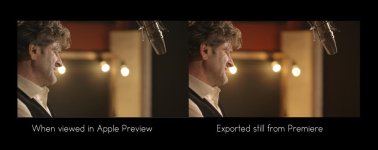
Here is a exported still from Premiere. When opened in Preview...the saturation is definitely altered. So this was not a movie....but a still taken from a movie opened in Preview.

Color example.jpg
 
Hey man. Yeah I totally hear you about it being like reading a language I don't understand. Apt metaphor actually. I'm definitely not a computer scientist, but I can share some of what I've been learning/studying for several months now. Here's a very useful webinar offered by puget systems that very clearly and generously lays out system requirements and more importantly... why certain components versus others. Well worth the hour spent.

https://www.youtube.com/watch?v=MafWIPETZ0g

If you're in the NYC area, the PC building workshop I'm taking is at SVA. Very likely I'll end up getting a system custom built after that, but as I come from the DIY Punk/Hardcore scene in my youth, the bricoleur in me wants to do it all myself, even if it makes more sense to leave it to the professionals.

Anyway, wishing you well.
 
Hey man. Yeah I totally hear you about it being like reading a language I don't understand. Apt metaphor actually. I'm definitely not a computer scientist, but I can share some of what I've been learning/studying for several months now. Here's a very useful webinar offered by puget systems that very clearly and generously lays out system requirements and more importantly... why certain components versus others. Well worth the hour spent.

https://www.youtube.com/watch?v=MafWIPETZ0g

If you're in the NYC area, the PC building workshop I'm taking is at SVA. Very likely I'll end up getting a system custom built after that, but as I come from the DIY Punk/Hardcore scene in my youth, the bricoleur in me wants to do it all myself, even if it makes more sense to leave it to the professionals.

Anyway, wishing you well.

Thanks, Kohl. I'll check out the link... Yeah, I'm here in NYC. I have a few friends at SVA, actually. Are you taking a continuing ed course there or are you a full time student?
 
Back
Top