Accurate Anamorphic Preview on External Lilliput Monitor

sinapps

Well-known member
This might have been discussed before, but...

D7000 outputs 4:3 + Lilliput expands image by default to 16:9 = accurate anamorphic preview when shooting with a 1.33 lens such as the AG-AL7200.

More info: http://kokomonstrum.com/anamorphic
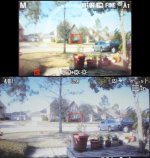
monitorandcam0.jpg

Nikon D7000 screen top, Lilliput bottom. Cropped to the image area.
 
Last edited:
This might have been discussed before, but...

D7000 outputs 4:3 + Lilliput expands image by default to 16:9 = accurate anamorphic preview when shooting with a 1.33 lens such as the AG-AL7200.

More info: http://kokomonstrum.com/anamorphic

View attachment 27997

Nikon D7000 screen top, Lilliput bottom. Cropped to the image area.

Do you know if I'll have the same feature if I use it with GH2 ? I want to test anamorphic lenses too, what do you mean by 4/3 output on your Nikon ? Don't you have a 16/9 HDMI output, like (if I'm not wrong) on a GH2 ? Thanks
 
He's just talking about the monitor stretching the 4:3 output to 16:9 effectively creating an anamorphic ratio. This isn't really a feature per se as much as it is a problem for anything not anamorphic.. The GH2 should output in 16:9 so you won't get this "feature," but you could always use an anamorphic template and use painters tape or something like that to make anamorphic guides on your external monitor.
 
I want to test anamorphic lenses too, what do you mean by 4/3 output on your Nikon ? Don't you have a 16/9 HDMI output, like (if I'm not wrong) on a GH2 ? Thanks
Seb, I think you might indeed be referring to viewing 16:9 footage as twotonepunkkid says. But many of us with anamorphic adapter lenses are looking to view our GH2 2.35:1 footage *after* a 1.33:1 adapter has squeezed it down to camera's 16:9. We all want to review our footage quickly without having to go to our computers.
Solutions are even harder to come by than they used to be! I think Century Optics had a lens which fitted over the LCD screen. That helped. Not long ago, CRT production monitors had trim pots which could be turned to adjust screen aspect ratio to your liking.
But at present, all I have at hand is my 42" Panasonic TV which gives me few options. Its "4:3 Full" option will at least show the centre of your 2.35:1 footage via HDMI input from the camera. That's a help- when I'm at home.
Now, there are heaps of field monitors around. What are people using for reviewing? [I don't mean for shooting - we all get used to seeing a squeezed viewfinder].
Sorry about forgetting all of you 2X anamorphic users, I am even more at a loss to know what you'll do with your massive 3.55:1 widescreens!
 
Last edited:
Back
Top