

Samuel H
Major Contributor
I made some Premiere presets to adjust exposure by given amounts: up to two stops either way, in thirds of a stop (12 curves in total). I use them a lot, so I thought others might be interested too --> I posted them here.
Starting from my measurements of the a7S+slog2 light-response function, I defined the presets so that the change in the midtones would be as accurate as possible, without clipping anything that's not already clipped (so, the adjustments are not accurate anymore when you approach the white or black limit). For example, this is the effect of the curve that brings exposure down by one stop:

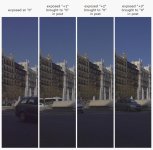
And here are some tests. Quick overview:
I also made some presets to adjust the black point and add different amounts of contrast (four options, from none to a lot), but those will be useless to experienced users, they're just a generic starting point for fast work.
More info here.
Starting from my measurements of the a7S+slog2 light-response function, I defined the presets so that the change in the midtones would be as accurate as possible, without clipping anything that's not already clipped (so, the adjustments are not accurate anymore when you approach the white or black limit). For example, this is the effect of the curve that brings exposure down by one stop:
And here are some tests. Quick overview:
I also made some presets to adjust the black point and add different amounts of contrast (four options, from none to a lot), but those will be useless to experienced users, they're just a generic starting point for fast work.
More info here.
