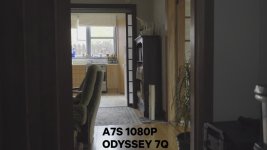
A7S Internal 1080P vs Odyssey 7Q ProRes 1080P

rotierney

Active member
4K options aside, I decided to compare the internal codec (XAVC-S @50Mbit/s) with the 7Q ProRes HQ (220Mbit/s) in 1080P.

To my surprise the internal codec seems far better with regards to retaining highlights and has lower noise. There is no extra detail in the 7Q ProRes either. Makes me worry about their 4K option for the A7S with the 7Q+ and whether it has the ability to hold highlights. Perhaps Mitch can give us some insight here as to what is going on??

Some stills to show the difference below including some 400% crops.

NOTES:
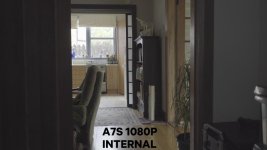
  • Output levels of 7Q ProRes clip was limited to 16-235 in Premiere (result was worse without doing this!)
  • Recorded at 25fps in FF mode
  • Slog2, ISO 3200, F7.1, Sony 16-35 F4 @35mm
AA7S INT.jpg
AA7S 7Q.jpg
A7S INT 400.jpg
AA7S 7Q 400.jpg
 
It seems you already checked that, but I'd think it's the usual superwhites-not-being-correctly-read-by-Premiere thing. In the waveform of the prores clip, do you see stuff above 100%? If so, you can bring highlights down and that detail will re-appear.
 
It seems you already checked that, but I'd think it's the usual superwhites-not-being-correctly-read-by-Premiere thing. In the waveform of the prores clip, do you see stuff above 100%? If so, you can bring highlights down and that detail will re-appear.

Afraid not. It's clipped at 100% so reducing highlight achieves nothing.
 
It seems you already checked that, but I'd think it's the usual superwhites-not-being-correctly-read-by-Premiere thing. In the waveform of the prores clip, do you see stuff above 100%? If so, you can bring highlights down and that detail will re-appear.

Here's two more images, one showing the 7Q clip output levels @ 0-255 (default in Premiere) and the other showing output levels at 16-235 (using fast color corrector). As you can see, reducing the highlight output from 255 to 235 does almost nothing. I do this all the time to my ProRes clips from my FS700 and it brings back heaps of highlights but not on the A7S unfortunately


77Q 0255.jpg
77Q 16235.jpg
 
Internal seems to have more DR. 7Q seems sharper and more saturated (wood looks.. warmer?)

Yes definitely more DR on the internal and slightly more saturation on the 7Q. The 7Q is perhaps a little sharper but not enough to warrant the extra file size. I sharpened both images (not shown in the images I posted) and they came out pretty much identical. I pulled both images around in a grade and again I see no advantage in the 7Q's ProRes.
 
I will ask our engineers to test with one of our own a7S cameras to determine what is going on and how it can be addressed.
 
I posted this video quite a while ago when testing this:


The conclusion is that the A7s signal on HDMI out is somehow baked a bit by Sony, I confirmed this with Dan Keaton at CD. There is no loss in the highlights or shadows it just seems the middle of the curve is different than the internal recording.
 
There is no loss in the highlights or shadows it just seems the middle of the curve is different than the internal recording.

From my tests there is definitely a loss of highlights. I have found the middle of the curve to be identical once the output levels are limited to 16-235 on the ProRes clips
 
I Use both FCPX and Resolve, I have PP but never use it. In FCPX and Resolve in all my tests I never saw Slog from the Odyssey clip highlights or crushed blacks in the footage from A7s HDMI. At least the way I exposed it.

As stated before there is a problem or a difference in how Sony outputs the HDMI from the A7s, this has been documented by many. But NLEs interpret footage differently, and have many import settings. This is a very complex issue.

I am starting testing with the O7Q+ and comparing that to the Shogun now in UHD and HD from the A7s and FS7 as well as the internal recordings. I have already published some of these findings, and I will post here once I have comprehensive results.

The bottom line is you have to work out your own way of exposing, recording and depending on post programs used, there are thousands of combinations. None are wrong and every one has to find a way that works for them. Like I said it is complex. In the 90's it was easy, but also pretty limited unless you shot film.

To get the best results out of your equipment these days takes a bit of experimentation. These boards are good for exchanging ideas, but take everyones conclusions with a bit of salt and work out your own workflow. The results with todays equipment is astounding for the $$$ spent, at least if you look at it historically.

It used to be you bought a new cam and took it to Roger Macie for the standard setup, you learned how to use zebra, and you were done. Shoot and hand off tapes. The post was very limited and if you blew white point or exposure, it was unfixable and you were probably not rehired if that happened. Very simple...
 
Here's two more images, one showing the 7Q clip output levels @ 0-255 (default in Premiere) and the other showing output levels at 16-235 (using fast color corrector). As you can see, reducing the highlight output from 255 to 235 does almost nothing. I do this all the time to my ProRes clips from my FS700 and it brings back heaps of highlights but not on the A7S unfortunately
Could you elaborate on this a little please? I am routinely dealing with blown highlights on my FS700 - Odyssey 7Q 4K>HD footage. I use Premiere Pro CC2014 and I am somewhat familiar with Fast Color Corrector. I know how to set the output level to 16-235, but I am assuming you are tweaking the image much further from there. Are you then lowering Gamma level? Any additional tips would be greatly appreciated.

Thank you,
Robert Pfeifer
 
Just to point to the obvious, you get much greater color depth with the Odyssey's 422 ProRes files than with internal recording.
If you grade in Resolve you shouldn't have a problem.
 
Just to point to the obvious, you get much greater color depth with the Odyssey's 422 ProRes files than with internal recording.
If you grade in Resolve you shouldn't have a problem.

You only get the amount of colour depth that the camera supports, which is 8bit per shade. It isn't related to chroma subsampling, which is a form of colour compression.
 
You only get the amount of colour depth that the camera supports, which is 8bit per shade. It isn't related to chroma subsampling, which is a form of colour compression.

The camera records 8 bit 4:2:0 50Mb/s internally while sending 8 bit 4:2:2 220 Mb/s external. Very effective for pixel pushing in post, banding in sky's, etc.
 
I am starting testing with the O7Q+ and comparing that to the Shogun now in UHD and HD from the A7s and FS7 as well as the internal recordings. I have already published some of these findings, and I will post here once I have comprehensive results.

Hello Olof,
I am looking forward to your findings. I'm about to purchase the O7Q+ myself to use both on my FS700 and A7s. Please crack a mystery for me while you're at it - Does the O7Q+ record 1080p at 50/60p from the Sony A7s? Much appreciated for your efforts!
 
Hello Olof,
I am looking forward to your findings. I'm about to purchase the O7Q+ myself to use both on my FS700 and A7s. Please crack a mystery for me while you're at it - Does the O7Q+ record 1080p at 50/60p from the Sony A7s? Much appreciated for your efforts!
No mystery here. The answer is YES, the Odyssey7Q+ will record 1080p at 50p and 60p via HDMI from the a7S.
 
Does anyone know if the O7Q can do 4k for 2K w/ the a7s or is the O7Q+ required for the job?
The Odyssey7Q cannot accept the UHD signal over HDMI output by the a7S. The Odyssey7Q+ can do this.

There is currently no mode on any Odyssey monitor/recorder for accepting 4K video and transforming it into 2K video. With the FS RAW Record Option, the FS7 and the FS700 can output 4K RAW and the Odyssey7Q and Odyssey7Q+ can accept this RAW data and transform it into HD, 2K, UHD or 4K video, recorded as Apple ProRes 422 (HQ). But that is only RAW data and only using FS RAW, at least at this time.
 
Back
Top