A7S ii - how far can I zoom in with 4K on 1080p time line?

I'm guessing it's 100%, if someone could confirm that would be great, thanks
This question doesnt make much sense. This all depends on your editor. When you put a 4k clip on a 1080 timeline, it typically retains all the resolution from the clip but just scales it to 1080, unless you zoom at which point it uses he full 4k res to get you to your desired zoom. If your editor lets you zoom to 100000%, then you will get 100000%. You may be looking at a single pixel, but thats up to you.
 
UHD is 4XHD so you should be able to use 25% of the source image to present the timeline with 1080 pixels. In reality Id guess about 50%
 
mmm...

4K is twice as wide and twice as high as 1080p, so at 50% it fills the 1080p timeline perfectly (no extra pixels not being shown). Also, if you do that, it's sharper than shooting 1080p to begin with, and you have 444 color as well.

In fact, on my RX100 IV, if you shoot 4K and use odd scaling factors like 53% or 57% or 62% in order to reframe your image, it's still sharper than the 1080p image out of the camera.

What Matthew Smith is asking is: what if you leave it at 100% and use a super-heavy crop and reframe of the original image? Will it still cut well with 1080p footage? And if it's still sharper for some reason, what about 110%? 120?
(personally, I haven't tried to go that far, when I reframe in post it's usually with something like those 53% or 57% or 62% that I mentioned above)
 
UHD is four times the resolution of HD. Therefore, if your question is: "how much can I zoom-in on UHD media and still retain HD resolution -- the answer would be 400%, as long as your editing platform is sourcing the original UHD media and it has not already been downconverted to HD. Be advised that many professional editing tools do not convert UHD 420 color sampling to HD 422 or HD 444. For example, Avid Media Composer has no such provision.
 
UHD is four times the resolution of HD. Therefore, if your question is: "how much can I zoom-in on UHD media and still retain HD resolution -- the answer would be 400%, as long as your editing platform is sourcing the original UHD media and it has not already been downconverted to HD. Be advised that many professional editing tools do not convert UHD 420 color sampling to HD 422 or HD 444. For example, Avid Media Composer has no such provision.

Doesnt the UHD -> FHD scaling, by the nature of scaling itself, produce a FHD resolution the color channels to the equivalent of 444? I dont think it is dependent on the editor since a UHD file has FHD color info regardless.
 
In Avid Media Composer, AMA Linking of UHD media does not have any effect on chroma subsampling. Media Composer's FrameFlex can be used for scaling and cropping UHD media -- but it won't change the subsampling. This has been confirmed with Avid Tech Support.

If you AMA Link UHD 420 media to an HD 422 or 444 project, then transcode said media to DNxHD, there will be a conversion from 420 to either 422 or 444. But FrameFlex will not computationally interpolate UHD 420 subsampling to achieve HD 422 or 444.

One potential way to think of this is the notion of recording a camera's 8-bit HDMI output -- to a 10-bit external recorder. Yes, you end up with a 10-bit file format on the external recorder -- but they are just padded 8-bit signals without an actual 2-bit increase of bit depth, and all of the glory that comes with that.

Mind you, I am only commenting on Avid Media Composer. Other NLE's may very well operate differently. And certainly, there are 3rd party software products that are known for being able to achieve increased subsampling when converting UHD media to HD.
 
Thanks for the replies, I should have been a bit more specific.
I'm editing on Premiere Pro CC and filming in 4K and outputting at 1080P. What I wanted to do was when I film an interview, shoot it wide in 4K, and then crop in for close-up instead of reshooting if possible. I just wanted to know from the wide how much could I zoom in and re-frame without loss of resolution at 1080P, thanks
 
Thanks for the replies, I should have been a bit more specific.
I'm editing on Premiere Pro CC and filming in 4K and outputting at 1080P. What I wanted to do was when I film an interview, shoot it wide in 4K, and then crop in for close-up instead of reshooting if possible. I just wanted to know from the wide how much could I zoom in and re-frame without loss of resolution at 1080P, thanks

Understood. And the answer is 400% (25% of UHD)-- although you can likely go a little bit further without seeing meaningful image degradation.
 
I think those numbers are wrong, it's 200% (50%)... and in any case that's theory, what you want is the "real world" answer, which depends on how good the debayering and encoding is, and also on how much of a change you're ready to accept, and whether you'll judge it by the output from Premiere or by how it looks on YouTube. I think the best you can do is test it yourself...
 
400% is right. I do that every day. Not always 400% :-) but its possible and its an excellent way to improve your work.
Benn
 
Samuel has the correct numbers for plugging into premiere when working in a 1080p timeline.
Easy way to test: insert your UHD footage into a 1080p timeline, then adjust the scale to 50, it will fill the frame perfectly. Conversely, put a 1080p image in a UHD timeline, and 200 will fill the frame.

math: 1920*2=3840, 1080*2=2160

for scaling purposes this is correct.

Now, depending on your camera, you could push in even more without noticeable quality loss. Often times I find that you can punch in an extra 10-20% on 1080p footage even when exporting at 1080p and nobody will notice.

In practice:
Editing UHD footage in your 1080p timeline, if you leave the footage at 100% scale, you'll see exactly what a 1080p image would be from your 4k footage. You could probably push that to 120% and be just fine assuming your image is sharp and there isn't much noise.

Editing UHD footage in your UHD timeline and then exporting to 1080p, you could punch in 200% and you would see the 1080p image. Again, you could go to say 210% and probably not see much loss in quality depending on your image.

400% of 1920*1080 is 7680*4320
 
Last edited:
I personally don't cut in Premier. I use Avid Media Composer, and I have since 1994. As such, the nomenclature may very well be different.

However, nearly every day of the week I pull HD crops on UHD/4k source material and the zoom ratio is 400%.

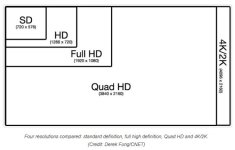
And the reason for this is easily seen in the graphic below. HD resolution is 1/4 that of UHD resolution. It is clearly not 50%.

Again, this may be down to NLE nomenclature (scaling versus zooming), but the actual real world size ratios are incontestable.


comparison-of-4k-resolutions.jpg
 
In Premiere, if one drops 3840x2160 footage into a 1920x1080 sequence, without setting Scale to Framesize, the result with be a 1920x1080 center crop of the 3840x2160 frame. Zoom in this case is 100%, which is the same view as a 200% zoom if putting UHD in a UHD sequence (not 400%). The reason it's not 400% is the scale/zoom factor is applied to both width and height. In order to get 1920 into 3840, the zoom/scale is 2x or 200%. This same zoom/scale is also applied to height at the same time. So even though the total resolution increase is 4x for UHD vs. HD, the zoom/scale is applied equally to width and height, and thus the zoom/scale factor is 200% (2x if going up, and 1/2 or 50% if going down).
 
Last edited:
Yes the area is 4x the size, but the height and the width only increase 2x.

I think we are all saying the same thing. It just comes down to how two different NLEs, from two different companies, deal with default resizing behavior and the naming conventions their tools use. The end result is exactly the same.
 
Back
Top