A7s Custom White Balance Is Bonkers!

Erik Naso

Veteran
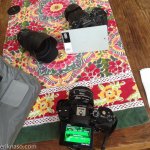
I can't seem to get a Custom White Balance with the A7s. Every time I try it errors and the balance is very florescent green. Anyone else having issues? The procedure is pretty straight forward. I've tried several gray cards and white cards too but the camera just wont take a proper balance without getting this error. Sure I can just dial in WB but I prefer to not. I'm an old school ENG guy is used to taking a WB. This issue is really bugging me.

Tried all shooting modes in stills. Movie mode doesn't allow a Custom White Balance.
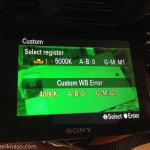
green Error balance.jpgA7s White Balance.jpg
 
Yeah, I get this same issue as well. From what I've found, if you point the camera away from the gray card and take a reading, then point the spot meter back at the card and include a bit of the black from the sticker on your card you'll get a good result.
This problem seems to happen more often if I'm taking a reading from the gray card, but only happened a couple of times taking a reading from the white chip on my X-Rite CC. Like to hear what you find..
 
Mines working as it should. Setting custom WB for use with video is really not very well though out. Seriously Sony?
 
Mines working as it should. Setting custom WB for use with video is really not very well though out. Seriously Sony?
Yeah it's pretty lame you cant just set a Custom White Balance in video mode without going to manual just to have access to the shutter button. Sony should reverse the two buttons when in video mode so the horrible video start and stop is a custom WB button and the shutter is the rec start and stop.

So this has me worried. I tried several different Canon mount lenses and have this WB issue. I might have problem camera.
 
I also get the green result but only in PP7. In other profiles the custom WB works pretty well.
 
I also get the green result but only in PP7. In other profiles the custom WB works pretty well.
I just tested it with turning the Picture Profile off and it works everytime. Whent back to PP7 (I'm using Kohli's PP. HA! That's still funny!) And get the green WB and error. Also tested other PP and they work fine. It seems that the issue happens only with Slog2. Doesnt matter if it's modified or not. Definitely a bug.
 
I don't seem to be having any issues. I'm clicking the right side of the toggle wheel with the WB sign. Then scrolling down 11 clicks to "C.Temp/Filter". I can dial in whatever white balance I need and add further adjustments if need be.

Or are you guys have trouble with something else?
 
I don't seem to be having any issues. I'm clicking the right side of the toggle wheel with the WB sign. Then scrolling down 11 clicks to "C.Temp/Filter". I can dial in whatever white balance I need and add further adjustments if need be.

Or are you guys have trouble with something else?

It's something else. Scrowl down further, past custom 1,2,& 3 to "Set". You can't be in video mode, though: the option's not available.
 
I don't think it's a bug as much as a manufacturing defect that seems to effect some bodies. I had exactly the same problem with my camera, but it seemed to run across all picture profiles. I never tried it with the pp set to off, however. I sent the body back to the dealer for exchange. The new body arrives Monday, I'll report back as soon as I test it.
 
Tried the same thing. While I do get the error message, it still seems to set the custom while balance. Don't get that green effect.

Sorry for asking, but what's the purpose is setting a custom white balance this way, rather than going through and manual punching it in. Just saves time?
 
Tried the same thing. While I do get the error message, it still seems to set the custom while balance. Don't get that green effect.

Sorry for asking, but what's the purpose is setting a custom white balance this way, rather than going through and manual punching it in. Just saves time?
The purpose is getting an actual white balance in the scene you are shooting in. I'm used to doing this with ENG cameras. Mixed lighting conditions can give you problems. Better to have a correct WB than to guess by dialing in the kelvin temp. Thats how I've worked for 25 years. My C300 takes a WB with no issues. I would think any modern camera would be able to do that. Sure if you are shooting outside in daylight it's a no brainer. Choose 5600 and go. Have tungsten for an interview? 3200K done. But if you don't have any set lighting condition or a mix of both it's best to be able to WB the camera in the scene you're shooting in.
 
Last edited:
I had that problem rear it's head a couple of times on Sony cameras (EX line) when i accidentally hit the white balance button in bright sunlight and the aperture wasn't choked down enough. I had to turn the camera on and off again to get rid of it. Probably has no similarity unless you were over-exposing when you did the WB. Throwin it out there just in case.
 
If the custom balance thing doesn't work with slog2, that's a real bummer: custom WB works really well on my 5N, is is very, very useful.
 
I had that problem rear it's head a couple of times on Sony cameras (EX line) when i accidentally hit the white balance button in bright sunlight and the aperture wasn't choked down enough. I had to turn the camera on and off again to get rid of it. Probably has no similarity unless you were over-exposing when you did the WB. Throwin it out there just in case.
I tried tricking the camera by going under and over exposing and of course spot on by taking the exposure from the 18% gray card with no luck. Again this is a Slog2 issue. When I have the camera set to any other picture profile custom white balance works perfect.
 
Yep Kholi's PP is green :huh: better get that looked into. Other PP's custom WB working okay but I still get "CUSTOM WB ERROR".
 
Last edited:
I've noticed some bugs while playing with the knee setting too. Sometimes it will still display zebra (at the same setting) other times not. Some stuff that will get squashed over time. I find that the results between a lot of the suggested profiles aren't making a world of difference anyway. In fact, I'm still using the stock Sgamut Slog2 profile and finding I like the color balance better with the right LUT applied. F55 sgamut slog2 LUT in FilmConvert ftw

Lut applied, no other adjustments except exposure to fill the range on the scopes. Nice and natural place to start.
mMylqBP.jpg

original
Sy1mWqt.jpg

with REC 709 (testing Andrew Reid's setting) instead of Sgamut in Slog2. Probably would choose the other F55 slog2 preset but regardless, here's that result. Dialing back the Film Color or the saturation is how I'd go from here.
mHqgEib.jpg
 
Last edited:
I don't know if this help but

"Setting [ITU709(800%)] or [S-Log2] may cause an error in the white balance customsetup. In that case, set the exposure bright first and then perform custom setup."

words from Sony.
 
Back
Top