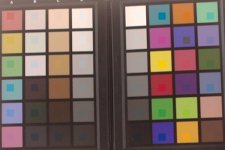
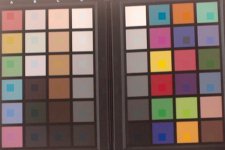
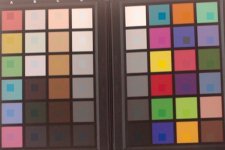
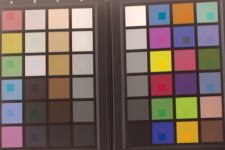
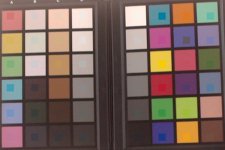
a7s color test

Samuel H

Major Contributor
So... I finally have my a7s
It's pretty good, but not as great as I thought it would be (in particular, slog2 didn't blow me away; macgregor warned me).

I'll write lots of stuff about it in the coming weeks, but for a start I thought I could upload something that we haven't seen much of so far: color tests.

All of this was shot with a sigma 30mm f/2.8 lens set at f/5.6 (it's designed for APS-C and it does crop in the corners, but it's my most neutral piece of glass), in slog2, overexposed one stop (with the 70% zebra blinking on the white patch of the spydercheckr). Natural light, in the shade, shadow white balance. Bright, sunny day, 17:00. I adjusted contrast and saturation in post to get close to the correct colors (which you can see in the little squares flying over the recorded spydercheckr).

Most people seem to be leaning towards cinema, and it's definitely one of the better choices. In any case, all modes seem pretty good. Some have skin that goes towards red (movie) or green (sgamut), but I've seen much worse than this.

709:
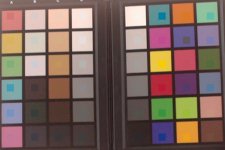
709.jpg

cinema:
cinema.jpg

movie:
movie.jpg

pro:
pro.jpg

sgamut:
sgamut.jpg

still:
still.jpg
 
Last edited:
YES, finally. Can't wait to see the rest of the tests. BTW; do you need to grab any BM or just had all the material you need for a side-to-side comparison already...?
 
You've got mail :)

The GH4 that macgregor used would be a nice addition to the test too, if he's still in Madrid... wink wink macgregor wink wink
 
I've got more preliminary DR measurements. Since they are still preliminary, I won't open a new thread, I'll just pollute this one :)

This is the scene I used for deciding what's usable and what's not:
* the highlights only count if the rim highlights in the white cloth are not clipped and show texture detail
* the shadows only count until the upper-right parts of the black cloth start to lose texture detail
a7s_dr_target_v1.jpg


Results:
a7s_usable_dr_v1.jpg


This is not comparable to my previous test. Because, with very few exceptions, no two "usable DR" tests are ever comparable. So don't mix the numbers, they measure different things (in the pocket test, the shadow texture I used was even finer than this; I think it set the bar a bit too high, that's why I changed it this time).
I will run more tests in the coming weeks, facing off the a7s against not only the 5N but also a BlackMagic, a D5200, and maybe a GH4. I believe the DR will come much higher than the BM+prores, and on par with the BM+RAW, which absolutely rocks. (I thought it would be even better, but seriously, this would already be really great).
 
Last edited:
making a video that I can upload, so you can see where these results come from, would take me a couple of hours that I don't have right now; I may or may not upload a video when I get the final results.

For now, here are some snapshots from the a7s ISO 3200 test

(extra bits of information that are needed to get the measurements: my reflective measurements say the white rim highlight is 5 stops above mid grey, and the black cloth is 1.7 stops below mid grey)


exposure +3
a7s_drtest_iso3200_plus3.jpg


exposure +2
a7s_drtest_iso3200_plus2.jpg


exposure +1
a7s_drtest_iso3200_plus1.jpg


exposure ok
a7s_drtest_iso3200.jpg


exposure -1
a7s_drtest_iso3200_minus1.jpg


exposure -2
a7s_drtest_iso3200_minus1.jpg


exposure -3
a7s_drtest_iso3200_minus3.jpg


exposure -4
a7s_drtest_iso3200_minus4.jpg


exposure -5
a7s_drtest_iso3200_minus5.jpg
 
What's your workflow? Did you make sure to recover superwhites? Most NLE's clip them unless you manually bring them down.
 
Yes, I know.

I thought the a7s had superwhites that needed to be recovered, but it turns out it depends on what picture profile you use: you have to do it with cine4, but it's not needed for slog2. I discussed this with sombody in another thread before I had my camera; it turns out both of us were right, it just depends on which picture profile you use.

My settings right now are: PP7 with slog2, cinema, saturation +15. The images above are straight out of the camera. The lens is still the sigma 30mm f/2.8. I did the measurements in Premiere CS5 but exported the sample frames from AE.
 
I thought the a7s had superwhites that needed to be recovered, but it turns out it depends on what picture profile you use: you have to do it with cine4, but it's not needed for slog2. I discussed this with sombody in another thread before I had my camera; it turns out both of us were right, it just depends on which picture profile you use.

A good way to go with is through a very unknown BUT still really useful AE effect called Cineon Converter (Linear to Log) . It's a very old and Cineon certificated plugin that basically works like as a Linear2Log LUT but with several parameters and in a nondestructive way. I use it all the time in order to see how much superwhites can be recovered of any compressed footage -if any-; specially with the "Highligh Rolloff" slider...
 
Last edited:
Thanks for the test.

Putting a range of colours locked down in still images is definitely the best way to compare colour modes rather than scrubbing awkwardly back and forth through a vimeo video of someone turning their head over and over again. (although I appreciate those videos also).

I thought more people would have weighed in with their opinion on the colour test by now, but since they haven’t I’ll comment.

Firstly, I don’t know if it’s an optical illusion, but most of the inner squares that are supposed to be the actual colours look blue. Are they really the correct colour in terms of RGB values?
I will assume for simplicity that they are.

I stacked all your samples in layers in a Photoshop document so I could flick between them.
The following is what I noticed:

There is very is very little difference between 709 and pro. Pro just has slightly brighter reds and pinks. Which is slightly less accurate according to the reference colours.

Cinema has darker and less vibrant reds than 709 and also has greener yellows. But the accuracy of the brown in the bottom right corner improves if that is important to anyone.

Movie is between 709 and cinema in terms of red brightness.

There is practically no difference between movie and still what so ever.

Sgamut is very similar to cinema but with greener and brighter yellows. And a darker green.


So basically they all line up in an order of darker to brighter reds:
Sgamut/cinema, movie/still, 709, pro. The order of greenness also follows this line with Sgamut the greenest, then cinema. Everything over this isn’t really green at all.

As far as the other colours go the difference is very subtle and just coincides with what you would expect from more or less red added to them.

Interestingly the ‘peach’ skin tones actually look closer to the reference with sgamut, but the modes with more red and less green give a more pleasing colour.

So basically if you don’t want green tinge avoid sgamut and cinema, and then decide how bright and vibrant you want your reds by deciding between movie/still, 709 or pro respectfully.
 
^ I've created my reference patches using the spydercheckr official info, which states that those patches actually are not perfectly neutral, they do have some tint.

If you loaded the files into photoshop, you can look at the HSL info and see exactly how each profile offsets each patch.

Samuel curios to know what is your Cine4 profile?

I just took the PP6 preset and switched to Cine4, that's all.
 
Thanks for the test.

Putting a range of colours locked down in still images is definitely the best way to compare colour modes rather than scrubbing awkwardly back and forth through a vimeo video of someone turning their head over and over again. (although I appreciate those videos also).

I thought more people would have weighed in with their opinion on the colour test by now, but since they haven’t I’ll comment.

Firstly, I don’t know if it’s an optical illusion, but most of the inner squares that are supposed to be the actual colours look blue. Are they really the correct colour in terms of RGB values?
I will assume for simplicity that they are.

I stacked all your samples in layers in a Photoshop document so I could flick between them.
The following is what I noticed:

There is very is very little difference between 709 and pro. Pro just has slightly brighter reds and pinks. Which is slightly less accurate according to the reference colours.

Cinema has darker and less vibrant reds than 709 and also has greener yellows. But the accuracy of the brown in the bottom right corner improves if that is important to anyone.

Movie is between 709 and cinema in terms of red brightness.

There is practically no difference between movie and still what so ever.

Sgamut is very similar to cinema but with greener and brighter yellows. And a darker green.


So basically they all line up in an order of darker to brighter reds:
Sgamut/cinema, movie/still, 709, pro. The order of greenness also follows this line with Sgamut the greenest, then cinema. Everything over this isn’t really green at all.

As far as the other colours go the difference is very subtle and just coincides with what you would expect from more or less red added to them.

Interestingly the ‘peach’ skin tones actually look closer to the reference with sgamut, but the modes with more red and less green give a more pleasing colour.

So basically if you don’t want green tinge avoid sgamut and cinema, and then decide how bright and vibrant you want your reds by deciding between movie/still, 709 or pro respectfully.

Your observations look accurate to me.
I'll quote myself from the other thread; seems relevant:
Color modes Cinema, Pro and Movie all have pretty good color right out of the camera with good skin tones. A bit suprisingly considering the name its Cinema with the most color separation. Pro compresses the space a bit for a more filmic effect, and Movie brings that even further. Cinema has just a tiny-tiny bit of bronze tint to the skin tones, Movie has a tiny bit of pink tint to them, and Pro is in the middle. I would confidently use any of these three color modes without fear of the results.
 
Color modes Cinema, Pro and Movie all have pretty good color right out of the camera with good skin tones. A bit suprisingly considering the name its Cinema with the most color separation. Pro compresses the space a bit for a more filmic effect, and Movie brings that even further. Cinema has just a tiny-tiny bit of bronze tint to the skin tones, Movie has a tiny bit of pink tint to them, and Pro is in the middle. I would confidently use any of these three color modes without fear of the results.

Assuming you're going to Resolve with this material, I'd think the best possible color separation would be the way to go? Just gauging by my admittedly limited experience, particularly working with an 8-bit codec.
 
Mattoid - excellent synopsis!

And Samual thank you so much for all your work on this camera. Sony should hire you and Miguel to promote their work! You get serious karma points.
 
Last edited:
Assuming you're going to Resolve with this material, I'd think the best possible color separation would be the way to go? Just gauging by my admittedly limited experience, particularly working with an 8-bit codec.

Correct answer is "depends". :)
You'd get most separation with s-gamut, but it also needs most work in post. If you trust your grading skills, more separation means more options, yes, because there is more differentiation between similar scene hues. If you are only looking for a quick and good result, more compressed hues generally mean more appealing images (think film), because real life generally sucks at throwing harmonious color compositions at you, and some hue compression helps streamline color a bit.
Also note that the compression effect you get with the various color modes out of the camera is mostly subtle (but still existent). From my limited tests, I find that I want to compress hues a little here and there with Cinema mode (in the yellow region, at least).
 
Back
Top