A7s 5D MK3 Raw shootout

squig

Veteran
I bought the A7s as a potential successor to the 5D MK3 Raw to shoot my feature and I'll be testing them together over the next couple of weeks. My initial impressions of the A7s were very good but the 8bit files are a bit fragile. The 5D looks a little sharper here, followed by XAVC S, and then Prores4444 from the A7s. They matched up pretty well in this test, I didn't touch the colours on either camera. Same Pentax SMC Takumar 55/1.8 lens and Hoya NDX8 on each. S-log is 3200ISO, the 5D was set to 800 ISO to match. You can drag and drop the images to see the full size screenshot.

5D MK3 Raw, Adobe RGB, ACR luma corrections.

5jiDOSu.png


A7s XAVC S, K-Log with +4 saturation, S-curve in R11.

Anc2O6H.png


A7s prores4444, K-Log with +4 saturation, S-curve in R11.

UZ4nxUg.png
 
Last edited:
While the 5D3 might be a touch magenta, the A7S examples here are way green (even the tree bark looks green). I'm viewing on a MacBook Pro Retina (2014) OSX.
The sky is much cleaner on the 5D3 (noise)- overall a much better image (though the A7S can look better with a different profile / post CC).
 
I shot some earlier tests with a Tiffen vari-MD and as you can see it's not pretty, it's a good test though because you can see how easily the 8bit XAVC S falls apart compared to the DNG. The 5D did a lot better with the gradation in the clouds too. I wasn't rolling the prores on this shot unfortunately but I'll grab something similar in the coming days.
The A7s shot is a bit soft, it appears to be an issue with the adapter on my Leica Elmarit-r not quite hitting infinity focus :nads:

5D MK3 Raw

rGl9lDc.png


A7s XAVC S

K9XIhAo.png
 
While the 5D3 might be a touch magenta, the A7S examples here are way green (even the tree bark looks green). I'm viewing on a MacBook Pro Retina (2014) OSX.
The sky is much cleaner on the 5D3 (noise)- overall a much better image (though the A7S can look better with a different profile / post CC).

It is a bit green isn't it. KHOLI! :Drogar-Dum(DBG): In his defence he has been tuning it for skin not trees. Yeah I wasn't trying to make them look pretty, I wanted to keep everything as untainted as possible so we could see what the sensors and codecs are up to. I'll have to add some vanilla S-Log to the mix too cause K-Log is in the experimental stage.

EDIT: There's a +25 colour NR on the 5D file in ACR too.

EDIT: I just had a look at the files in Resolve, the green looks like it's coming from Kholi's KLogV LUT, I didn't use the LUT on that last XAVC S shot.

EDIT: I've replaced the A7s KlogV (green) shots with S-curve shots, better.
 
Last edited:
I just saw the edit where you say you've replaced the green shots. So I was looking at the DE-GREENED? shots. They still looked green to me. The worst example is the underside of the roof in the top right hand corner in the last example. It doesn't look pure white in the 5d3raw shot by a long shot, but in the A7s shot the green is just ugly. Using photoshop I could get rid of it by moving the yellow/blue sliders in colour ballance towards blue. And moveing the magenta green sliders very slightly towards magenta. But after doing this I couldn't honestly say that the overall image looks better than the 5d3 shot, even with the magenta bias. I think I would rather see 4% magenta bias rather than 4% green bias any day. Hopefully there is some setting somewhere that would change this. But I guess that's one big advantage with raw that you don't have those settings to think about.
 
I would use custom WB in the a7s to make sure the green tint is not a WB thing. Or, more accurately, I would use custom WB on the a7s for every shot (as I do with my 5N), so I would test with custom WB too.
 
I would use custom WB in the a7s to make sure the green tint is not a WB thing. Or, more accurately, I would use custom WB on the a7s for every shot (as I do with my 5N), so I would test with custom WB too.

Doesn't the custom WB do funky things when using Slog on A7s?
 
I just saw the edit where you say you've replaced the green shots. So I was looking at the DE-GREENED? shots. They still looked green to me. The worst example is the underside of the roof in the top right hand corner in the last example. It doesn't look pure white in the 5d3raw shot by a long shot, but in the A7s shot the green is just ugly.

Yeah they were even greener before with Kholi's LUT... too many hours in front of the screen. The last shot was taken with the Tiffen vari-nd which wouldn't help with the green. The other shots I took with an old Hoya ND (not a proND) which is probably a bit green too. Both cameras were set to 5600k. I'll tell the neighbours to repaint their roof and I'll wait for some fluffy clouds and do another test without the NDs and crank up the shutter.
 
I would use custom WB in the a7s to make sure the green tint is not a WB thing. Or, more accurately, I would use custom WB on the a7s for every shot (as I do with my 5N), so I would test with custom WB too.

If 5600k isn't 5600k it's going back to Sony.
 
I don't have a 5d III here but just a A7s and in my tests and philip bloom's test too , i got better results indeed and i do think there is something weird going on with your Emount adapter and your picture setting.. You should get sharper results and more balanced colors
 
The strange thing is I have an uber expensive MTF adapter and a Chinese cheapie and can't get a good focus with either. As for the colours it's Kholi's profile which is a work in progress.
 
I've found some good skin tones tweaks using saturation in FCPX. For scenery, it will be hard to match the color depth that the 5d MKIII can get but could def get close within reason. Honestly, some of the Canon examples I've scene are overly saturated and glossy for what I'd usually deliver anyway. I'm a gauze fan :)
 
Last edited:
The 5D looks really nice. Very natural looking.

Some of Andrew Reid's 5D shots blow the A7s away and they were squashed into a REC709 colour space. So far they don't look that far apart. The Sony high ISO is good but they're cheating those numbers.
 
I've found some good skin tones tweaks using saturation in FCPX. For scenery, it will be hard to match the color depth that the 5d MKIII can get but could def get close within reason. Honestly, some of the Canon examples I've scene are overly saturated and glossy for what I'd usually deliver anyway. I'm a gauze fan :)

Love the gauze but I 'm just a bit concerned about flat skin, funny because I used to worry about shiny skin.
 
I've found that when shooting Raw stills on the A7s, you have to crank up the magenta anywhere between +20 to +30 on the white balance slider to get it to look neutral in ACR. Whatever is in the camera it biases heavily towards green.
 
I've found that when shooting Raw stills on the A7s, you have to crank up the magenta anywhere between +20 to +30 on the white balance slider to get it to look neutral in ACR. Whatever is in the camera it biases heavily towards green.

Noticed that too. Also helps dialing back WB a bit under what I'm normally going to on other cameras. Lenses also make a huge difference. My Rokinon Cine are yellow cast and Sigma 18-35 is cleaner and has more contrast. I realize that's not a revelation but just good to factor in to what is already biasing green/yellow.
 
5D MK3 raw
2Co96hy.png


A7s S-Log full frame prores 422HQ
oegx8tb.png


A7s S-Log APS-C prores 422HQ
anZQl6f.png


A7s S-Log APS-C XAVC S
E35rEuk.png
 
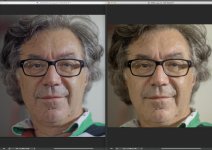
The ACR 8.6 is beta and is cropping the Original A7s pictures Size! DXO 9.X it is the full frame again, much better Image Quality & Control.

Pic Left ACR 8.6 Right DXO 9 SLOg2 / Zeiss 2.0 100 mm

Why not use Custom WB with a Grey card to elimate the colorshift with filters?

my 5 cts trowing in...
 

Attachments

  • Bildschirmfoto 2014-07-30 um 08.56.28.jpg
    Bildschirmfoto 2014-07-30 um 08.56.28.jpg
    74.9 KB · Views: 0
Last edited:
@squig: those prores yellow highlights are much worse than XAVC-S ones, unless you can find a way to keep all the range when recording externally I would stick to the internal codec. Weird. The 16-235 thing doesn't fix it, I guess, right?

Edit: looking at full res, not so sure: the yellow splotchiness of the XAVC-S in the white wall is mostly gone in FF ProRes (and absolutely non-existent in the 5D3+RAW). In the end I'm going to be happy with any of these options, but why can't we have it all? The highlight thing in HDMI-out looks like something that could be solved easily if Sony put some work...
 
Last edited:
Back
Top