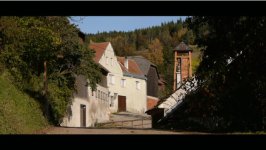
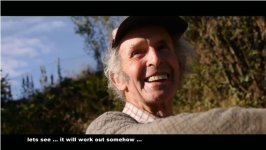
A short GH1 documentary: Nonnersdorf - a lost paradise?

GMC

Well-known member
Please find my latest GH1 documentary of a small, romantic village east of Vienna here:

http://www.vimeo.com/7305316

It seems like one of the places which bring you back to a time where nature and human mankind were sharing peacefully the same environment. Things are going real slow there. A leftover from the last century.

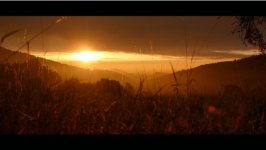
Find some screenshots below. Filmed in smooth filmmode, all manual, in 1080p24, with the kit lens. Music from mozart.

Enjoy.
 

Attachments

  • Non 1.jpg
    Non 1.jpg
    48.6 KB · Views: 0
  • Non 2.jpg
    Non 2.jpg
    71.7 KB · Views: 0
  • Non 3.jpg
    Non 3.jpg
    60.1 KB · Views: 0
Beautiful and nicely done -- gives a real sense of the place.

What were your settings in Smooth mode, and how did you do the time-lapse? Thanks.
 
Beautiful and nicely done -- gives a real sense of the place.

What were your settings in Smooth mode, and how did you do the time-lapse? Thanks.

Thank you. In smooth mode, everything set to -2 except color saturation. The timelapse was just filmed over 10mins and later speeded up in the post. But I am not so happy with that approach. In my vid

http://vimeo.com/7006327

I was doing the timelapse in photomode. The dynamic range and effective resolution when scaled down to video is better in photo mode.

best regards
 
The timelapse was just filmed over 10mins and later speeded up in the post. But I am not so happy with that approach. In my vid

http://vimeo.com/7006327

I was doing the timelapse in photomode. The dynamic range and effective resolution when scaled down to video is better in photo mode.

All your stuff looks very good. Am I right that you're doing mainly 1080 and 30fps using Premiere? PC or Mac?

Definitely agree about using stills for time-lapse. Have you tried RAW? The latitude there is pretty amazing; especially if you set the GH1 to Adobe RGB instead of sRGB because the color is broader. Found the best settings are to have everything in full manual except to use aperture priority and let the GH1 set the shutter speed to control exposure. Seems pretty smooth for changing light conditions. Oh yeah, and meter for the whole frame.

I've been using an inexpensive JJC intervalometer (1 frame every 5 seconds) and then adjusting the RAW files with the Adobe Camera RAW plug-in in AE (imported as 24fps) all at 16bit Adobe RGB in both Camera RAW and AE. Then exporting to Premiere (as PSD sequence) for final editing and export at 24p. I use the PSD sequence because I've found it preserves the RAW adjustments best. Had tried the old stand-by Animation export, but was disappointed with the results - washed out compared to what I was seeing in AE and didn't want to have to further process once in Premiere. Had never used the PSD sequence before, but figured Photoshop handles RAW well so why not give it a shot. And turns out it works really well.

Probably more than most want to know and maybe more complicated than you'd want to fool around with (especially since your time-lapse already looks really good), but could be something to experiment with for anyone doing time-lapse.
 
The sound from the interview was actually quite good to me... What mic did you use?

I was just using the in - camera mic. I didn't want to distract the old man too much by pointing an external mic in his face. The internal mic is OK for voice recording, but rather bad for ambient sound recording.
 
All your stuff looks very good. Am I right that you're doing mainly 1080 and 30fps using Premiere? PC or Mac?

Definitely agree about using stills for time-lapse. Have you tried RAW? The latitude there is pretty amazing; especially if you set the GH1 to Adobe RGB instead of sRGB because the color is broader. Found the best settings are to have everything in full manual except to use aperture priority and let the GH1 set the shutter speed to control exposure. Seems pretty smooth for changing light conditions. Oh yeah, and meter for the whole frame.

I've been using an inexpensive JJC intervalometer (1 frame every 5 seconds) and then adjusting the RAW files with the Adobe Camera RAW plug-in in AE (imported as 24fps) all at 16bit Adobe RGB in both Camera RAW and AE. Then exporting to Premiere (as PSD sequence) for final editing and export at 24p. I use the PSD sequence because I've found it preserves the RAW adjustments best. Had tried the old stand-by Animation export, but was disappointed with the results - washed out compared to what I was seeing in AE and didn't want to have to further process once in Premiere. Had never used the PSD sequence before, but figured Photoshop handles RAW well so why not give it a shot. And turns out it works really well.

Probably more than most want to know and maybe more complicated than you'd want to fool around with (especially since your time-lapse already looks really good), but could be something to experiment with for anyone doing time-lapse.

Hey, thanks for your input! I am using mainly 1080p with 24fps. I transcode the AVCHD file with VoltaicHD to Windows media (I am on a PC), and do the edit in EDIUS Neo 2.

For the timelapse, going to RAW certainly is an option but I am fine with the photo (JPG) approach so far (I am a videographer and never messed around with RAW before - seems like an art on its own to me). With jpg's it is pretty easy to just drag and drop all photos at once into the timeline and set (in the general settings of the editing software) a duration of each photo to just 1/24s = 1 frame.

best regards
 
Found the best settings are to have everything in full manual except to use aperture priority and let the GH1 set the shutter speed to control exposure. Seems pretty smooth for changing light conditions. Oh yeah, and meter for the whole frame.

What aperture setting do you use ?
 
Hey, thanks for your input! I am using mainly 1080p with 24fps. I transcode the AVCHD file with VoltaicHD to Windows media (I am on a PC), and do the edit in EDIUS Neo 2.

For the timelapse, going to RAW certainly is an option but I am fine with the photo (JPG) approach so far (I am a videographer and never messed around with RAW before - seems like an art on its own to me). With jpg's it is pretty easy to just drag and drop all photos at once into the timeline and set (in the general settings of the editing software) a duration of each photo to just 1/24s = 1 frame.

best regards

Thanks for the clarification on your workflow - got the idea you were using Premiere from a comment you made on your Vimeo page (Atlanta video). Which I downloaded and QT indicated was 30fps.

Had never used RAW previously myself either. Just trying to do whatever I can to milk the most possible out of the original material. Turns out it's very simple to adjust using Adobe Camera RAW. Actually left out a step in my workflow because I use Adobe Bridge to preview the RAW files and make initial adjustments using Adobe Camera RAW via Bridge. And once I've made the corrections (which you can save as a preset), it saves a metadata file with that info. Then it's just a matter of opening the first photo in the sequence in AE - you can specify whatever frame rate you want for it and AE imports all photos as a single file (sequence), along with your adjustments. You can even tweak it at anytime back in Adobe Camera RAW from within AE.

So Adobe Camera RAW is a plug-in that works with Bridge, AE, and Photoshop in CS4.
 
What aperture setting do you use ?

Really depends on the scene I'm shooting and the lens. Everything I've done a time-lapse on so far has involved widely changing light conditions. And going from darker to lighter. I try to use an aperture setting where I don't anticipate the shutter speed will need to go too high (with 1600 being max) to avoid noise. And I normally have ISO at 100 (to account for bright light at the end) so I'll choose an aperture where I'm probably somewhat underexposed in order to keep the shutter speed down. But having limited experience is a definite handicap in being able to anticipate changing light and figuring out all these relationships.

One of the reasons I like RAW is the recovery latitude is really amazing short of anything that has been so overexposed that it's completely blown out. And the color correction is awesome. Being a newbie at this, I can use all the latitude I can get. So if my settings weren't the best, my chances of ending up with a decent image are still pretty good.
 
Thanks for the clarification on your workflow - got the idea you were using Premiere from a comment you made on your Vimeo page (Atlanta video). Which I downloaded and QT indicated was 30fps.

Had never used RAW previously myself either. Just trying to do whatever I can to milk the most possible out of the original material. Turns out it's very simple to adjust using Adobe Camera RAW. Actually left out a step in my workflow because I use Adobe Bridge to preview the RAW files and make initial adjustments using Adobe Camera RAW via Bridge. And once I've made the corrections (which you can save as a preset), it saves a metadata file with that info. Then it's just a matter of opening the first photo in the sequence in AE - you can specify whatever frame rate you want for it and AE imports all photos as a single file (sequence), along with your adjustments. You can even tweak it at anytime back in Adobe Camera RAW from within AE.

So Adobe Camera RAW is a plug-in that works with Bridge, AE, and Photoshop in CS4.

Actually, for the Atlanta video I was using Premiere Pro 1.5 - I just recently shifted to a new Windows Vista PC and it doesn't work anymore unfortunately. Thats why I purchased Edius Neo 2 - it is a 170$ program which almost has the same functionality than PPro 1.5 - amazing! And it runs much more stable.
 
Nice work Gunther, your stuff always looks nice and crisp. Do you use anything to stabilise, for the handheld shots?
 
Nice work Gunther, your stuff always looks nice and crisp. Do you use anything to stabilise, for the handheld shots?

Dear Adrian,

I always carry a small rice bag with me, which allows me to place my GH1 very flexibly to any object which is around (rice bag between fixed object and GH1). On the handheld shots the added weight of the rice bags helps to stabilize as well.

Thats all.

best regards, Gunther
 
For those wondering about audio

For those wondering about audio

The audio is so good because there is very little if any wind in the shot, the talent is in a wide open space so there isn't any reflections, and he speaks consistently and quickly without many if any gaps. This keeps the AGC from freaking out and boosting the floor noise from the mic when it's not supposed too.

what I am saying, is that if you don't have wind, and you keep the camera really smooth, and the talent is even remotely close to the mic, and there aren't any reflections the audio will be good even on a 10$ mic.

I am sure the creator of this video knows this too!
IB
 
The audio is so good because there is very little if any wind in the shot, the talent is in a wide open space so there isn't any reflections, and he speaks consistently and quickly without many if any gaps. This keeps the AGC from freaking out and boosting the floor noise from the mic when it's not supposed too.

what I am saying, is that if you don't have wind, and you keep the camera really smooth, and the talent is even remotely close to the mic, and there aren't any reflections the audio will be good even on a 10$ mic.

I am sure the creator of this video knows this too!
IB

Absolutely right. But still the GH1 onboard mic is not too bad too. If you use it for voice recording, its ok.

best regards
 
What (if any) work was done in post as far as color correction goes? I found myself looking at very contrasting shots most of the time. I think the piece could have benefited from a slightly flatter curve.
 
What (if any) work was done in post as far as color correction goes? I found myself looking at very contrasting shots most of the time. I think the piece could have benefited from a slightly flatter curve.

Dear Voytech,

thank you for that observation. I was doing only slight color corrections here and there, but I pushed the contrast pretty hard (maybe too hard). I am using a Panasonic HD plasma TV to view my films which is capable of resolving very high contrasts, hence everything is still there and I like it pretty much the way it is.

Just recently I watched this piece on an LCD screen and it was much too contrasty, I agree. In the future (when posting the Vimeo version) I'll look for a flatter curve.

Thanks again for the feedback,

best regards, Gunther
 
Back
Top